

KEYESTUDIO Robot Arm Starter Kit for Arduino,4DOF Electronic Coding Robotics Arm DIY Set for Kids Adults to Learn Robotics,Support PS2 Joypad Control,Remote Control by Android/iOS APP
$55.00
Related Products



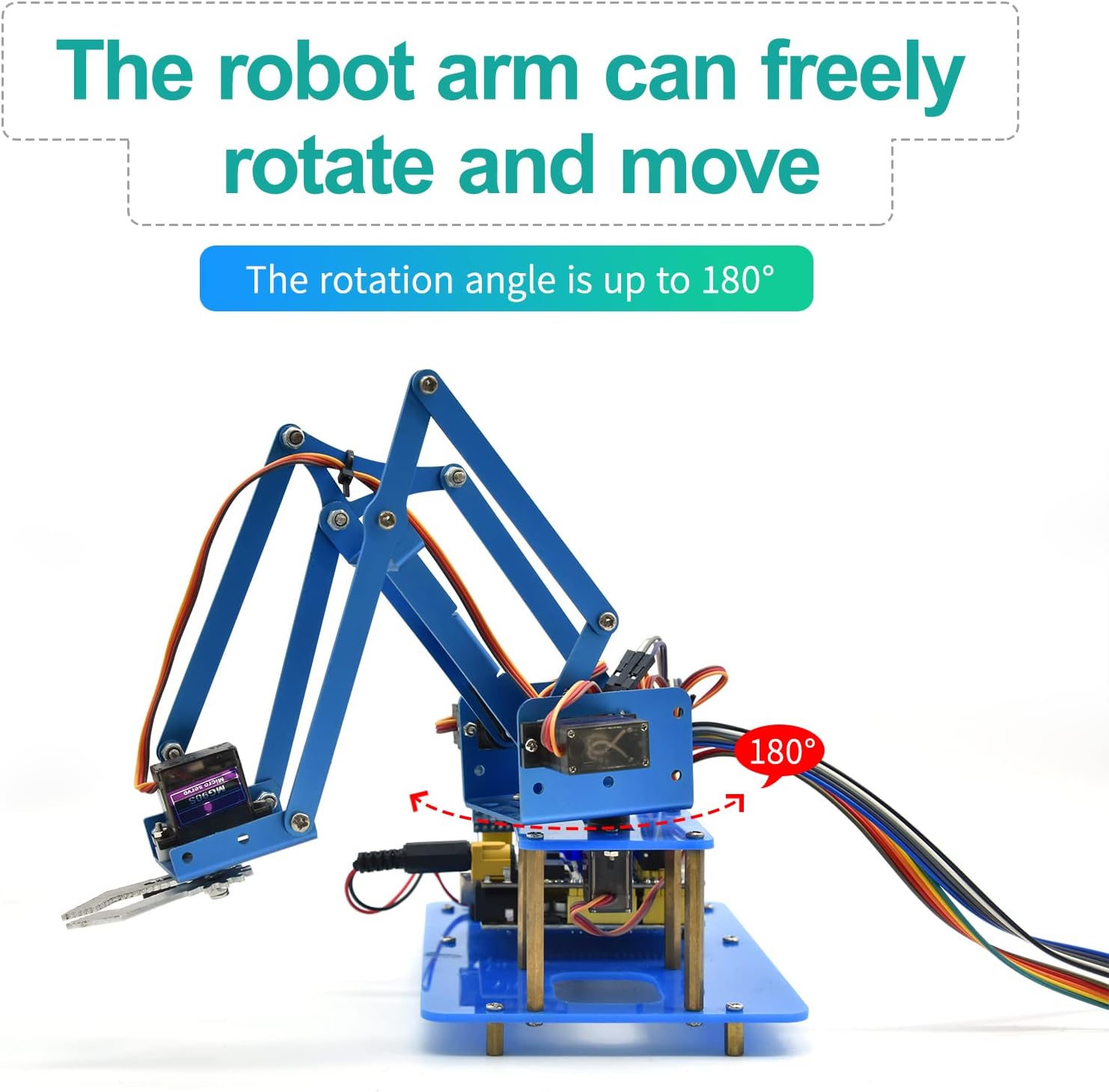

With this keyestudio robot arm kit, you are able to code and DIY your own mechanical arm. It uses R3 development board and 2 Joystick modules to control the angle degree of 4 servos. When DIY this 4DOF robot arm kit, you could get everything needed for arm installation and debugging.
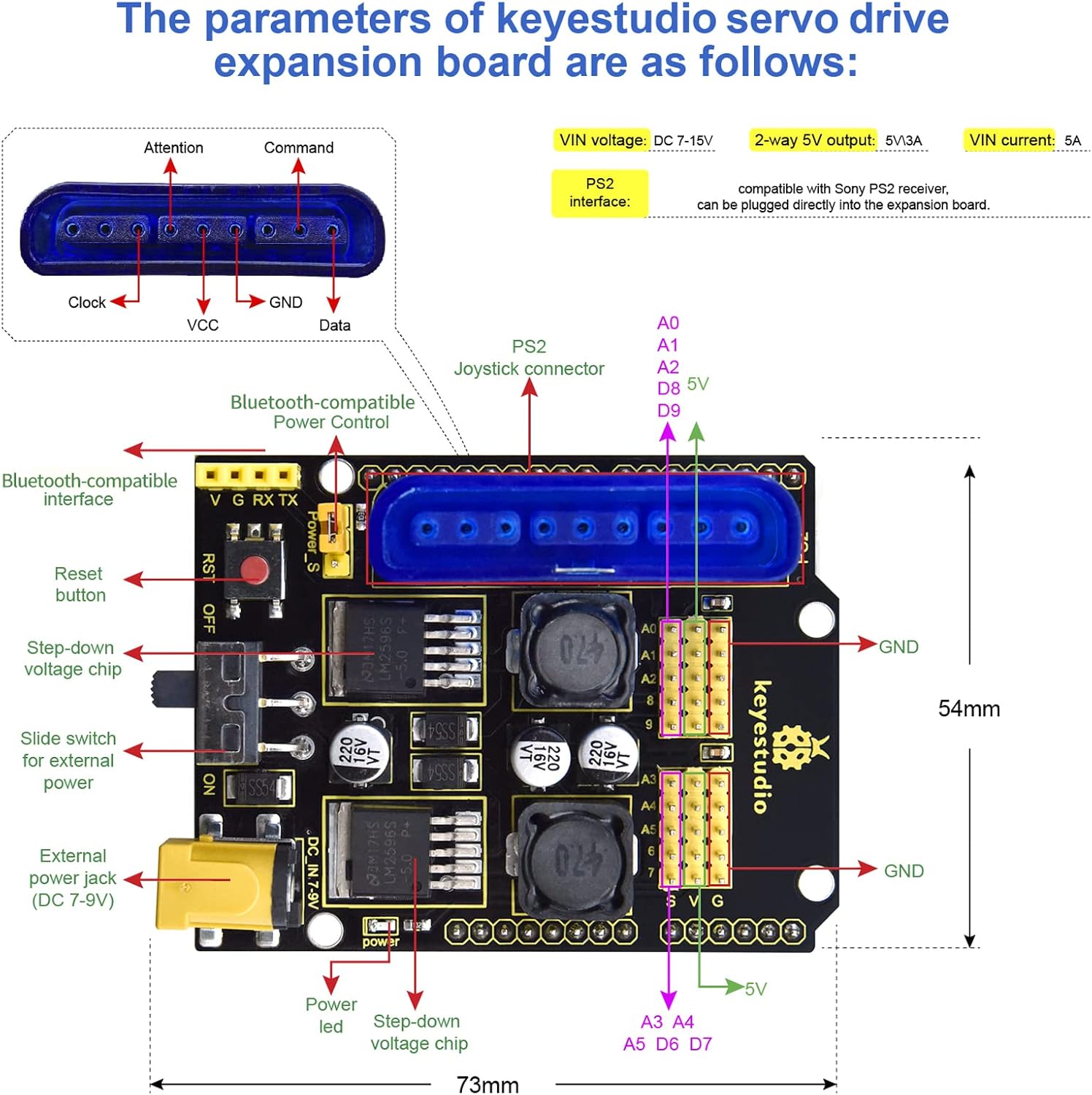
The parameters of keyestudio TB6612FNG motor/servo driver expansion board are as follows:
VIN voltage: VIN = DC 7-15V
VIN current: 5A
Two-way 5V output: 5V/3A
TB6612FNG: VIN input DC 7-15V; average drive current 1.2A; peak current 3.2A
PS2 interface: compatible with PS2 receiver, can be plugged directly into the expansion board.
Package contains:
1x 4DOF Robot Arm Kit
Note: Unassembled Delivery, which require you with patience and hands-on ability.
This was a surprisingly high-quality kit. The mechanical parts (nuts, bolts, etc.) for each subsystem were packaged separately and clearly labeled.
It’s really excellent and safe to be a perfect gift for your children and friend.
KEYESTUDIO Robot -This product is suitable for users over 15 years old with a theoretical basis for electronic programming.By assembling this robotic arm, it can help beginners have a deeper understanding of programming and electronics.
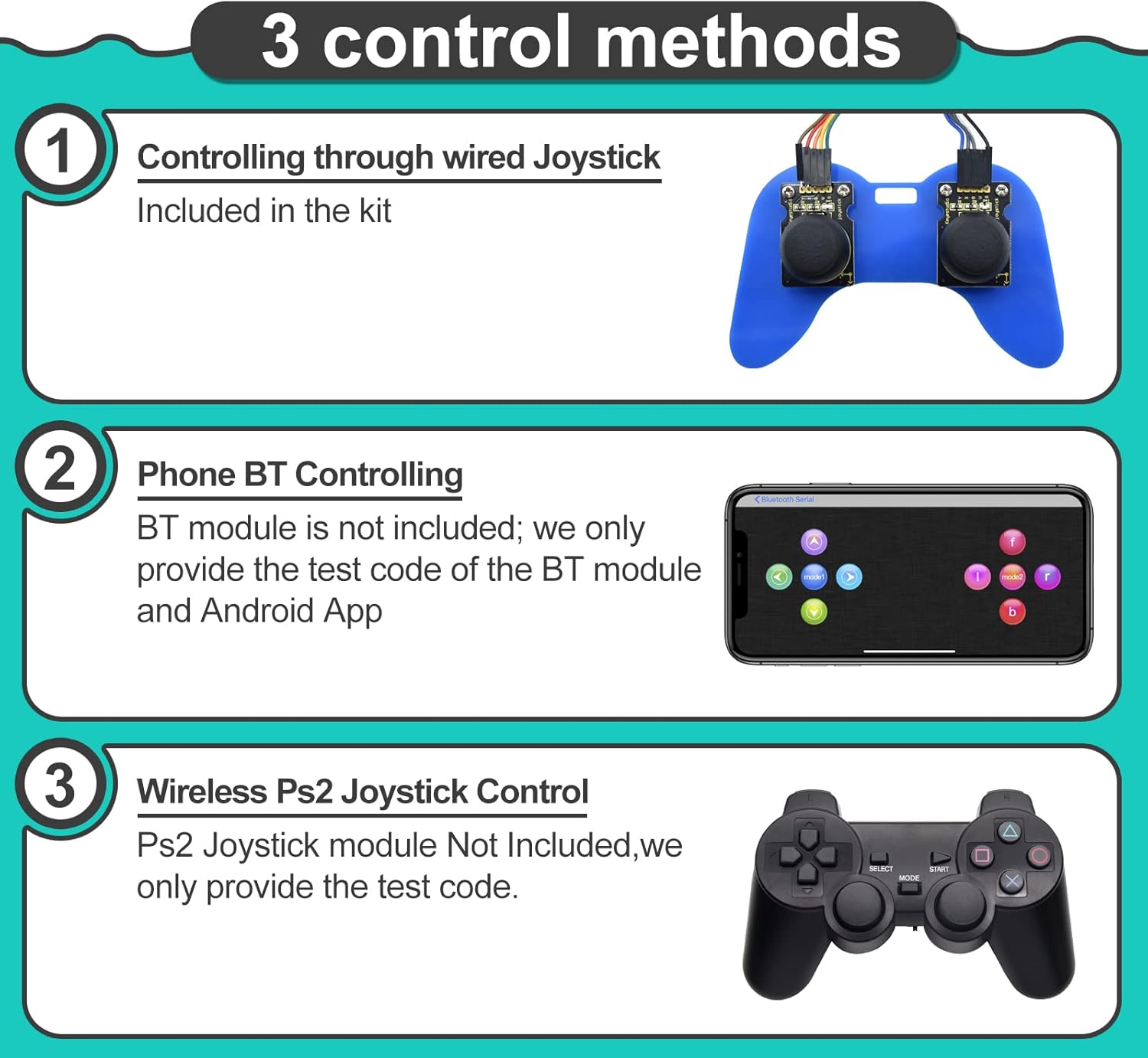
3 control methods- JoyStick modules included control; Remote Control; Btmodule and APP compatible with Android/iOS are provided. Wireless PS2 Control (Note: Wireless PS2 controller is not included, we only provide sample code and instructions )
Flexible arm claw – This Robot kit provides 4 Gear Servos of 180 Degree which can easily control the robot arm claw and make the robotic arm move flexibly that can grab objects in any direction. You can program the servo to adjust its angle.
Perfect Stater Kit -This is a surprise holiday/birthday learning kit for all those who enjoy building this ROBOT ARM!
Package contains – 1x 4DOF Robot Arm Kit,For more accessories information and manuals. Please check the number of accessories carefully after receiving the product. We offer technical support, ask a question and we’ll respond promptly!(Note:This kit does NOT include batteries)
11 reviews for KEYESTUDIO Robot Arm Starter Kit for Arduino,4DOF Electronic Coding Robotics Arm DIY Set for Kids Adults to Learn Robotics,Support PS2 Joypad Control,Remote Control by Android/iOS APP
Add a review
$55.00
Peter –
Nice little arm for experimentation
Nice little robot arm that you can build yourself. This is more than a remote control arm that you run from your phone. This kit is a learning experience. I particularly like the joystick handle that allows you to experiment with direct servo wiring and Arduino programming. You mount the two joysticks on an acrylic game-like controller, wire it to the Arduino type board, and go to it.Tons of screws and you have to go online for the manual, but once you have everything at hand you are ready to start. Take your time adjusting the motors and examining the assembly pictures, and everything goes together smoothly. When you have completed the included projects, there is great opportunity to experiment with other projects of your own.There is also a way to control the arm via Bluetooth (this means using your Android or Apple phone) or even a PS2 JoyStick controller. If you tire of experimenting with servos you can always remove the arm shield and have full access to the Arduino pins. Just add a few sensors continue exploring.
Brian A. –
Sweet Robot Arm
This was a fun kit to put together. It comes with some cool parts that can be re-used for other projects later, too. Specifically I like the included Arduino shield that allows control from a PS2 controller. Initially, I had the claw adjusted poorly, so it was hard to function, but I adjusted the screws and it worked well after that. The instructions do warn you not to over-tighten the screws, but I accidentally did anyway. There is included code (download) that allows for a memory function – move the arm and memorize position, then after you move it you can recall the position – such as dropping an item in a cup. Pretty fun! My kids really enjoy playing with this. I worked with them to put it together The included very tiny screws to connect to the servo horns were too small, however, there are extra screws that come with the servos themselves that work great for this purpose. There was not a link in the instructions to download the library for PS2 controller, but I was able to find it on github.
William Mather –
great product for learning basic robotics
The robotic arm works and is easy to get going! Clearly this is more of a toy / learning kit, but it illustrates all the right features to start building larger projects.I was looking for a good Arduino robotics project to do with my child, and this product stood out. The majority of the arm came assembled (phew!), with the remaining assembly was easy and related more to the base and joystick. Wiring worked as expected, though I added a bit more length to the servo cables for the clamp servo (wires come with the kit for things like this). The product links to a long PDF manual that seems informative enough.Caveat: I’ve been programming Arduino’s for a while, and it seemed easy enough to write my own code using the Servo library, so I did. The required code is not too complicated. I have yet to play with the bluetooth module, but I doubt it has issues. The PDF manual has code in it that I didn’t try.
Dwight Bumgarner –
A good starter kit to begin a journey into robotics!
This is a serious kit! It involves many different components: hardware, electronic, and software, but in the end they all combine to result in a nice robotic arm! Robotic arms are some of the best kits to build because of their cool factor combined with how much room they leave for learning, and I definitely feel I learned a lot with this kit. I especially appreciate the variety of control methods that are included – rather than just having one method, this kit can be pre-programmed, controlled via bluetooth from an app, controlled via the included joystick controller, and even controlled via plugging in a PS2 controller. I would definitely recommend this to anyone looking for a somewhat challenging (although the instructions can be found online) yet rewarding build. You won’t be disappointed!
E. Eric Bender –
The supplied Arduino board is faulty… seriously considering returning.
The build was not all that difficult, and the material is pretty sturdy. I only had great difficulty getting the joysticks to work after loading in the code. After reading some other reviews, I decided that the problem with this unit is possibly a chip in the Arduino board itself. I replaced the supplied board with one from another manufacturer and it seems to work fine.
Amy Blackstone –
Works as expected, good robotics starter set
Good: You would never be able to gather and print the components for a DIY version at this price, so it is a good place to start for a first robot project. Code is easily downloaded and installed to the board from the Keystudio site. Assembly instructions are decent.Bad: Preassembled part is very rickety and sloppy. This is a learning platform, not a toy for repeated use in play; the metal parts will wear out quickly. Short servo wires require extensions (included). Mainly, who has 18650 batteries sitting around? Does not include batteries. The included holder is for 18650 cells at about 3.7 V each (7.4 total). Few people have these sitting around. You can plug a power supply into the servo shield and it will power the whole thing instead (observe voltage and pin polarity requirements).Verdict: These were too complex for the kids I intended them for. It even took me a while to get it all going. This is a good value if you are considering building a small robot from scratch, since it contains everything you need. After you get it working as it is intended, you can start working with the code to do specific tasks and demos. I did not try the bluetooth module yet, but it introduces you to using apps to control devices.
Mark J. Deroche –
Kit was well packaged and all parts accounted for. Installation requiring usng Keyestudio web page. Find the WIKI for DoF Robot Arm Kit V2.0 for Arduino. This WIKI will provide you with assembly, witing and operational codes for your Robot Arm. There is also a KS0488 page on the web page that shows the detailed assembly of the CLAW of the 4DoF arm itself. (I found these pages very useful)Assembly:As per earlier reviews, do not tighten the lock nuts too tight. They can be adjusted later on if too loose. Follow the wiki and should have no problems. (see below)I ran mot of the tests and found the code accurate. It would help if you had experience in Arduino code structure.Comments:The lock-nuts are very tight so be careful not to strip the heads of the screws.Make sure the teeth of the Jaws, left and right are properly meshed before completing assembly.The product is well manufactured with aluminum for the cranes and solid plastic for the bases.Young children will certainly need the help of an adult to assemble but adults may need help from their children to code??
Nem –
まずパッケージが綺麗でしたので、写真付で。この手のキットはパーツリストすら提供されていない物が見受けられるのですが、これはパーツリスト添付。しっかりチェック出来ました。組立の説明書はオンライン供給ですが、添付されていた書類記載のQRで飛んでも目的のページには行けませんでした。検索方法が書かれているので、その手順に従って探す必要有りです。説明書の記述はとてもわかり易いものでした。組立時には、サーボの角度調整等を行なうのでarduinoへのプログラム書込みが伴います。要PC(windows機)ですね。これは販売ページに書いておくべきだと思いますが。arduino統合環境を使った事が無い人には若干敷居が高いかも知れませんが、ググれば初心者向けの解説は沢山有るので、心配無いでしょう。…さて、組み立ててみるか。ヤスリが必要有りでした。サーボ取付ブラケットの取付穴が若干狭く、削ってやらないと取り付けられませんでした。長手方向の縁をごく僅か(0.1mm程度かな)削ってやる必要がありました。また、付属のドライバーは先が小さいので、M3ネジを締めるのは厳しいですね。#2ドライバーを用意しておくと吉でしょう。最大の問題は電源かな。USB給電ではarduino へのプログラム書き込みしか出来ません。キットは18650バッテリーを2本使用する事を前提にしているのですが、保護回路も無しでリチウム電池を使うのはちょっと怖い。充分な容量を持った7~9VのACアダプターを接続するのが良いかと思います。まとめておきます。別途必要な物:・電源(7~9V)←2A以上は欲しいかな…(追記:5Vで行けました)・ヤスリ・#2プラスドライバー追記:あまりにも基本的な事で忘れていましたが、ラジオペンチが有った方が組み立ては楽です。結構大量にロックナットが使われていて、付属のスパナはサイズ違いのために使用不可でしたので。また、インターフェース基板の仕様が不明でしたので、サポートに問い合わせしてみたのですが、とんちんかんな回答が返って来ました。(笑)アテにはならなさそうですが、レスポンスは速かったので、くじけずに何度か連絡すれば求める答が得られるかも知れない…と言った感じで行くと良さそうです。9/29追記:3回質問して、拡張ボードの回路図を送って貰えました。回路図を信頼するなら、ボードに供給する電源は12v程度まで大丈夫ですね。ただし、使用されているコンデンサの値が回路図記載の容量より小さい(多分、コストカットのために他の物と同じ容量にしたんでしょう)など、信頼しきれない部分は有りますが。まぁ、配線パターンは変更していないだろうから、多分大丈夫かと。
Milan –
There are plenty of kits available on Amazon, but not all of them include the little tools like the screw driver, cable protection, and full instructions. Yes, full, including drivers and a (working) app. The arm actually came semi assembled, so if you want the full experience you’ve gotta undo that first. Oh and by “PS2 controller” it means a literal Sony PS2 controller, not a windows controller with a PS/2 plug.
Amazon カスタマー –
マニュアルやプログラムのダウンロードに、時間が掛る。
Clodo –
Un beau petit projet pas bien chère pour passer une hiver longue, pas trop compliqué mais il faut être débrouillard, les instructions sont quand-même bien.