

Makeblock mBot Ultimate 10 in 1 Robot Building Toys, Robotics Kit App Remote Control Robot Toys Compatible with Arduino C & Raspberry Pi, STEM Educational DIY Robotics for Kids Ages 12-16
$399.99
Related Products




From the brand


For Kids Aged 4+
For Kids Aged 6+
For Kids Aged 8+
For Kids Aged 12+
Hot Add on Packs
Makeblock Hot Accessories
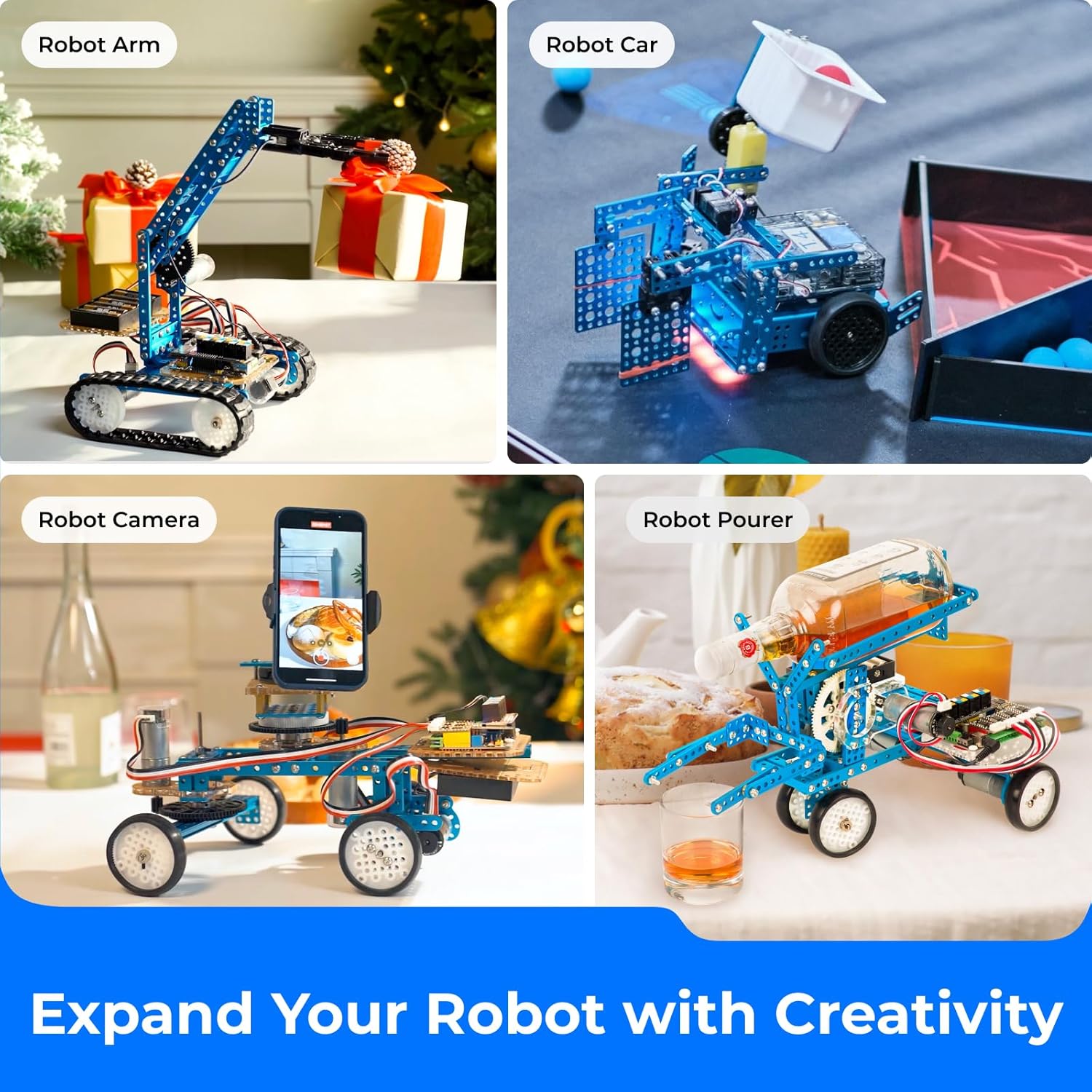
Spark your teen’s passion for technology with the 10-in-1 mBot Robot Building Toy. Perfect for aspiring engineers and coders aged 12+, this kit is more than just a toy—it’s a hands-on journey into robotics. They can build 10 unique models, like a functional robotic arm or a remote-controlled tank, with user-friendly guides making both assembly and coding a fun, rewarding experience.
From first-time coders to future programmers, these building toys offer a complete learning journey. Kids can start with the fun, drag-and-drop blocks in our free mBlock software to bring their coding robot to life instantly. As their skills grow, they can advance to text-based coding with the powerful Arduino IDE or even Python by connecting to a Raspberry Pi. It’s the perfect, all-in-one kit that grows with their curiosity.
Take your robotics projects to the next level. Fully compatible with both Arduino and Raspberry Pi, this kit’s powerful MegaPi control board is your canvas. Drive multiple motors and servos in perfect sync to build a complex robotic arm, read various sensors for an autonomous obstacle-avoiding vehicle, or leverage your Raspberry Pi for advanced machine vision projects. Whatever you can imagine, this platform helps you build it. (Requires 6x AA batteries, not included).
Industrial-Grade Aluminum Alloy Parts. Built to last, the Ultimate robotics kit uses high-strength aluminum alloy that is lightweight, solid, and safe for kids and makers alike. Precision mechanical parts with threaded grooves ensure easy assembly and compatibility with industry-standard components, making it ideal for STEM learning, maker projects, and long-term use.
Ideal STEM Educational Toy Gift — Designed for both adults and robotics for kids ages 12-16, this kit makes an inspiring choice for birthdays, Children’s Day, Christmas, Easter, and STEM activities. With 10 robot models to build, it sparks creativity in summer camps, back-to-school projects, or family playtime. A meaningful way to combine fun with hands-on learning, making it one of the most exciting STEM Educational Toy Gift options for aspiring makers.
9 reviews for Makeblock mBot Ultimate 10 in 1 Robot Building Toys, Robotics Kit App Remote Control Robot Toys Compatible with Arduino C & Raspberry Pi, STEM Educational DIY Robotics for Kids Ages 12-16
Add a review
$399.99
Joe Richardson Jr. –
This is a fantastic product.
This is the real deal! Assembly may require some adult assistance depending on the child’s age. This item worked as it should and all parts were included. The website support, answered all of our questions.This is just a fantastic product!
Amazon Customer –
Excellent product
One of the best product for kids who are intrested in mechanical . Sturdy built quality is excellent pl do let me know is any higher version comes
Amazon Customer –
This is an awesome way to play with robots
Really love it and is very well madeThe manual is super detailedI think its a bit too expensive.I got it for $300 with a discount, that is the only way i could convince myself of buying it.
Michael Therouxx –
Very nice kit
It’s expensive, but you are getting what you pay for. Very high quality from components to instructions. Spent 4 great hours with my son with autism building the robot arm tank, which says a lot. Definitely recommend
Amazon Customer –
Our son loved it!!!
Great product! Well-made components! Our 12-year-old son built a cool mbot the very next day!!!
Muhammad S. –
Awesome idea still needs some improvements though
This is great for kids getting a hang of how stuff works under the hood. Few issues though which makes it frustrating to work with:1) the battery compartment can be made a lot better. It does not fit well and also there is no cover so the batteries keep poppoing as it is very loose in terms of that. On a similar note, We have made the camera doll uptill now and the battery compartment goes upside down , making it more vulnerable to fall down.2) the physical instructions are for only 3 out of 10 designs. It is a hassle specially with the kids to get the information printed or done online. It should be included as part of the product
Gaurav –
Not a value for money. Misleading marketing
Note: I purchased this assuming there will be enough structural components to build 10 projects. I was fine with quick swap of motors, sensors and MegaPi across various builds. This is not the case, and this is an unfinished product.1. The printed manual describes how to build 3 robots, instead of 10.2. Once you build the first robot (arm), you do not parts to complete step 2 for second project in the manual ( bartender), or the third project ( camera dolly)3. As of Dec 26, 2020 – mLink2 v2.2.1 software does not work on MacOS 11.1 Big Sur. After installation and reboot, launching mLink2 and clicking on ‘create new’ block-based editor opens up Safari which asks you install mLink . Clicking on ‘Already installed’ opens up mLink2. It’s a loop I can’t get out of.4. Basic play application on iOS works functionally.5. Got it as a Christmas gift for primary schooler – if I am able to disassemble the first build, I’ll return it. It is falsely marketed as 10-in-1 kit.
ingress –
The product as a starter is good for children and enthusiasts to build and they have …
The product as a starter is good for children and enthusiasts to build and they have many useful hardware modules and extensions. Seeing the community I was interested in buying.However regarding software, this is only good if you are experienced with Arduino IDE because you can have little more freedom than other high-level language APIs. The Python and NodeJS APIs, that this product advertise to support, are highly unstable, not fully baked, encoder motor APIs t don’t work and the tech support straight away rejects any kind of help to work around their own bug. Their language is not rude, but to me the behavior is. If I would have known, I would have gone for a general Arduino board instead of MegaPi.
AK –
設計図が分かりやすく簡単に組み立てできました。プログラミングはスクラッチでもできるので、初心者はまずスクラッチから手をつけることをお勧めします。