

Insta360 Link 2C – 4K Webcam for PC/Mac, 1/2″ Sensor, Auto Framing, HDR, AI Noise-Canceling Mic, Gesture Control for Streaming, Video Calls, Gaming, Works with Zoom, Teams, Black
$149.99
Related Products


Product description
The video showcases the product in use.The video guides you through product setup.The video compares multiple products.The video shows the product being unpacked. Insta360 Link2C KV Merchant Video


1 4K Resolution
2 1/2″ Sensor
3 HDR & Low Light
4 True Focus
5 Natural Bokeh


1 Professional Audio
2 AI Noise-Canceling
3 Intelligent Audio Modes


1 Auto Framing
2 Gesture Control


1 Smart Whiteboard Mode
2 Whiteboard Mode
3 DeskView Mode
4 Portrait Mode
5 Privacy Mode


1 Virtual Backgrounds
2 Creative Filters
3 Remote Smartphone Control

1 FAQ
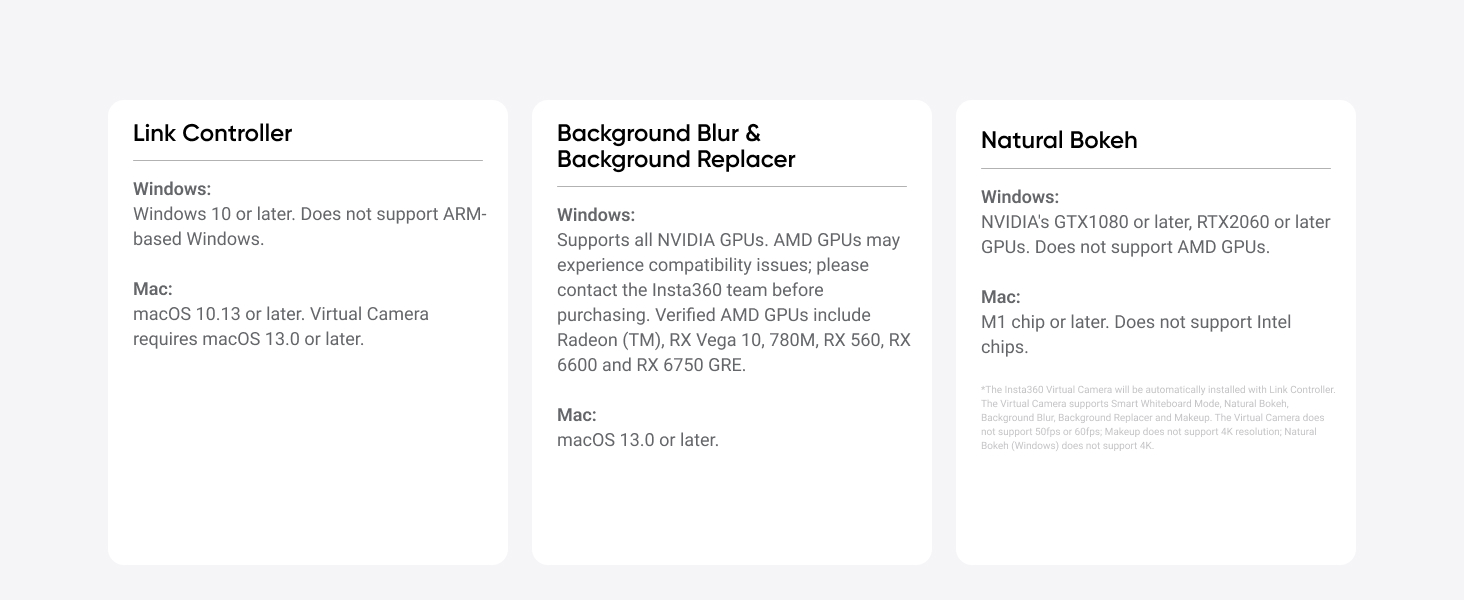
2 Compatibility List
Premium Image Quality: Capture every detail with an impressive 1/2″ sensor, balanced, true-to-life 4K visuals with HDR and exceptional low light performance for quality videos in any light.
Professional Audio: Experience best-in-class audio with advanced AI noise-canceling algorithms. Filter out unwanted background noise for clear communication, even in busy environments.
True Focus: Keep your audience engaged with faster, more accurate Phase Detection Auto Focus (PDAF). No more blurry shots, just fast focusing and crisp video.
Natural Bokeh: Get a professional look by replicating a DSLR-like depth of field. Provides a realistic and natural bokeh effect, straight from Link Controller.
Auto Framing: Insta360 Link 2C automatically zooms and adjusts to keep everyone clearly in sight, whether it’s one person or a group.
Gesture & Remote Smartphone Control: Control your webcam remotely from your smartphone, or use simple hand gestures to start AI Tracking/Auto Framing, zoom in or out and activate Whiteboard Mode.
Specialized Modes: Adapt to every scenario with versatile modes, including DeskView, Whiteboard and 4K Portrait Mode.
Advanced Desktop Software: Fine-tune settings, access advanced features and personalize your experience with the free dedicated Link Controller software.
Privacy Mode: Insta360 Link 2C has an easy-access privacy switch for privacy whenever you need it.
Universal Compatibility: Fully compatible with all major video conferencing software and live streaming platforms, including Microsoft Teams, Zoom, Twitch and more, for a seamless experience.
10 reviews for Insta360 Link 2C – 4K Webcam for PC/Mac, 1/2″ Sensor, Auto Framing, HDR, AI Noise-Canceling Mic, Gesture Control for Streaming, Video Calls, Gaming, Works with Zoom, Teams, Black
Add a review
$149.99
Gary –
Great value for money. Amazing video/voice quality
One of the best webcam you would buy south of $200 or may be even more. Great video processing, fast autofocus, great low light capability, plenty of settings to dial in the picture but looks superb out of the box anyway. The manual shutter allows me to control my privacy and the mics are best in class.Additionally, the thing looks great and is very compact for a webcam with this quality.
Andrea Polk –
Up to 4K, Good Microphone, Portrait or Horizontal Recording
I purchased the Insta360 Link 2C to use for FaceTime and to create YouTube content in 4K. I use a Mac Mini M4, and my BenQ monitor didn’t have a webcam, so this solved that issue. The cam comes with great setup directions and a QR code for a video on how to do it. You will want to download the Insta360 Controller app, and when the camera is connected, update the firmware. Scanning the QR code will get you where you need to be to do it. Mine installed easily and quickly. I encountered no glitches with the app or using the interface on the 2024 Mac Mini M4.AUDIO: The Insta360 has a microphone on the top of the camera. It worked surprisingly well, with no need for enhancement when I was positioned in front of my monitor with the camera mounted on top of it and about 3′ away from the cam. I have a Rode USB-C microphone and a DJI wireless microphone that can also be used with it when chosen as an audio source and paired with the Mini. There are audio settings to focus on your voice, remove voices, and enhance music.VIDEO ADJUSTMENTS: You can zoom in up to 4x or zoom out using the app, and it works great! There’s no loss of clarity and when the software adjusts it’s subtle and smooth. I love how I could hold up something to the camera like a coin, and the camera would focus on it providing great detail, and not switch back and forth to my face behind it. Of course this required me to stay still, as if I didn’t, the auto-tracking would follow my face and not the object.You can enable auto-frame (a setting) or leave it off. If enabled, you set it for your face or half-body.EFFECTS: I think this is the fun part of using this cam! I like the pre-installed backgrounds like a coffee bar, and living room, but it’s even more fun to create backgrounds with AI and use them. You can work in your brand elements, provide a seasonal backdrop, and so much more. Blur and Bokeh are presets that I appreciate to soften the background, and/or help keep focus on the person being filmed and not the background – without changing the background. Users can upload their own backgrounds or enjoy the presets.Auto exposure , autofocus, and color tempurature settings can also be used manually. This is helpful if you add external lighting to your set-up. Brightness, Contrast, Saturation, Sharpness, HDR, and Anti-Flicker are also options for adjustment and can be done in the dropdown. Look for a downward facing arrow to get into the menu.MORE SETTINGS: You can flip your videos horizontally or vertically.MAGNETIC MOUNTING: The magnetic mount works great IF you are using the camera in the horizontal position. The camera can be used vertically if you have a mount for it. I think this was an oversight in the designing of this camera that Insta360 could easily, and cheaply fix – offering a magnetic attachment on the side too, so it could be mounted vertically. As it stands, you have to provide your own mount or add a bit of magnetic tape to use it on the existing mount.RESOLUTION CHANGES: In the lower lefthand corner of the app you change the resolution, up to 4K, 30fps. 1080P and 720P are also options. Some settings will not be available to you at 4K. You can also use Portait mode resolution which offers higher frame rates, but will require a restart of the app. You can also lower the resolution with settings to as low as 360p If you have a very slow internet connection that would be one way to stay connected in a Zoom call.BUILD-QUALITY: This webcam feels professional, as does the mount for it. It comes with a generously long USB-C cable and an USB-C to USB-A adapter; about 4′ long. It is well packaged with good instructions. With the usual care given to such items, this product should provide years of usefulness.VIDEO & STILLS: This cam can take screenshots, still photos, and video up to 4K. The images are of very good quality and as expected by the product description. The wide angle view the webcam provides is very nice and I like that I can also zoom in for close shots. I’m pleased, but did note a slight lag with recording video between the image and the audio. I think that may be my lack of experience with the camera and the choice of audio input. I expect over time for that issue to be resolved with a few tweaks.HAND GESTURES: You can use three hand gestures to make this webcam work for you. Auto-framing, Whiteboard, and Zoom. Ideal for those using the webcam for meetings. The Whiteboard functionality is something I don’t expect to use, but it’s nice to have for students, teachers, and instructors of all types. You do have to have a whiteboard for the cam to focus on – it doesn’t create one for you.Overall, this is a very good choice for casual YouTube streamers and those interested in upgrading their Zoom-call game. Sharp 4K resolution, background swap-outs, up to 4K zoom, auto-tracking, with very a good microphone – so no need to use another audio pickup source unless you want to refine it. For under a hundred, it’s a great option I highly recommend!
Amazon Customer –
Best quality for the price!
This webcam is of great quality. It has autofocus and shoots in 4K. If you download the app you can control a lot more.
Rshopper –
Best image, The only one at this price that has physical zoom
This is the best webcam that tested among a dozen others. The video quality exceeds all the others. The software is very good especially the background blur. Although the software is optional. It has physical touch zoom That works without the software, which is extremely rare at this price. The natural color is excellent. I have No reservation highly recommending this camera if you are looking for the best quality and benefits. Look for it on sale for $99.
Gabriel –
Buena opción
Buena presentación buena calidad. Esperaba un software más robosto. Pero costo beneficio está muy bien
Amazon Customer –
Very nice web cam
Very good 4k video and the tracking is very good. Also the microphone works well
S –
Great Webcam!
I’ve been using this for my twitch streams and let me tell you, I don’t recognize the person I see! Never would have thought my face would look decent in 4k. Very easy to use downloadable app, very easy to use, the quality of images is amazing and it’s very decently priced.
Michael kelley –
Glad i bought it. Im happy.
This is a good camera. Its not the best by any means but if u need a cam for streaming or conference, this is a good buy. Works great with some features. Just like any camera, once you dial it in, it has a good picture quality.
Romain –
Exatamente como na descriçao.Qualidade impressionante, tanto do produto em si (tamanho do cabo, etc) quanto da imagem.
Shaan –
Kk