

Anker 555 USB-C Hub (8-in-1), with 85W Power Delivery, 4K 60Hz HDMI Port, 10Gbps USB C and 2 A Data Ports, Ethernet microSD SD Card Reader, for MacBook Pro More
$37.99
Related Products





Product description

 Transfer Files in Seconds
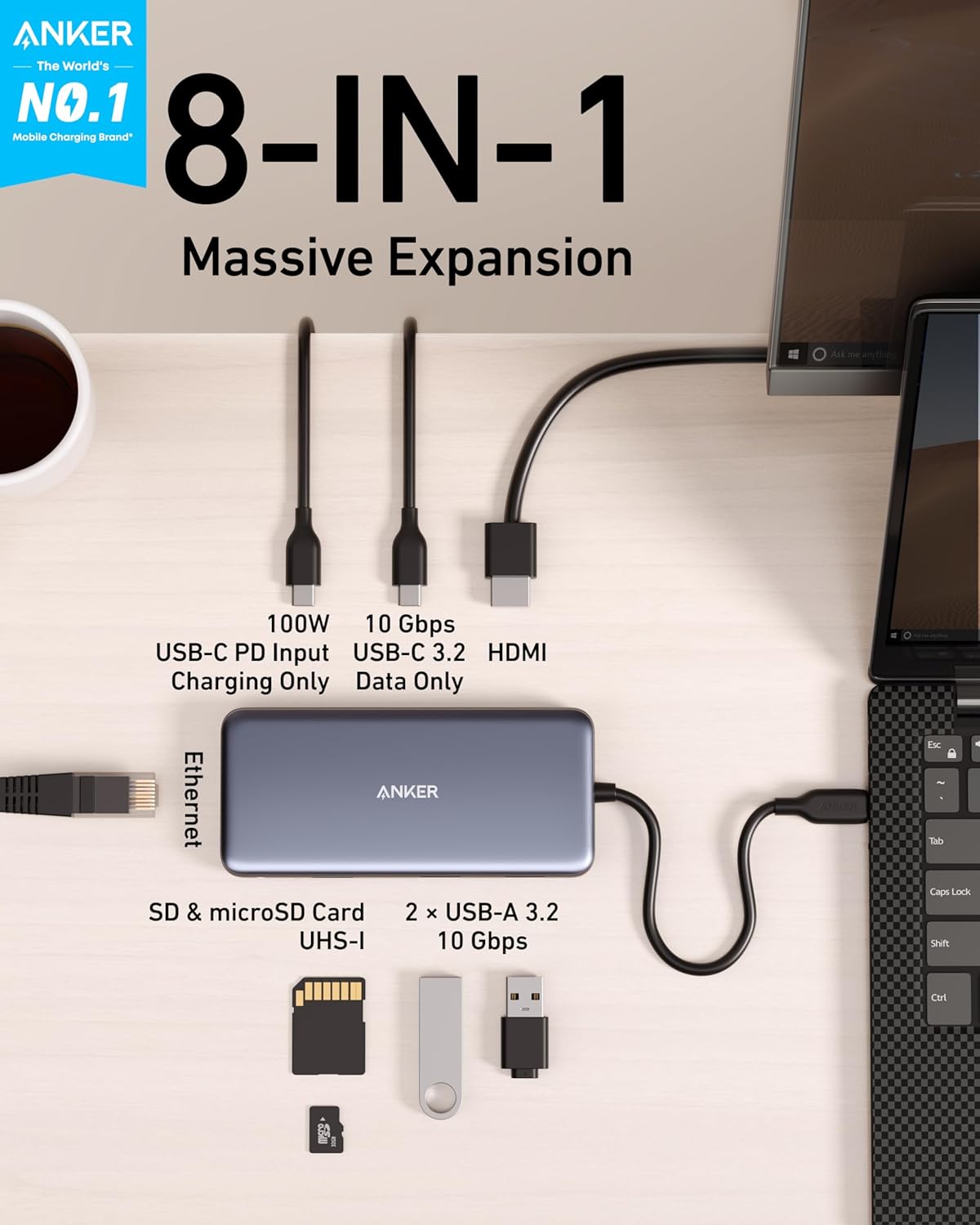
Transfer movies, photos, and music at speeds of up to 10 Gbps via the USB-C 3.2 Gen 2 port and the dual USB-A 3.2 Gen 2 ports.
 Power Delivery Compatible
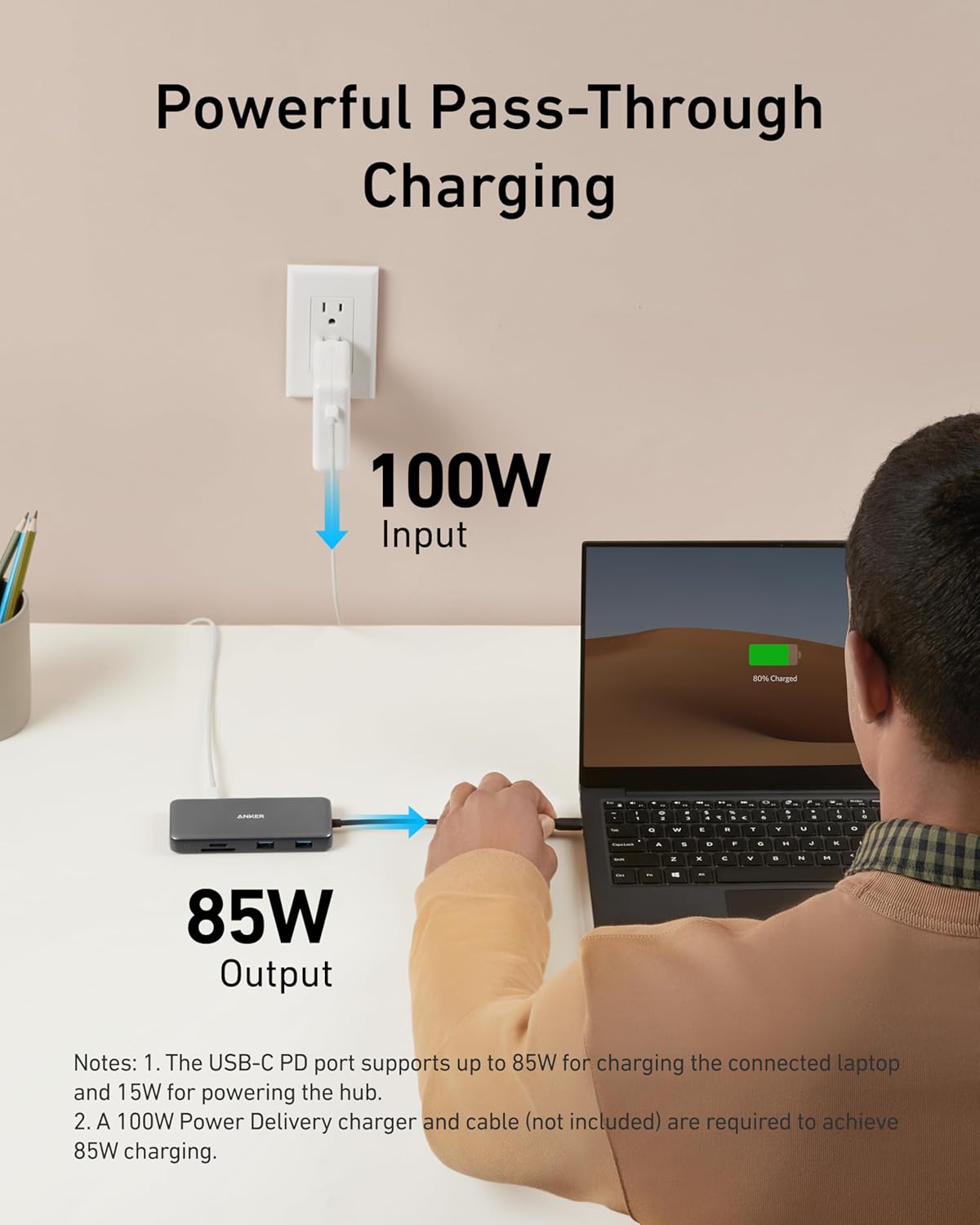
Supports up to 100W (minus 15W for operation) pass-through charging so you can power up a 15” MacBook Pro at full speed—all while accessing the hub’s other functions. (Charger not included).
 Fast and Stable Ethernet Connection
Connect your wireless router to the hub’s Ethernet port to access a stable wired internet connection of up to 1 Gbps.
 Lightweight and Portable
At only 0.6 inches thick and weighing just 4.4 oz, Anker 555 USB-C Hub (8-in-1) fits easily into your bag for effortless portability.

Anker 555 Hub 8-in-1
Comparison
10Gbps
Data transfer Speed
5Gbps
1 × HDMI 4K@60Hz
Video Output Ports
1 × HDMI 4K@60Hz
2
USB-A Data Ports
2
1
USB-C Data Ports
1
1 × 100W
USB-C PD Inputs
1 × 100W
/
Audio Ports
/
SD/TF & Ethernet
SD/TF & Ethernet
SD/TF
10Gbps
Data transfer Speed
10Gbps
1 × HDMI 4K@60Hz
Video Output Ports
1 × HDMI 4K & DP 4K
2
USB-A Data Ports
3
1
USB-C Data Ports
1
1 × 100W
USB-C PD Inputs
1 × 100W
/
Audio Ports
1
SD/TF & Ethernet
SD/TF & Ethernet
SD/TF & Ethernet
10Gbps
Data transfer Speed
5Gbps
1 × HDMI 4K@60Hz
Video Output Ports
1 × HDMI 4K & DP 4K
2
USB-A Data Ports
3
1
USB-C Data Ports
1
1 × 100W
USB-C PD Inputs
1 × 100W
/
Audio Ports
1
SD/TF & Ethernet
SD/TF & Ethernet
SD/TF & Ethernet
10Gbps
Data transfer Speed
5Gbps
1 × HDMI 4K@60Hz
Video Output Ports
2 × HDMI 4K@30Hz
2
USB-A Data Ports
2
1
USB-C Data Ports
/
1 × 100W
USB-C PD Inputs
1 × 100W
/
Audio Ports
/
SD/TF & Ethernet
SD/TF & Ethernet
SD/TF & Ethernet
Anker USB-C Hub 7-in-1 
Anker 565 Hub 11-in-1 
Anker 563 Hub 11-in-1 
Anker 553 Hub 8-in-1 
How can this hub achieve 85W Power Delivery charging?
To get 85W charging, use a USB-C wall charger and a USB-C to C cable that both support 100W PD charging.
Does this hub get hot?
When the hub is fully loaded, it may reach a surface temperature of around 149°F. However, this is normal for products of this kind.
Can I use the USB-C port on the hub to connect a monitor?
No, Anker 555 USB-C Hub supports display output only through its HDMI port. The USB-C ports do not support video output and cannot be used to connect a monitor.
Frequently Asked Questions:
1.Does the USB-C Power Delivery port support charging for tablets (including iPad Pro) or phones?
Due to the power input limitations of mobile devices, this hub can not provide pass-through charging to tablets (including iPad Pro) or phones when using the original wall charger that came with your mobile device. To support full-speed charging for iPad Pro, use an adapter that supports at least 15V (45W).
2.Why can’t my HDMI resolution reach 4K@60Hz?
The HDMI port supports a variety of resolutions up to 4K@60Hz, including 1080p, 1080i, 720p, and 480p. For 4K@60Hz resolution, please confirm your device supports DP 1.4. Below are some devices that support DP1.4:
MacBook Air 2021/2022
MacBook Pro 14/16″ 2021
MacBook Pro 15” 2018 / 2019
MacBook Pro 16” 2019
iPad Pro 2018 / 2019 / 2020/2021/2022 (Only iPad Pros with iPadOS are compatible)
Compatibility
MacBook Pro ( 2021 / 2020 / 2019 / 2018 / 2017 / 2016 )
MacBook Air ( 2022 / 2021 /2020 / 2019 / 2018)
iPad Pro ( 2022 / 2021 / 2020 / 2019 / 2018)
XPS (13 inch / 15 inch) / Pixelbook (2017) / Incompatible Devices / Nintendo Switch / USB SuperDrive
Notes
The USB-C port on this hub does not support video output. The USB-C port does not support screen mirroring.This hub does not require a wall charger to function properly. You need to plug in a wall charger only if you want to charge the host laptop. It is normal the Hub may become warm (122 °F) when it is fully loaded or connected to PD adapter. The USB-A port or USB-C data port does NOT support charging.
Flawless 4K Video via HDMI: Enjoy crystal-clear visuals with 4K@60Hz output when using a DP 1.4 laptop, or 4K@30Hz with a DP 1.2 laptop—perfect for high-definition presentations and entertainment. (Note: Only the HDMI port supports video output. The USB-C port is for data transfer only.)
Massive Expansion: Equipped with a USB-C Power Delivery input port, a built-in 7.48″ USB-C cable, a USB-C data port, 2 USB-A data ports, 1 HDMI port, an Ethernet port, and a microSD/SD card reader, giving you an incredible range of functions—all from a single USB-C port.
High-Speed, High-Def: USB-C and USB-A data ports provide file transfer at speeds up to 10 Gbps, while an HDMI port supports media display at resolutions up to 4K@60Hz for DP 1.4 laptops, or 4K@30Hz for DP 1.2 laptops.
Powerful Pass-Through Charging: Compatible with USB-C Power Delivery to provide high-speed pass-through charging up to 85W.
Note: The hub requires 15W for operation. Please use a 100W Power Delivery charger and cable to ensure adequate power.
Compatibility: Supports USB-C, USB4, and Thunderbolt connections. Compatible with MacBook (macOS 12 and newer), Windows 10 and 11, ChromeOS, and laptops equipped with DP Alt Mode and Power Delivery. Note: This device is not compatible with Linux.
What You Get: Anker 555 USB-C Hub (8-in-1) / PowerExpand 8-in-1 USB-C PD 10Gbps Data Hub, welcome guide, our worry-free 18-month warranty, and friendly customer service.
9 reviews for Anker 555 USB-C Hub (8-in-1), with 85W Power Delivery, 4K 60Hz HDMI Port, 10Gbps USB C and 2 A Data Ports, Ethernet microSD SD Card Reader, for MacBook Pro More
Add a review
$37.99
Aaron –
Great 10gbps USB-C Hub, worked with Anker support through compat issues with PD4 iteration 1
Original Review (updates below):—–The moment I noticed this thing on Amazon, I bought it and it literally just arrived. Finally, 4K60 over just USB-C with other ports (including making up to 10Gbps available to them) for a reasonable price. Unfortunately, the first two things I’ve done with it were both disappointing. I’ll cut to the chase, the power delivery pass through isn’t working with one of their own chargers.The first device I tried connecting this with is my Anker PD4 with one USB-C cable as the only thing plugged into it so I can test the truly up to 100W (-15 for its own power) claims. I’ve tried connecting it with Apple’s 2m USB-C charge cable (100w capable) and an equivalent CableMatters cable that also supports 100W. When plugged directly into my laptop, both of these cables immediately start charging it and show up as 100W power sources. When this Anker hub is plugged in and either of them is connected to the power delivery port on the side of it, the laptop does not charge (laptop is a 16″ Macbook Pro, I’ve tried multiple ports just for the heck of it).My second complaint is that when absolutely nothing is plugged into it, it becomes fairly warm to the touch. Why, when it’s doing nothing, is it hot? I’m clearly not running data or even power through it so I have low hopes for it under load.The fact that it doesn’t work in exactly the scenario they want it to most (a MacBook Pro with one of their own chargers) seems like a pretty big fail. I’ve got lots of USB-C things though so I thought I’d grab a couple and try those. Using an Apple 96W USB-C charger, the device does pass through power delivery properly. It shows up as providing 79W to the laptop (siphoning off 17W in this instance). I also have a 56W Aukey charger that splits power between a USB-A port and a USB-C port that can provide 45W of power delivery. When plugged into that charger it does appear to work as well and appears in macOS as a 30W power source.Maybe the problem is the Anker PD4? But it works fine providing power to the laptop directly. Would love to hear from Anker about these two products working together and what I should actually expect. Having it be unreliable for power delivery isn’t great, but power and heat aside (it is getting a little bit warmer now that it’s providing power from the Apple power adapter, but still definitely holdable), the hardware looks and feels good and the cable feels durable. Worth also noting that there’s a white LED ring on the side of it that appears to be always on when it’s plugged in. Don’t know why it needs an LED.—–Update, June 22, 2020:I’ve done some more testing and Anker has reached out to me to investigate what might be the issue. I can say that the hub works as I would expect from a quick test with my iPad Pro 11″ with the above functioning chargers. It was able to pass through power with the 96W Apple Charger on the other end to both the iPad port as well as a Magic Keyboard port. The ethernet adapter showed up in iOS settings and an external drive was functional. When connected via the Magic Keyboard, which is a power only connection, as expected it provided only power.Still no power passthrough of any kind when connected to the PD4.—–Update July 1, 2020:I’ve written back and forth with Anker and they’ve sent me a replacement hub. It also doesn’t work with the PD4. I’ve tried multiple USB-C cables but they have also shipped a cable to test with it. For now I’m increasing the review from 2 to 3 stars because I am more and more suspicious about the PD4 and less about this hub. They claim that they have tested the setup I have separately without issue, and I’ve sent video showing the problems I’ve encountered, so the troubleshooting is ongoing.Have had a chance to use Ethernet on it without issue. Still need to try to test out its throughput when trying to use a 10Gbps USB-C enclosure and a 4K60 monitor at the same time (+ ethernet).More updates to come.—–Update July 10, 2020:I’ve continued to talk with Anker support and they shipped me a replacement PD4. The one I had was labeled as “Iteration 1” on its barcode, the one I got back was labeled “Iteration 2”. I tested it out and it works perfectly with this hub, passing through the correct amount of power to multiple Macbook Pros and fast charging an iPad Pro. Clearly the fault doesn’t lie with this hub and is instead an issue with the first iteration PD4, so I’m updating my review accordingly. Working with Anker support was great.I’ve also been able to test USB-C throughput (without driving a display as well so far) and it properly utilizes 10Gbps. I’ve attached some extra images showing various devices connected to it (keyboard dongle, SD card, USB-C 10Gbps external SSD enclosure, USB sound card, ethernet).
Jason J –
compact and efficient
This hub has turned out to be an incredible value for the price. It packs a lot of functionality into a small, lightweight device that’s easy to throw in a bag and take on the road. I keep it with me whenever I travel, and it’s saved me more than once when I’ve needed extra ports.The 85W power delivery is a big plus, since it keeps my laptop charged while still letting me connect everything else. Between the HDMI, USB, SD card slot, and more, it covers just about every connection I ever need.Build quality feels solid, and it doesn’t run hot even after long use. For something so compact and affordable, it adds a huge amount of convenience to both work and travel setups.
Jon –
Handy Little Tool Does Require Power Supply for all port functions.
Great Device!Hub works well in Dell Laptops, HP Laptops, and Apple computers. Hub must be powered by the computers charger for use. Monitor display port will not work without it. Could be made better to be able to use it entirely without the additional Power supply requirement.If your computer requires more than 85W of power, it will not effectively charge your computer and work at the same time. Your computer may go into a lower Power mode to offset the Wattage difference. For example My MacBook Pro will not Charge effectively since it requires a larger Charger.
Elodine –
Like It, but it required additional equipment to charge iPad Air 4
I am exploring ways to make my iPad behave like a laptop, and with this little device, I am on my way. One of my primary concerns is that sometimes I have to troubleshoot routers at other people’s homes. So I tried it out on my home. I found that I had to install an app from the manufacturer to make it work, then I had to reboot the router. Then, I got an amazing interface that was not the same as the interface on my laptop. It told me that I need a firmware update, but at this point, I am more comfortable doing the update on my laptop. One quirk I don’t understand is that I plugged the PD port into my power cube, and the iPad told me it wasn’t charging. That isn’t good. I might have to return it and shop for a different brand. The newer Apple devices are awfully picky as to where they get their power from.Update: I found the email for Anker customer support, sent an email, and they got right back to me. Here is what they said:”Please first know: Due to the power input limitations of mobile devices, this hub can not provide pass-through charging to tablets (including iPad Pro/Air) or phones when using the original wall charger that came with your mobile device. To support full-speed charging for iPad Pro/Air, use an adapter that supports at least 15V (45W).”I found that the 3 foot power cord that Apple sent me is nowhere near long enough for charging while using the dock, so I sent away for a 45W charger and a 10 foot USB-C to USB-C charging cable that was compatible with iPad. Please be aware that Apple has circuitry embedded in the cord and you cannot use just any cord. The equipment I got was this:Charger https://smile.amazon.com/gp/product/B083BRKMJQ/ref=ppx_yo_dt_b_asin_title_o00_s00?ie=UTF8&psc=1Cord https://smile.amazon.com/gp/product/B07LF1FNRV/ref=ppx_yo_dt_b_asin_title_o00_s00?ie=UTF8&psc=1Cords are not rated in either volts or watts, so I sent another email to Anker asking if a 3 amp cable would work, and they told me that it should. Pay attention to the amperage when purchasing a cable to go with a high wattage charger.The cord that I purchased also comes in a 15 foot length. If this rig works, I will also purchase the 15 foot cord. The reason being that sometimes I need to do stuff in other people’s houses, and I cannot count on a nearby outlet.I will update when the new equipment comes.Update: I installed a 45W charger with a USB-C TO USB-C cable that was advertised for iPads, and now my iPad is charging through the PD port, so that problem is taken care of.I sold the iPad and bought a 2019 MacBook Pro. The MacBook Pro has four Type C USB ports only, no others. I use one of the ports on the Mac for charging and another for the hub. I use the Type 3 USB ports on the hub for my mouse and graphic tablet. I like wired mice, because they use a wire for power, are more reliable, and do not generate dead batteries to pollute the environment. I wish the hub had an additional Type 2 or 3 USB port. Maybe I will buy an additional adapter, because I can’t find a hub that sports the extra ports. I looked for a mouse that would plug into a USB C port, but did not find one to my taste. I like wired keyboards for the same reason I like wired mice.At any rate, all these wires that will not plug directly into my computer makes kind of a clutter, as depicted in my photo. Not much I can do about it at this stage of the game, however.
AnGuS –
Llevo ya unos meses usándolo todos los días y va genial! No puedo poner ninguna pega, lo volvería a comprar sin duda
Jaime Jimenez –
Cuenta con múltiples puertos, como USB-A, HDMI y lector de tarjetas SD, lo que lo hace extremadamente versátil. La transferencia de datos es rápida y sin interrupciones, y la salida HDMI ofrece una calidad de imagen nítida, perfecta para presentaciones o ver contenido en alta definición.Algo que me encanta es lo bien que se integra al flujo de trabajo diario. Es increíblemente fácil de usar: simplemente conecta el adaptador al puerto USB-C, y todo está listo para funcionar.He probado otro tipo de adaptadores más económicos y después de probar este de Anker no los volvería a comprar ya que es una perdida de dinero. A veces lo barato sale caro.
Jacek Kosinski –
Dysk podłączony przez usb-c nie jest rozpoznawany w komputerze , monitor podłączony przez usb-c także. Power deliwery nie działa. leci reklamacja.
Kyle –
Works well, feels like good quality – I needed this specific one because apparently it was one of the only ports I could use to hook up a Spyder colour calibration tool to calibrate my external monitor with my macbook pro – anyway it worked and did what I needed.
John C –
Short Version:- Good build quality, nice packaging, carry pouch is a nice touch.- Connects wired USB mouse, wired USB keyboard, HDMI monitor and ethernet without problems- Works (for the above) with or without laptop charger plugged into it.- With charger plugged in, powers and charges Thinkpad X390 (using 65w Lenovo charger)- Nice alternative to a larger, less portable dock- Anker customer service is excellentGripes:- I don’t use the card reader, and would have another USB port or HDMI port in its placeI’m using this with a Thinkpad X390.In my setup, it connects a wired USB keyboard, wired USB mouse, an HDMI monitor and my ethernet network to the laptop.I wasn’t certain from the description whether the product would power the laptop as well (but wasn’t too worried as I have two USB-C ports, and figured, if it came to it, I would charge the laptop via one, and connect the hub via the other. It does charge and power the laptop via the PD socket though, using the 65w Lenovo charger supplied with this Thinkpad model.Taking the charger power cable out of the hub will briefly pause operation of the connected items, but they spring back into life without problems.UPDATE – this no longer happens – I’m not sure why, but operation of the connected peripherals continues uninterrupted if the charger power cable is removed or plugged in.As ever with Anker, the product arrives nicely packed, and has a reassuring, quality feel to it.The pass through charging works nicely with Lenovo’s 65w charger, and the hub works whether plugged into the pass through charging or not. I use it as a more portable laptop dock, with only one thing to unplug should I need to move away from my desk. Using this also frees up the laptop’s USB ports (previously taken up by the wired keyboard and mouse).Personally, I don’t use the card readers – while it’s sort of nice to have them available, more USB or HDMI capability would have been better, I think.In all, an excellent product.