

Acer USB C Docking Station Dual Monitor with 2 HDMI, 9-in-1 Laptop Docking Station with 4K@60Hz HDMI, USB A&C 3.0, SD/Micro SD, 100W PD, USB C Dock Compatible with Acer/Dell XPS/HP/Mac/Surface etc
$34.99
Related Products



From the brand


New Product Display
USB Hub–High Parameters
USB C Multiport HUB
USB Hubs
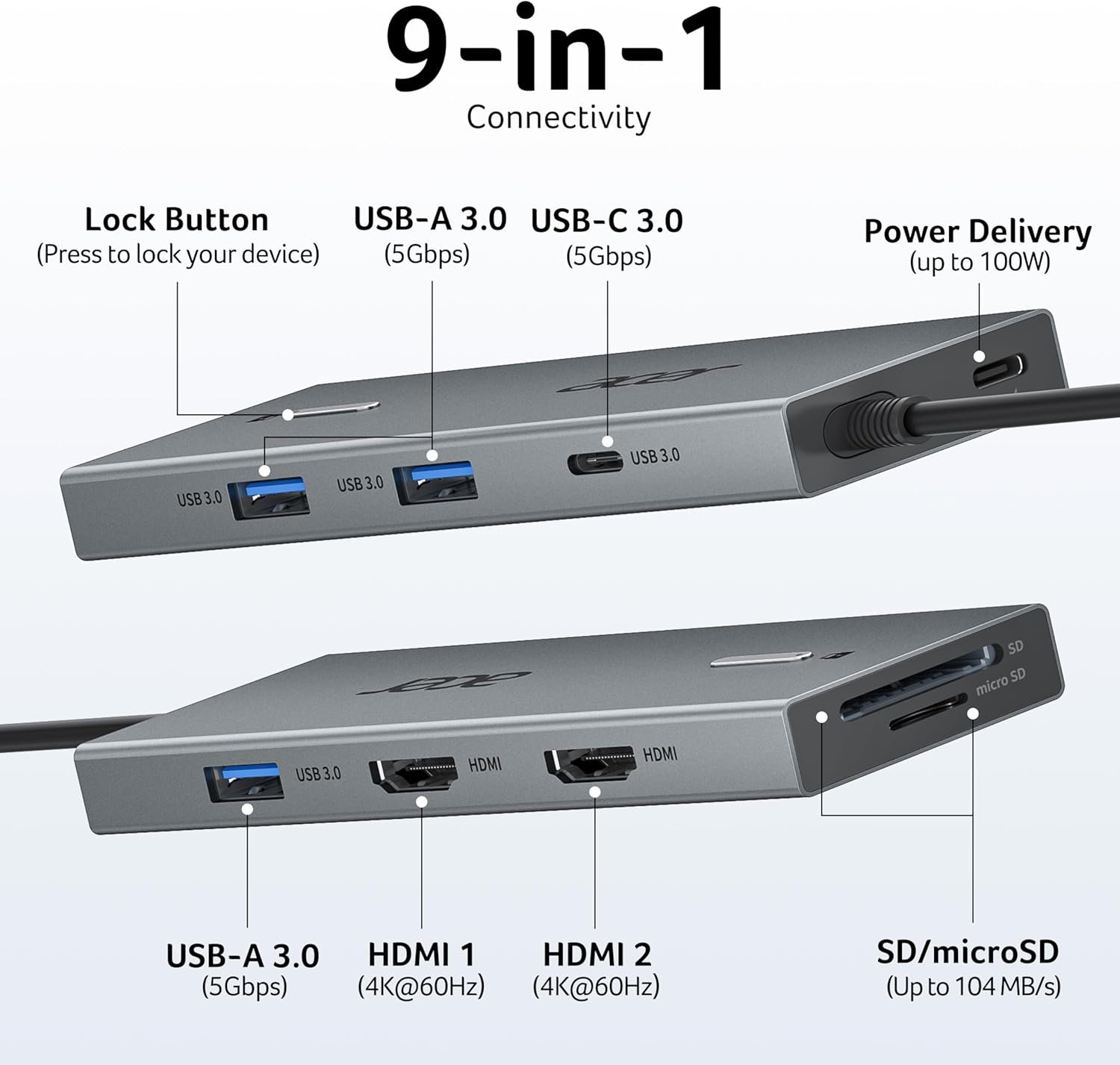
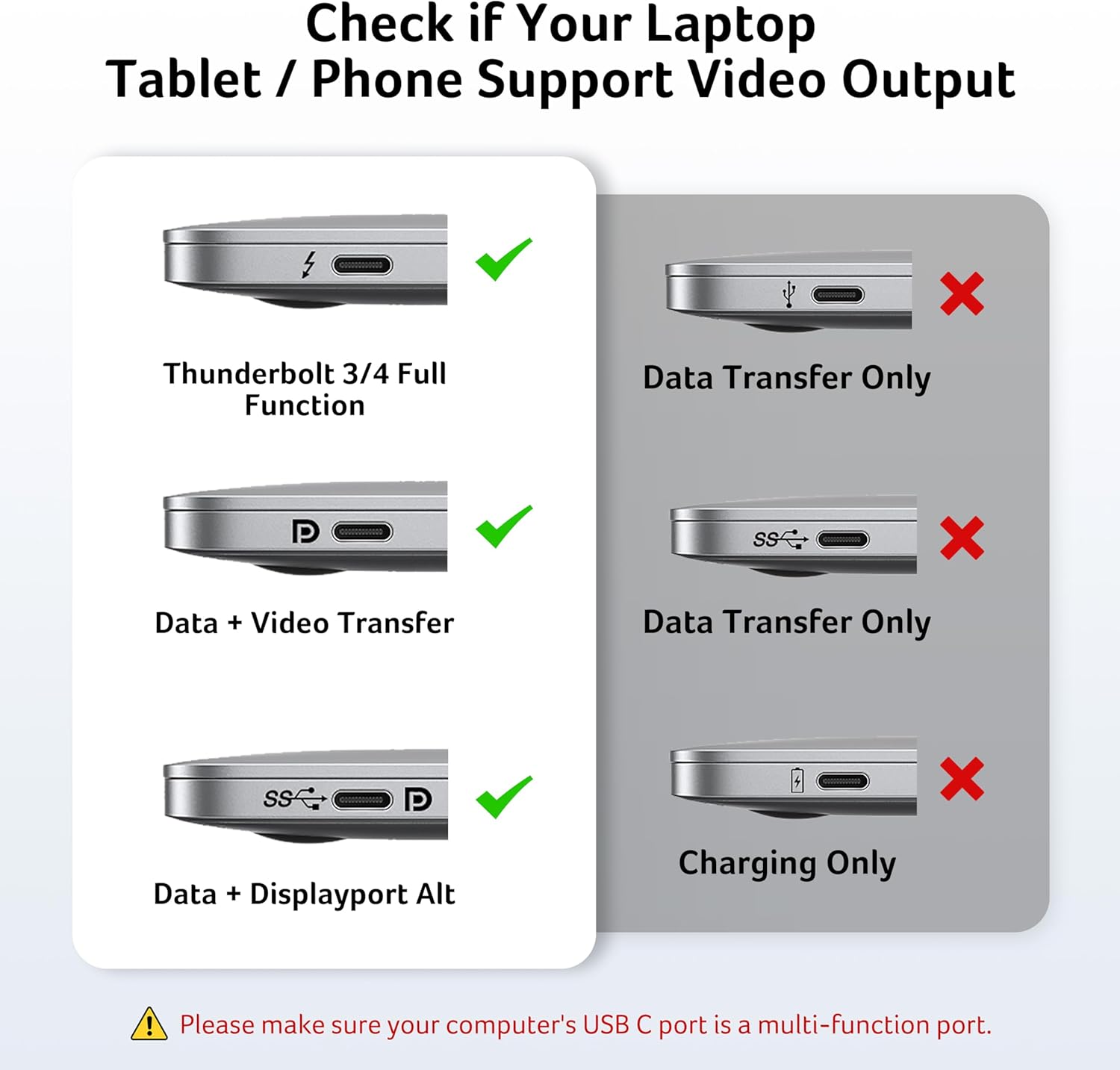
【9-in-1 USB-C Docking Station】This Acer laptop docking station includes 2 HDMI(4K@60Hz), 3 USB-A (5Gbps), 1 USB-C (5Gbps), 100W PD charging, and SD/MicroSD slots (104Mbps). 📌Note: 𝐏𝐥𝐞𝐚𝐬𝐞 𝐞𝐧𝐬𝐮𝐫𝐞 𝐲𝐨𝐮𝐫 𝐥𝐚𝐩𝐭𝐨𝐩 𝐡𝐚𝐬 𝐚 𝐔𝐒𝐁-𝐂 𝐩𝐨𝐫𝐭 𝐰𝐢𝐭𝐡 𝐯𝐢𝐝𝐞𝐨 𝐨𝐮𝐭𝐩𝐮𝐭 (𝐃𝐢𝐬𝐩𝐥𝐚𝐲𝐏𝐨𝐫𝐭 𝐀𝐥𝐭 𝐌𝐨𝐝𝐞) 𝐬𝐮𝐩𝐩𝐨𝐫𝐭.
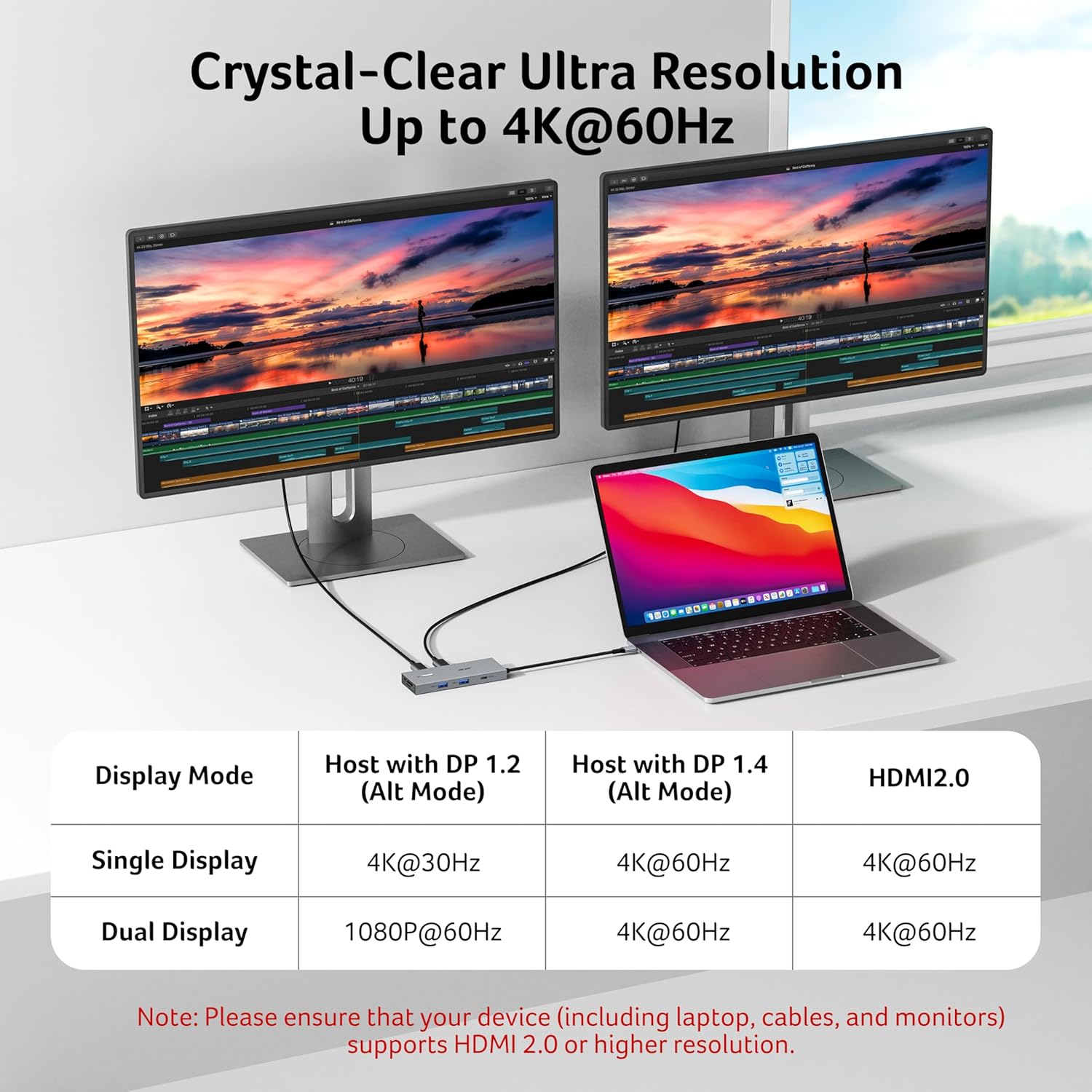
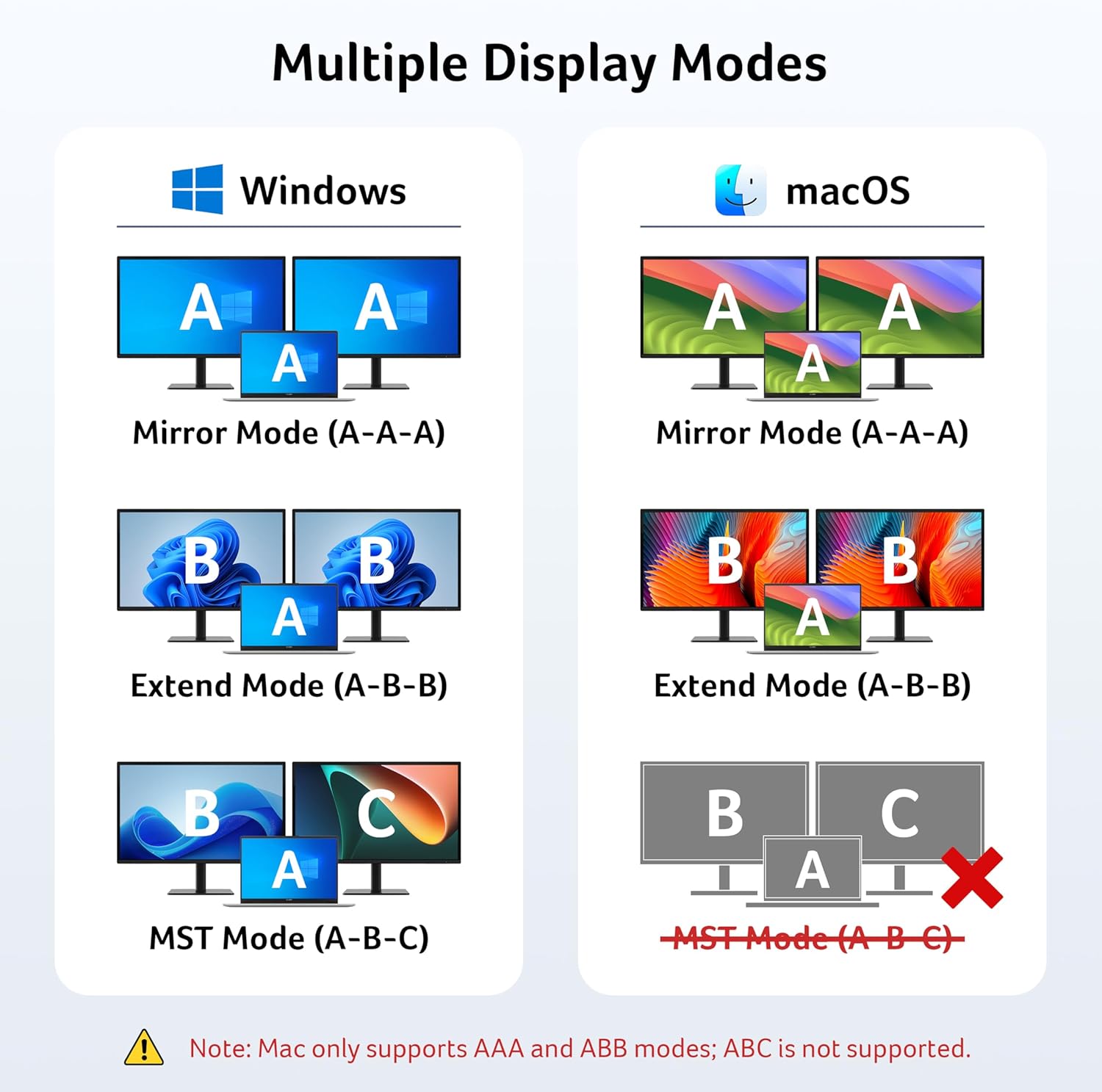
【Stunning Dual 4K@60Hz Display】This USB-C docking station supports dual monitors via 2 HDMI ports with 4K@60Hz resolution, making screen extension or mirroring easy. 📌Note: ①𝐏𝐥𝐞𝐚𝐬𝐞 𝐞𝐧𝐬𝐮𝐫𝐞 𝐭𝐡𝐚𝐭 𝐲𝐨𝐮𝐫 𝐝𝐞𝐯𝐢𝐜𝐞 (𝐢𝐧𝐜𝐥𝐮𝐝𝐢𝐧𝐠 𝐥𝐚𝐩𝐭𝐨𝐩, 𝐜𝐚𝐛𝐥𝐞𝐬, 𝐚𝐧𝐝 𝐦𝐨𝐧𝐢𝐭𝐨𝐫𝐬) 𝐬𝐮𝐩𝐩𝐨𝐫𝐭𝐬 𝐇𝐃𝐌𝐈 𝟐.𝟎 𝐨𝐫 𝐡𝐢𝐠𝐡𝐞𝐫 𝐫𝐞𝐬𝐨𝐥𝐮𝐭𝐢𝐨𝐧. ②𝐦𝐚𝐜𝐎𝐒 𝐨𝐧𝐥𝐲 𝐬𝐮𝐩𝐩𝐨𝐫𝐭𝐬 𝐨𝐧𝐞 𝐞𝐱𝐭𝐞𝐫𝐧𝐚𝐥 𝐦𝐨𝐧𝐢𝐭𝐨𝐫 𝐢𝐧 𝐄𝐱𝐭𝐞𝐧𝐝 𝐦𝐨𝐝𝐞.
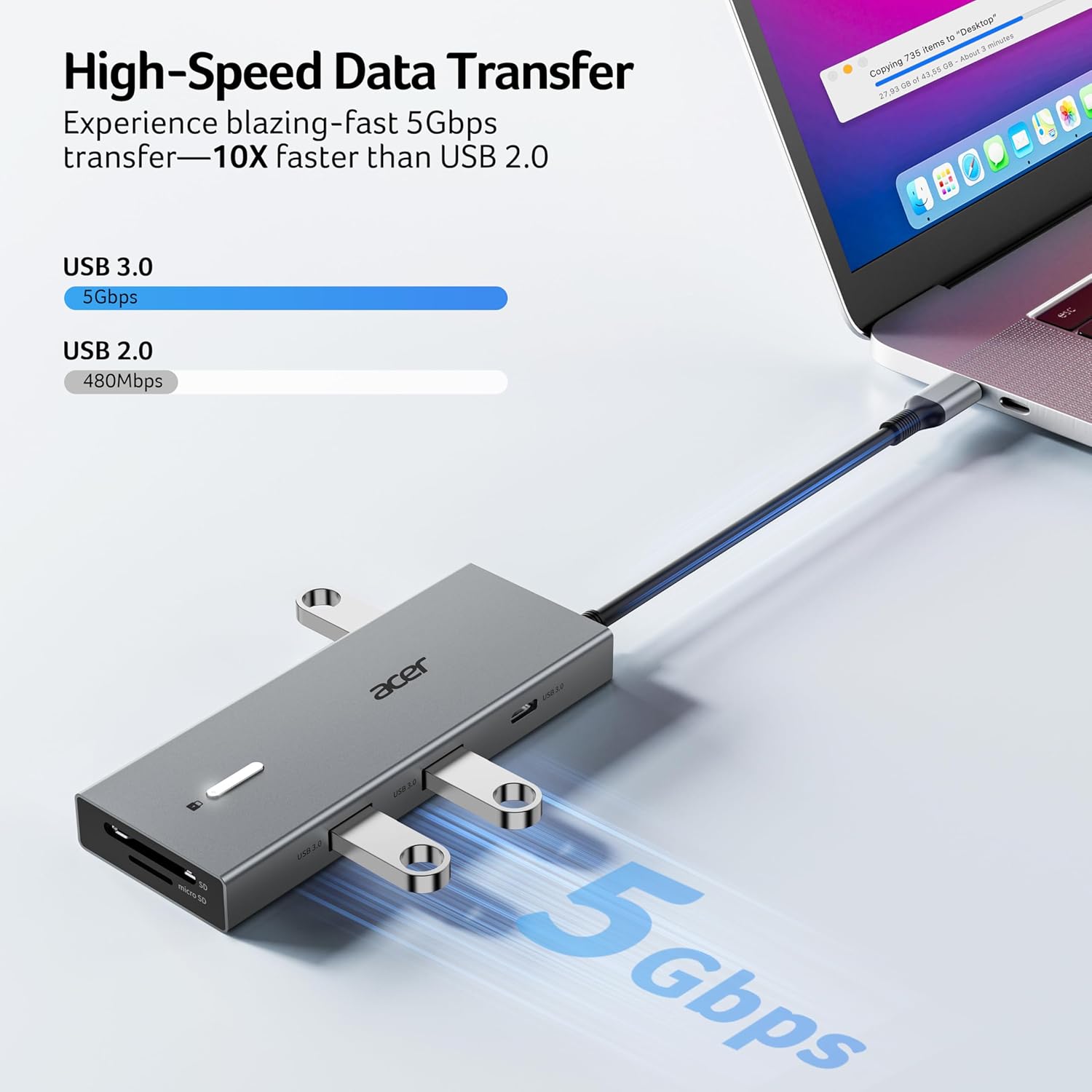
【Fast Data Transfer & Easy Access】This Acer USB-C docking station offers 1 USB-C (5Gbps), 3 USB-A (5Gbps), and dual SD/MicroSD slots (up to 104Mbps) for fast, reliable file transfers.
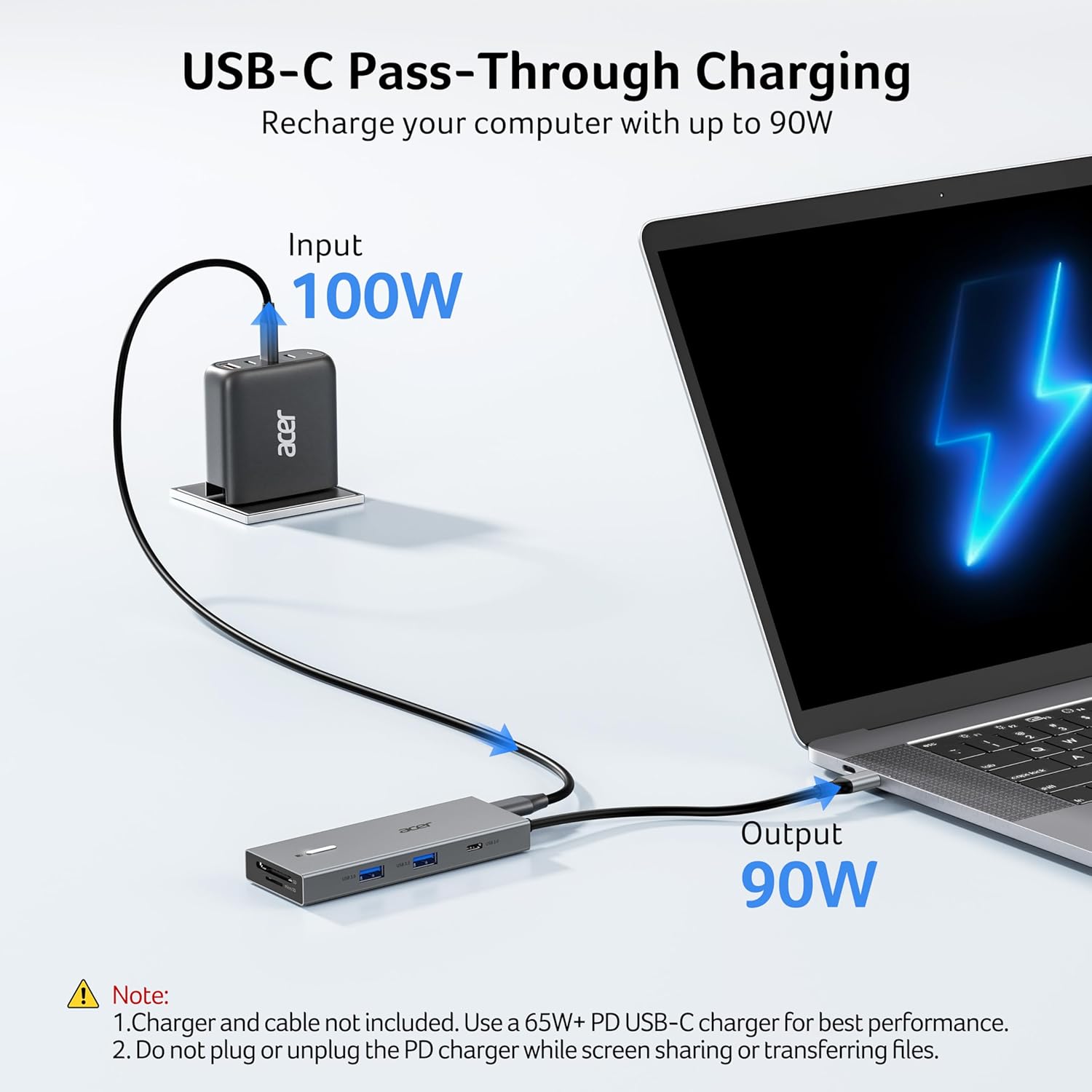
【100W PD Fast Charging, Efficient Power Supply】This Acer USB-C hub supports up to 100W input and delivers up to 90W to your laptop, allowing you to stay charged while using the docking station. 📌𝐍𝐨𝐭𝐞: ① 𝐄𝐧𝐬𝐮𝐫𝐞 𝐲𝐨𝐮𝐫 𝐝𝐞𝐯𝐢𝐜𝐞’𝐬 𝐔𝐒𝐁-𝐂 𝐩𝐨𝐫𝐭 𝐬𝐮𝐩𝐩𝐨𝐫𝐭𝐬 𝐏𝐨𝐰𝐞𝐫 𝐃𝐞𝐥𝐢𝐯𝐞𝐫𝐲 (𝐏𝐃); 𝐮𝐬𝐞 𝐚 𝟔𝟓𝐖+ 𝐩𝐨𝐰𝐞𝐫 𝐚𝐝𝐚𝐩𝐭𝐞𝐫 (𝐧𝐨𝐭 𝐢𝐧𝐜𝐥𝐮𝐝𝐞𝐝).
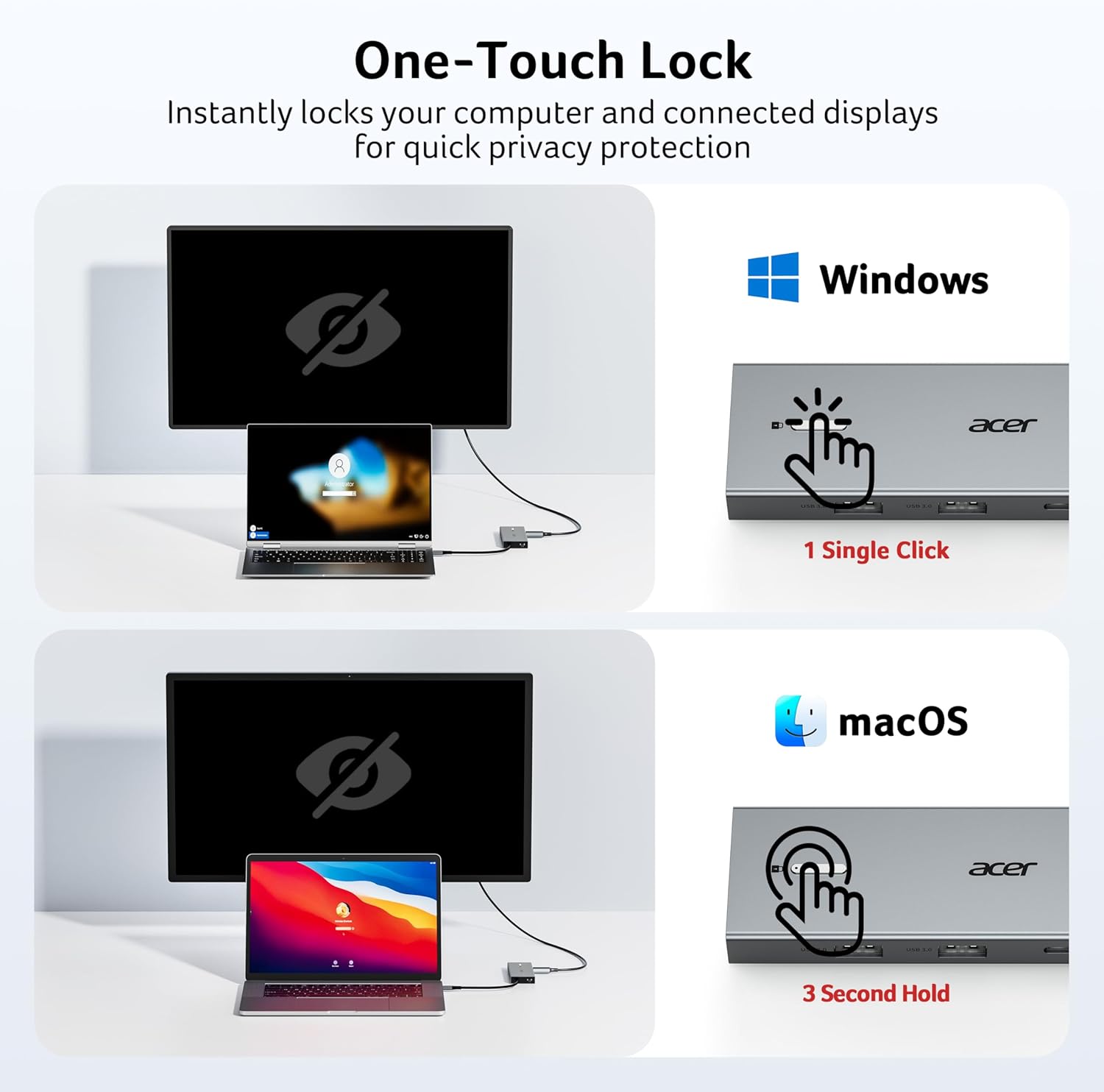
【Thoughtful Details】This docking station has a 0.66FT built-in cable, an aluminum alloy body, and a lock button for device security. Single click locks Windows; press and hold 3s for Mac.
【Universal Compatibility】This docking station is designed for laptops with full-featured USB-C ports that support display, charging, and data transfer—compatible with Dell, Lenovo, and Surface devices.
【𝐏𝐫𝐞-𝐔𝐬𝐞 𝐒𝐞𝐭𝐮𝐩 𝐆𝐮𝐢𝐝𝐞】𝐅𝐨𝐫 𝐌𝐚𝐜: System Settings > Privacy & Security > Accessories, then set it to Always Allow. 𝐅𝐨𝐫 𝐖𝐢𝐧𝐝𝐨𝐰𝐬: Plug-and-play ready, enable external devices in Settings > Devices. After setting, reconnect the docking station and wait for your computer to recognize the device.
13 reviews for Acer USB C Docking Station Dual Monitor with 2 HDMI, 9-in-1 Laptop Docking Station with 4K@60Hz HDMI, USB A&C 3.0, SD/Micro SD, 100W PD, USB C Dock Compatible with Acer/Dell XPS/HP/Mac/Surface etc
Add a review
$34.99
FraneticPlay –
Excellent Acer Docking Station – Solid Build and Perfect for Samsung DeX 💻📱
I’m very impressed with this Acer USB-C Docking Station. The construction feels premium, with a solid metal body that gives it durability and a professional look. It even has a button to lock if you ever need it, which adds an extra touch of practicality.I’ve tested it with my Philips TV through HDMI, using my Samsung S25 Ultra in DeX mode, and it works flawlessly. The experience is smooth, fast, and very close to working on a desktop PC. I also connected my USB keyboard and mouse, and everything responded perfectly without lag. This docking station really makes multitasking easier, whether for work or entertainment. Acer did a great job with this product – reliable, well-built, and definitely worth recommending!
Liz –
Easy setup no issues
I work for a technology company that requires a lot of security restrictions on your PC. This makes it very hard to find compatible docks for peripherals. This little Acer works great and is half the price of similar docks.I use 1 HDMI on my computer and one on this to have a dual monitor setup. It has an external webcam, mouse, keyboard, USB lamp all plugged in with no issues.I don’t use the lock button, but it doesn’t hinder my use either. There was no program to download, it was easy plug and play setup. No problems with Windows 10 or 11.It’s been about 2 months and I’ve had no issues.
John Chambless –
Great customer service
After 4 months of working properly, the docking station became erratic and started to overheat after 15 minutes of use, then shutting down until it cooled. A call to U.S. based Acer customer service was one of the best experiences I’ve had in some time. The agent asked a few good questions and said she would refer my problem to her products support team. As promised, she called back the next day saying a new docking station was being mailed. This is as good or better than I could hope for. Acer made a loyal customer. Thanks
Jaclyn Cline –
Doesn’t Work
Update: Acer reached out to me and sent a replacement. The replacement has worked perfectly without any issues. The only note of interest is that the laptop charger will not charge the computer through the dock, but since I have two ports on my laptop this is not as big of an issue.I got this dock to support my dual monitor setup for my home office. At first, the screens would periodically go black for 10-15 seconds and then come back. Today, the screens starting flickering on and off repeatedly until finally I swapped out for a different dock. I checked all of the wires on both ends, everything was connected well. The issue has not happened with the dock from a different brand. I haven’t seen this feedback in other reviews so I’m not sure if I got a broken one or what, but it’s very frustrating to spend almost $40 on something that doesn’t work.
Jason V. –
Great docking station
This docking station works great for my home office. I am able to use my 2 monitor screens and my laptop too. Great for the price
alex dumitru –
Complete garbage
Complete garbage, I bought a new laptop and this hub. It doesn’t have any video output on my two monitors. I disconnected it and plugged directly into the laptop. Before that I even purchased new cables just in case, still didnt work. Expensive and trash, do not buy. I will be returning it.
Patrick Robertson –
Docking Station that works!
Working very well so far.
Tom –
So far, so good
This is the first cheaper USB C docking station that provides 4k to dual monitors in extended mode. The rest of them would say 4k and dual monitor, but not dual monitor at 4k. I will note that you have to go into settings and change the resolution to get it, but not a biggie. So far so good. I will update power delivery once I get the 100W power supply (I currently have a 65W, but there’s not enough to get past the 15-20W power ‘buffer’ these docking stations require. Initially I was getting some glitchiness with my wireless keyboard/mouse, but it stopped. Stay tuned.
Sophia M –
Ich habe diese Acer Dockingstation gekauft, um mein Homeoffice aufzurüsten und zwei Bildschirme gleichzeitig an meinem Laptop zu betreiben – und ich bin echt zufrieden!Setup und Nutzung:Die Einrichtung war kinderleicht: USB-C ran, angeschlossen, und schon wurden beide Monitore sofort erkannt. Auch meine Maus, Tastatur und externe Festplatte ließen sich ohne Probleme anschließen. Kein Gefummel, kein Treiberstress – einfach Plug-and-Play.Im Alltag:Die Dockingstation läuft stabil und zuverlässig, selbst bei längerem Arbeiten. Kein Flackern, keine Verbindungsabbrüche, alles flüssig. Praktisch ist auch, dass die Kabel ordentlich gebündelt werden können – mein Schreibtisch sieht jetzt deutlich aufgeräumter aus.Preis-Leistung:Das Beste: Sie ist wirklich preiswert. Für das, was sie leistet, bekommt man hier ein richtig gutes Gerät, das im Homeoffice sofort den Unterschied macht.Fazit:Wenn ihr zwei Monitore am Laptop nutzen wollt, ist diese Dockingstation einfach empfehlenswert. Funktioniert zuverlässig, spart Platz, macht das Arbeiten angenehmer – und kostet nicht die Welt.
Allan E Assoni –
Great productConnected easily with good quality
Andrea –
Finora funziona perfettamente, testate tutte le funzioni dichiarate compreso il tasto di lock. Per la cronaca il mio portatile è un Dell Precision 3591. Unico difetto che ho riscontrato è in stagione calda la temperatura africana che raggiunge, ma adesso che non fa più tanto caldo è solamente tiepidino.
ISABELLE –
Nickel ! Bon produit, installation rapide.
Anders Wihlborg –
Funkar som den ska!