

USB C Docking Station Dual HDMI Monitor, USB C to Dual HDMI Adapter with 2HDMI Ports, PD Charging, SD/TF, USB A&C 3.0 Ports, Laptop Docking Station for Dell XPS/HP/Lenovo/Surface/Yoga etc
$31.99
Related Products




Product description
Ensure your computer supports Thunderbolt protocol or full-featured USB-C ports. 
Please note before purchasing:
1.Docking stations require a Thunderbolt or full-featured USB-C port
2.MacOS only supports mirror mode(SST)/system restrictions, not a product defect.
3.Full dual monitor extended mode (MST) requires Windows DP1.4. You can ask us for help with confirming compatibility
The video showcases the product in use.The video guides you through product setup.The video compares multiple products.The video shows the product being unpacked. USB C Docking Station Dual HDMI Monitor Merchant Video
All in One Station – Selore&S-Global Premium 8 in 1 USB C Docking Station 
One device to 8 ports, all wirelessly: Dual 4K60HZ HDMI ports+a 100W PD charging port+a USB-C port up to 5Gbps+two USB 3.0 ports up to 5Gbps + TF/SD card slot up to 104 Mbps
USB-C data port does not support video transmission—only for charging/data transfer

For Mac OS(SST) —-Dual Display (4K@60Hz | 4K@60Hz)[Mirror A+A A] + [Extend A+BB] Attention: For Mac OS, extended displays are supported only via SST mode (A+BB), Can’t extend two different Screen, due to Mac OS limitation (NO A+BC)

*For Windows DP1.4 (MST)—-Single Display (4K@60Hz) [Mirror A+A]/[Extend A+B]; Dual Display (4K@60Hz | 4K@60Hz) [Mirror A+AA]/[Extend A+BB]/[Extend A+BC] *For Windows DP1.2 (MST)—-Single Display(4K@30Hz);Dual Display(1080P@60Hz | 1080P@60Hz )


Any part not working?
No worries, we’ll help you to solve it.
We have a tech team standing by and we got solution for every situation.


1 Widely Compatible
2 Compatible Laptop
3 Vivid 3D Video Sync
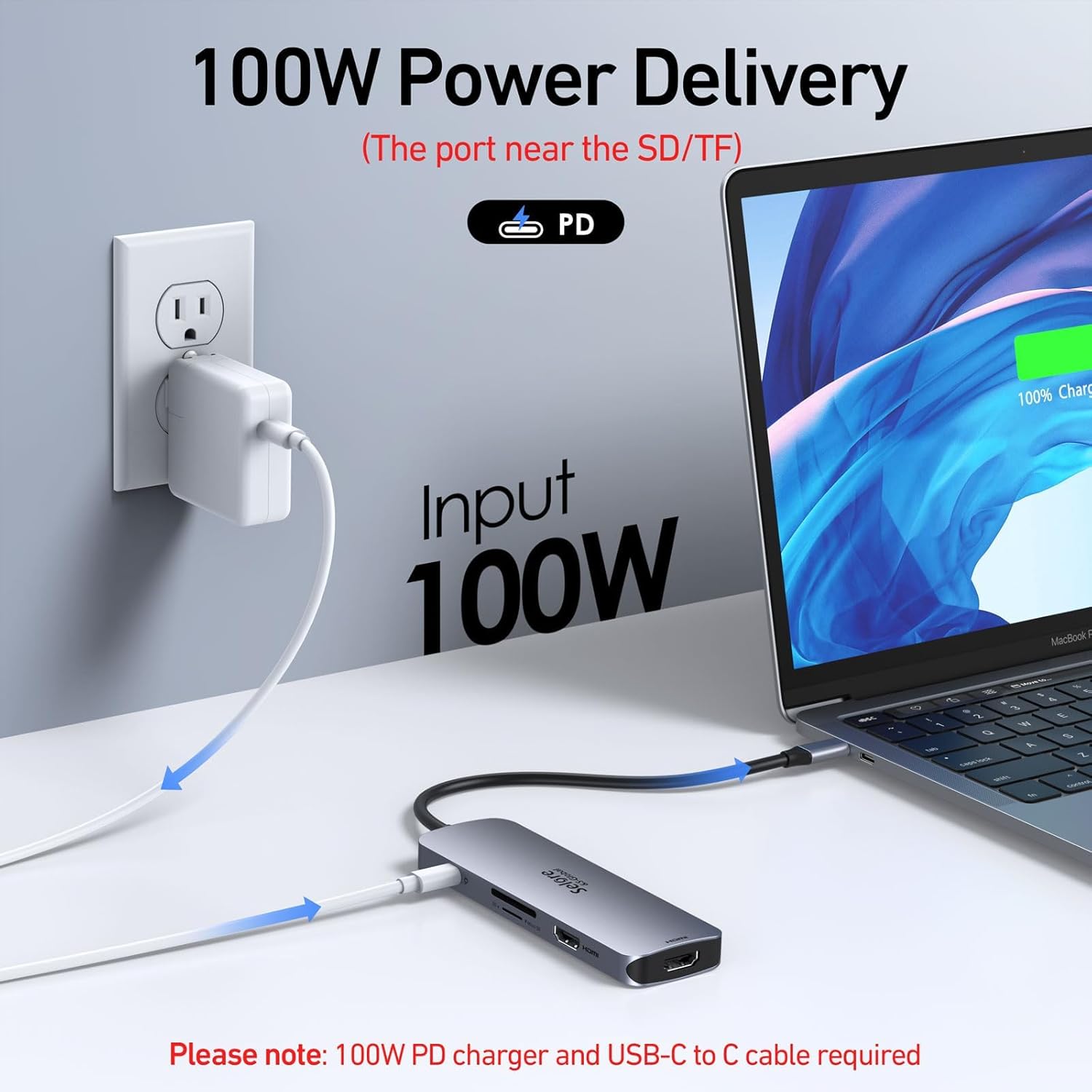
4 100W Power Delivery
5 5Gbps Data Transfer&SD/TF
Why is my HDMI port not working
Docking stations require a Thunderbolt or full-featured USB-C port.
If the USB C port you are using only has data function or charging function, then the video function will not be available
Can I use this dock with a Mac at all?
Yes, but only in mirror mode (SST).
How do I achieve dual 4K@60Hz output with this docking station?
– Your Windows PC must support DisplayPort 1.4 (DP1.4) or HDMI 2.0 protocols.
– Use HDMI 2.0 or DP1.4-certified cables.
Why can’t I get dual 4K@60Hz to work?
Common reasons include:
– Incompatible GPU: Older GPUs may not support dual 4K@60Hz.
– Low-Quality Cables: Non-certified cables may cap resolution at 4K@30Hz.
– System Settings: Check display settings to ensure refresh rate is set to 60Hz.
Key Notes for Buyers
– Windows Users: Full support for dual 4K@60Hz + MST extended mode.
– Mac Users: Mirror mode only; check our [Mac-compatible solutions].
– Need Help? Contact support for personalized troubleshooting.
[8 in 1 USB C Hub Dual HDMI] Transform your laptop with this latest upgrade Selore 8-in-1 dual monitor hub featuring dual 4K60HZ HDMI ports, a 100W PD charging port, a USB-C port up to 5Gbps, two USB 3.0 ports up to 5Gbps and TF/SD card slot up to 104 Mbps. Versatile and all-in-one hdmi adapter for dual monitors,suitable for home and office use for effective work (Docking stations require a Thunderbolt or full-featured USB-C port)
[Dual Monitors Made Easy for DP1.4 Laptop] Note for Mac Users: This adapter only supports mirror mode (repeated display), dual screen extension with two different screens (MST) is not available on macOS! With our advanced intelligent technology, the 2 HDMI to USB C adapter provides temperature control and stable performance. Boost productivity with our usb c dual hdmi supporting MST mode under Windows Laptop for extending two monitors simultaneously
[Speedy charging 100W] This dual hdmi adapter for 2 monitors with a USB-C power delivery port(near the SD/TF) can charge your laptop anytime; hdmi hub for multiple monitors input 100W, output 85W. Please Note: Power charger & charging cable is not included in the package. Note:The second USB C port is only for data transfer
[Fast Speed USB C Dock] 1xUSB C 3.0 &2xUSB A 3.0 port not only allows you quick transfer of data with a speed up to 5Gbps,but also supports to connect to peripheral devices such as mouse keyboards.USB C to SD/TF card reader(speed up to 104Mbs) allows you to easily browse and copy photos and videos from your cameras, and quickly share your beautiful moments
[Universal Compatibility] Note: Docking stations require a Thunderbolt or full-featured USB-C port. If the USB C port you are using only has data function or charging function, then the video function will not be available. Our plug-and-play docking station with 2 HDMI ports is compatible with a wide range of USB C or Thunderbolt 3/4 laptops,including MacBook Pro/Air(only supports mirror mode (SST)). Ideal for home and office use, maximizing productivity and efficiency
13 reviews for USB C Docking Station Dual HDMI Monitor, USB C to Dual HDMI Adapter with 2HDMI Ports, PD Charging, SD/TF, USB A&C 3.0 Ports, Laptop Docking Station for Dell XPS/HP/Lenovo/Surface/Yoga etc
Add a review
$31.99
MagnumMan –
Works Just as Well as the More Expensive Counterparts
Love my MacBook but hate the fact it has just a couple USB-C ports on each side and no SD card or standard USB slots.I’ve had dongles before that increased the MacBook’s capacity but they were attached with USB-C cords that dangled and tangled. In the long run, you sacrificed portability for convenience.This unit plugs into the 2 USB-C ports on the side and adds a variety of USB and memory card functions to the mix.In my case, I attached it to the right side ports so it technically faces upside-down. Even though I can’t see the power-on light, I know it’s working because I can see the green glow of the power light shining down on my desktop.And it’s designed to look like it came with the MacBook (unless you have the newer, colored versions) and even fits nearly flush to the side.One thing to keep in mind, though, is that this is a hub/dongle and merely plugs into the USB-C slots on your MacBook. It provides no power on its own unless you plug in a power source.To that end, it has a pass-through charger port (it’s the first USB-C port available) so if you’re attempting to power yet another port off of this dongle be aware of that.Worth noting, this will NOT work if you have a cover on your MacBook. Covers that come up the side will interfere with plugging this in.As for pricing, it was the lowest priced one I could find at the time and works just as well as the more expensive ones I’ve used in the past (these were originally $100 or more at one time).
Danny B –
Great USB-C Docking Station
Very useful periphery for my computer. It is working very well for my two HDMI terminals and one VGA terminal in addition to my hard wired internet connection.
West Evelyn –
Makes life one bit easier. One USB and everything is connected.
I purchased 2 of these. One for work, one for home, and it works great. I’m now able to plug in a single USB-C cable into my laptop and I get everything connected (keyboard, mouse, iPhone charger, usb power to the laptop and dual HDMI displays).
TreadHead –
Able But Not That Stable
Performs as expected. Great addition to the laptop. It is connected to the USB-C ports on the side and tends to be a little unstable-not to the point of disconnection. Longevity is an issue due to the instability of the connection. A positive lock would be outstanding.
Brent –
It essential to have this adapter with your MacBook
This adapter is a whole lot better than other one for my MacBook Air. It’s definitely worth for the money. Very convenient when are traveling or in the school. The charging capacity is good especially you don’t have a wall adapter. I brought this due to purdhasjng another MacBook to used for my graphic design business (freelancing)
John Falzon –
Great Docking Station
Great docking station. Works well. Just plug your charging system into the docking station, then plug the docking station into your laptop. Everything works well.
Alex DeSantis –
HDMI Port NOT Functional
I wanted this item because I needed to connect my MacBook Pro to a computer monitor, in order to show my staff a presentation for work.I plugged the device into my computer and it asked me if I want to allow this device to connect to my MacBook. I selected yes, and the power light on the device turns on indicating that the hub is powered on.I take a brand new HDMI cord and plug it into my computer monitor and it’s not detecting any HDMI input. I thought maybe it was a setting issue with my computer, so I tried it on my boss’ MacBook. It also shows no picture from his as well. So it appears the hub device has some sort of manufacturer defect regarding the HDMI port. I have NOT attempted to try the other connections, as I specifically only needed the device for the HDMI connection.I am very disappointed because the device hub itself looks very slick… I like how it sits flush with the computer. I also like how it doesn’t have a cord like similar hubs, so I don’t have to worry about a cord going bad. The downside is mine apparently has some sort of defect and I want my money back, but the UPS store is 25 minutes away from my work and literally is ONLY open during the hours I’m working. That means in order to get a refund I’d have to spend my entire hour lunch break driving back and forth to the UPS store.
Jessica –
Laptop Docking Solutions
I love this USB Docking Station! It gives me all the outlets options I need for plugging in multiple monitors to my laptop. It works so well for me I ordered another one for my spouse.
Narán Villegas Olvera –
Funciona bien el adaptador, solo el USB que está solo en un costado se traba y el adaptador no funciona si planean usar un protector o case para su Mac, pues no alcanza a conectarse correctamente.
chaqchaq –
I bought this USB‑C adapter for my MacBook Pro (M1, 15″) and it’s been a lifesaver. The MacBook only has USB‑C ports, so having HDMI, USB‑A, and SD card slots all in one hub makes daily work so much easier. The HDMI output works flawlessly with my external monitor—no lag, no flicker, and crisp 4K resolution.The build quality feels solid, with a sleek aluminum finish that matches the MacBook design. It’s compact enough to carry in my laptop sleeve, and it doesn’t get hot even after hours of use. I also appreciate that the USB ports transfer files quickly and reliably.If you’re tired of juggling multiple dongles, this hub is a great solution. It’s plug‑and‑play, no drivers needed, and everything just works. Highly recommend for anyone with a newer MacBook Air or Pro.
FERNANDO GONZALEZ LOYA –
Te da bastante productividad al poder conectar 3 dispositivos al mismo tiempo, puedes cargar la Mac.
Sarai Lopez –
Funciona muy bien pero si la Mac tiene funda el adaptador no funcionará a menos que se quite la funda
Mickey –
I got tired of having to carry around a sack of dongles. Want to save the day? Carry one of these in your computer sleeve. It always happens when you set up your computer to present your paper, and you don’t have the right dongle. With this you will always be prepared. Great stress reducer.