

UGREEN 7 in 1 Docking Station Dual Monitor, USB C Hub Dual 4K@60Hz HDMI Display, 10Gbps USB-A/C Data Ports, 100W PD, Aluminum Revodok Pro Laptop Docking Station for HP, Thinkpad, Dell and More
$26.99
Related Products
![SAMSUNG Galaxy FIT 3 [2024] 1.6″ AMOLED Display | 14 Days Battery Life | 100+ Watchfaces | 100+ Exercise Modes | International Model – (Black)](https://allthetech.org/wp-content/uploads/2026/01/517dEn58PHL._AC_SL1080_.jpg)




From the brand

UGREEN Multi Display Dock
Multi Display Docking Station
UGREEN Multi Display Dock
UGREEN 10Gbps USB C Hub
UGREEN Revedok USB C HUB
Revodok Max
Revodok Pro
Revodok Basic

7 In 1 USB C Laptop Docking Station:UGREEN Docking station comes with 2 HDMI, two 10Gbps USB A ports, two 10Gbps USB C portsand, a PD 100w charging transfer port. To achieve the full capabilities of hub, ensure your laptop’s USB-C port is a full-function or Thunderbolt 3/4 port and Ensure that the cables you are using are compatible with the interface.
Dual 4K@60Hz HDMI Display: The Dual HDMI Dock features two 4K@60Hz HDMI ports, allowing dual-screen 4K@60Hz HD configuration. Please ensure your laptop supports DP1.4. Note: Due to macOS limitations, all extended monitors will display the same content.
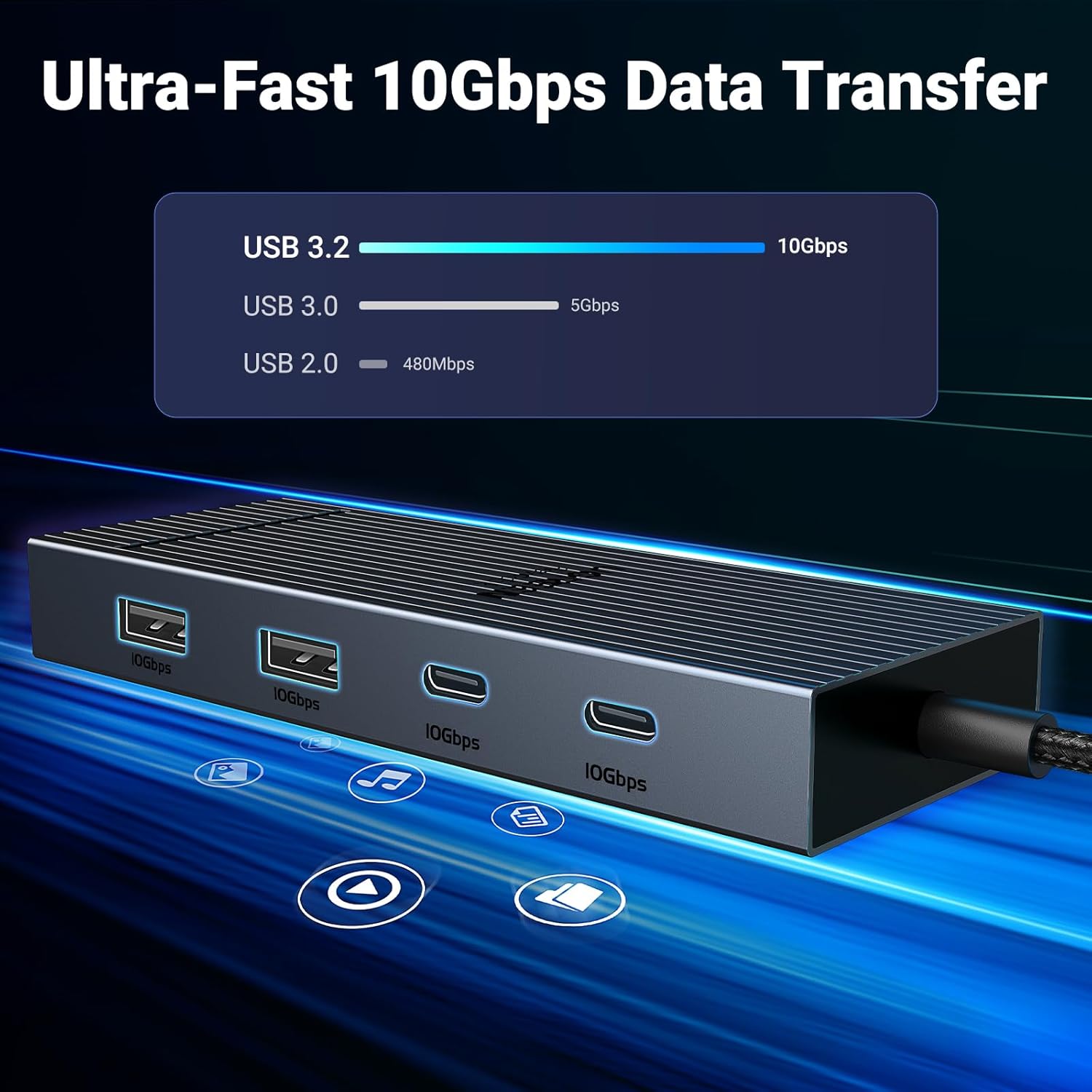
Lightning Fast Transfer Speeds: This dual HDMI USB C hub docking station comes with two USB A&C ports for connecting keyboards, mice, and transferring data in USB 3.2. Note: The 10Gbps USB A and C ports do not support charging, video or audio transfer, 10G rate requires the cable to also support 10G rate, 10G rate requires the cable to also support 10G rate.
PD100W USB C Adapter: The PD 100W Fast Charging Docking Station boasts 100W, Please note that the charging cable and power adapter are not included. Additionally, the port only supports charging; it does not facilitate data transfer or video output, PD100W requires a 100w+ charger or original charger(100w+ required)
Wide Adaptability: The Type-C docking station is compatible with ThinkPad X1, ZenBook, Chromebook, Surface, etc. Note: Windows systems can utilize an extended dual-screen display, Mac devices are limited to mirror mode.If you are a Mac user and want two external monitors to display different images, we do not recommend using this dock.
13 reviews for UGREEN 7 in 1 Docking Station Dual Monitor, USB C Hub Dual 4K@60Hz HDMI Display, 10Gbps USB-A/C Data Ports, 100W PD, Aluminum Revodok Pro Laptop Docking Station for HP, Thinkpad, Dell and More
Add a review
$26.99
Throckmorton P. Ruddygore –
Great value hub!
I have a Dell Pro 14 Plus from work with 100W charger. The hub works flawlessly, allowing me to both power my laptop and connect to two additional displays through a single USB-C connection. However I also have a personal Dell XPS that has 130W charger. I get a warning that the hub is underpowered when using the XPS, but it still charges the battery just fine, albeit a little slower. Overall the product works as advertised and so far has kept up with everyday use for over a month. It shows no signs of overheating – great value so far!
A.H. –
Good Product
Awesome docking station for its purpose. The item arrived on time. You can just plug it in and it is ready to work. There are multiple ports to be used. Very convenient for computers that do not have a lot of USB ports.
JG –
Make sure you use a quality power supply
Works well but make sure you use a quality power supply. I’ve only had this for a couple weeks. At first I was having some weird problems with it randomly disconnecting. I didn’t exactly blame the dock because that laptop has had problems with other USB devices. But the way it was disconnecting made me think maybe it was a power issue. I was using a 65w Dell charger which should have been sufficient. When I traded it out for a 65w Lenovo charger, the problems went away for the most part.Power requirements will vary based on the equaiment you have plugged in so I can’t really blame the dock for this. I should be using more than 65 watts, at least 10 watts higher, but I don’t have a more powerful adapter lying around. If you’re having problems, this is worth considering.
Draco76123 –
Does what it claims to do.
Initially hooked it up to test and it worked as expected, so far. I used this on a Windows 11 laptop and both monitors worked perfectly. I bought this to set up my work from home setup and I think it’s going to work out just fine.One thing I didn’t realize until I got the item and hooked everything up was that there’s no ethernet port. I think I was mainly concerned about the dual monitor capability and price when I was doing my research that I completely overlooked the ethernet, not a deal breaker though, I’ll just have to make two connections instead of just one USB-C connection to my laptop.The cord is definately not long enough, in my opinion. That fixed USB-C cable is 13 and 3/4 in long. I have an extension though but if I didn’t have it, I would have had to buy one. Thats not really necessary unless you want a nice clean looking workstation with all the cables tucked away nicely. I plan on using this in conjunction with a KVM switch that I’ll be purchasing later.The power pass through seems to work just fine. My laptop appears to be charging normally, no popup saying my battery is charging slowly. I’m using a 65 watt power brick for the power, not 100 watt like the description suggests. Although, my laptops original power cord is also rated at 65 watts.Overall, initial impressions, seems like a good cheap option for a laptop dock, especially if you work from home sometimes. I gave four stars just for the fact there isn’t an ethernet connection, otherwise would have been five. Many other cheap docks like this one have an ethernet port, why not this one? I would suggest using ethernet over Wifi any time it’s feasible. Thanks.
Santiago Chavarro –
Stop working after a few months and Low charging performance
After 5 months of use, out of nowhere it stopped working and i had to buy another docking station . I contacted the manufacturer but i got no response.Also, the charging port (PD) does not charge the laptop properly. I always got a message in my laptop saying “low charging”, and the computer would never get fully charged while using it connected to the docking station.
Brendan figlioli –
Doesn’t require a driver download perfect for if you work at home
Works great plug and play computer detected immediately! Can’t believe how compact it is
Timmy B –
A tank of a USB hub that does everything you need it to do.
I hooked up an external hard drive, my webcam, and use it to charge my phone. Initially, I was concerned about whether or not it would provide enough juice to give each item what they needed, but I was pleasantly surprised to find that everything was getting the same amount of wattage it was before. There are plenty of USB ports to keep me happy. My computer came with some in front and some in back, but it wasn’t enough for all the different accessories I have. I looked at adding a PCIE card, but this hub did the trick for exactly what I needed it to do.I was also concerned about how much data would be able to flow through the hub, but again, I was surprised because the hub connected straight to one of my USB-C slots, which provided a high transfer rate. Well, high enough for me. It’s really small, which I like. I can pack it in my backpack or laptop bag. The cord is short enough to be practical, but not so short that you can barely move the whole thing. It looks great, in that it’s a neutral design that doesn’t stand out in any negative ways. I have it velcroed to the side of my desk, and it’s been rammed by the side of my computer a few times, so I know it can take a beating. Its strength is something I really like about this little hub. I don’t have to be worried about tossing it in a bag and having it get bumped around or smashed. Overall, just what I needed, and for a great price.
mephusto –
Disconnects sometimes..
This dock fit the bill for what I needed, a portable dock for when I go on trips. At first I was really happy with it but I had noticed that it did not seem to charge correctly. After some trial and error I realized the same thing that others have said about it. When my laptop reaches full charge it says “Connected” but will no longer charge. If i disconnect then reconnect it starts charging again. The only other big problem for me was that it did that while I had a portable ssd connected and caused file transfer issues. I think it will still be okay for on the road and connecting keyboard and mouse and monitor but that is all. I am undecided if I will keep or return.
Kieran Fowler –
Very easy setup for my work station at school, no longer have to plug loads of different things into my laptop. This even works with an extra USB hub plugged into it allowing for even more USB connectivity.
MICHELA –
Ho acquistato questo hub per utilizzarlo con un monitor portatile, nello specifico l’Arzopa Z1RC, che supporta la trasmissione video sia tramite HDMI che tramite USB-C. L’hub si presenta ben costruito, con una scocca in alluminio elegante e che rimane fresca anche durante l’uso prolungato.Punti di forza:• Porte disponibili: 2 HDMI (4K 30Hz), 2 USB-C dati (10Gbps), 2 USB-A, e una porta USB-C PD per la ricarica.• Tutto funziona perfettamente e senza problemi, inclusa la trasmissione video tramite le porte HDMI.• Design compatto ed elegante, perfetto per un utilizzo quotidiano.Limite importante:L’unico motivo per cui non assegno una valutazione piena è la mancanza di una porta USB-C dedicata alla trasmissione video.Il mio monitor Arzopa Z1RC, infatti, supporta la trasmissione video tramite cavo USB-C → USB-C (offerto con il monitor), il che consente di evitare l’utilizzo di un cavo HDMI. Tuttavia, con questo hub non è possibile sfruttare questa funzionalità poiché:1. Le due porte USB-C presenti supportano esclusivamente il trasferimento dati.2. La porta USB-C PD è dedicata esclusivamente alla ricarica e non permette la trasmissione video.Di conseguenza, è possibile collegare un monitor solo tramite HDMI, escludendo la possibilità di usare USB-C per video.Conclusione:Si tratta di un buon prodotto, funzionale e ben realizzato, ma avrei preferito che una delle porte USB-C fosse compatibile con la trasmissione video. Questo sarebbe stato particolarmente utile per monitor portatili come il mio, che supportano ingressi video sia HDMI che USB-C.Se il vostro monitor utilizza esclusivamente HDMI per il video, questo hub è una scelta eccellente. Tuttavia, se desiderate sfruttare una connessione video USB-C, meglio cercare un prodotto alternativo.
Adrian –
Ich bin mit diesem USB-C Hub sehr zufrieden. Alle Anschlüsse funktionieren einwandfrei und ohne jegliche Probleme. Sowohl die USB-A- als auch die USB-C-Ports liefern eine stabile Verbindung.Positiv hervorzuheben ist, dass entgegen der Produktbeschreibung auch das Laden von Endgeräten über die USB-C-Anschlüsse möglich ist. Das war für mich ein großer Pluspunkt und funktioniert zuverlässig. Ob dies auch funktioniert, wenn 2 Monitore über HDMI angeschlossen sind, kann ich nicht beurteilen, da ich nur einen Monitor angeschlossen habe.Ein externer Monitor wurde über HDMI angeschlossen und sofort problemlos erkannt. Bild und Signal sind stabil, es gab weder Aussetzer noch Verzögerungen.Die Verarbeitung wirkt hochwertig, das Gerät wird im Betrieb nicht unangenehm warm und eignet sich ideal für den täglichen Einsatz im Homeoffice oder unterwegs.Insgesamt ein sehr gutes Preis-Leistungs-Verhältnis – klare Kaufempfehlung.
Sameer Tangri –
My main use case is extending display from my laptop and mobile to my Ultrawide monitor. This hub works fine with my Dell Windows and my Macbook Air M4 15″ laptop.I tried cheaper hubs but they failed to give me a good display extension from my Windows laptop to an LG 29″ Ultrawide monitor (its recommended display resolution is 2560×1080 @ 60Hz). With this UGreen hub, I am able to extend my Windows laptop display and the display is perfect because this hub gives me 2560×1080 @ 60Hz display output. The cheaper hubs were cheaper (I saved money), but useless as they gave me 4k display output at 30Hz which was very bad because the text appeared stretched and unreadable on my LG 29″ Ultrawide monitor.My second use case is to use this hub with my Samsung Galaxy Fold 4’s Dex mode and use it on my LG 29″ Ultrawide monitor. This use case also works perfectly with this hub. Again the 4k @ 60Hz output is the game changer here. With other 4k @ 30 Hz hubs the text was unreadable and very pixelated too.This hub’s build quality is very premium and another good part is that its type-c connector cable is quite long. This makes it easier to connect to my laptop. Other hubs had very small type-c connector cables and it was more difficult to use, in comparison, especially when there are multiple devices connected to the hub.Its passthrough charging works perfectly. ANother good thing is that if I leave my laptop charger connected to this hub, and then connect the hub to my Samsung Galaxy Fold 4 mobile, the phone also gets charged while its display is output to my widescreen monitor.I compared products like Samsung’s Multiport Adapter and Belkin’s hubs. Samsung’s hub is more expensive with fewer ports. The Belkin hub is at almost the same price as this UGreen one but it has 4k @ 30Hz display output. I would recommend paying the extra premium and buying this hub or another one with 4k @ 60Hz display support because that is a key feature that future-proofs the purchase.
Triple B –
Works as expected and better than other know competitors.