

Anker Nano Laptop Docking Station with Detachable Hub, 13-in-1 USB-C Triple Display with 2 HDMI and 1 DP, 10 Gbps USB-C, 3 USB-A, Audio, SD/TF, Ethernet, 100W Max PD for Dell, Lenovo, HP, and More
$109.99
Related Products


![SAMSUNG Galaxy FIT 3 [2024] 1.6″ AMOLED Display | 14 Days Battery Life | 100+ Watchfaces | 100+ Exercise Modes | International Model – (Black)](https://allthetech.org/wp-content/uploads/2026/01/517dEn58PHL._AC_SL1080_.jpg)




From the brand


Fast access to today’s prime
Power to Drive Your Prime
Ultimate Power to Keep Giving
Doubly Fast in a Snap
Pro Fast Charging in a Nano
Anker’s Sustainability Plan
Get Powered Up Now
Series 7 I Future Technology
Series 5 I Higher Quality
Series 6 I Unique Experiences

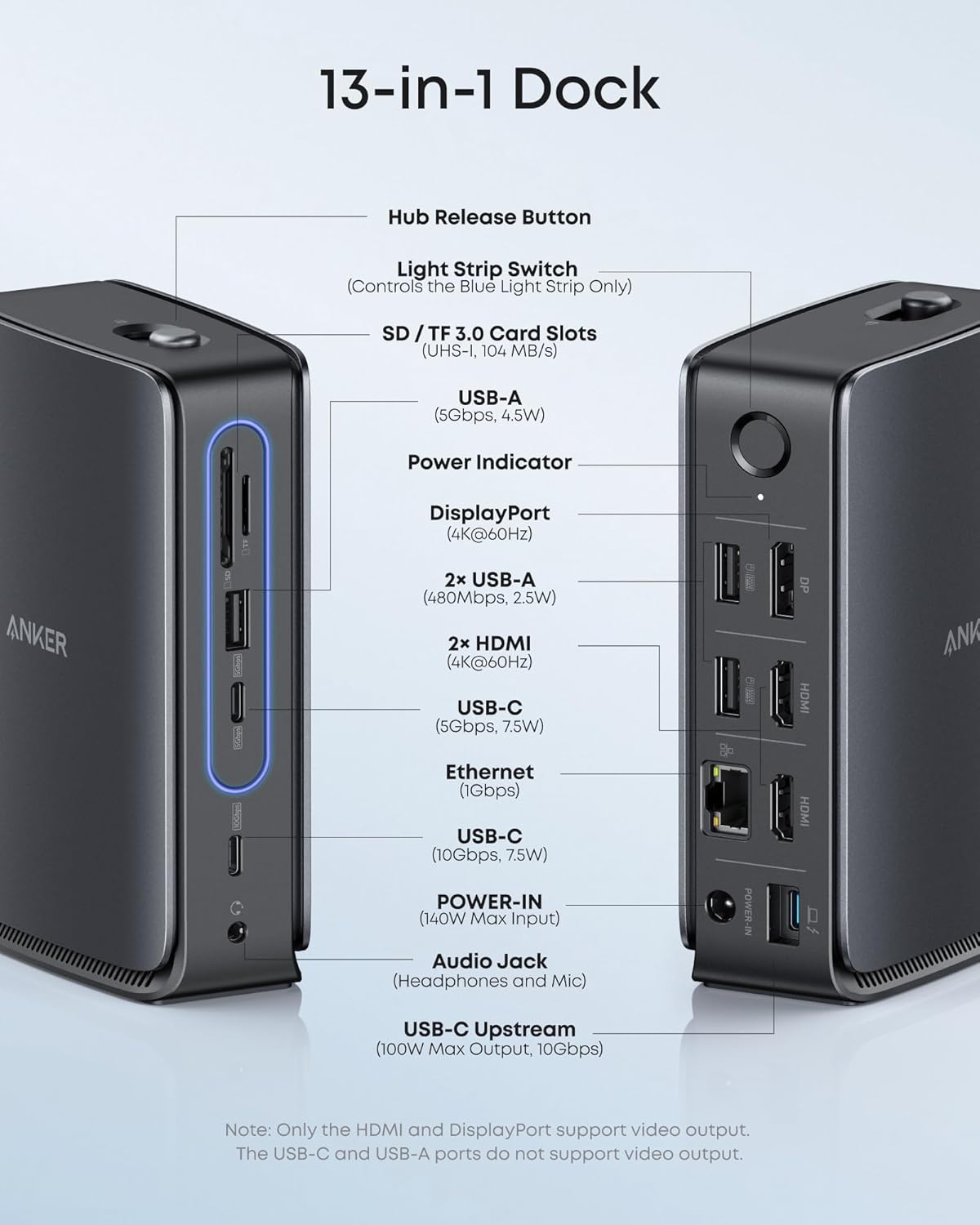
13-in-1 Dock with Detachable Hub: Switch effortlessly between full desktop setups and mobile work with a 13-in-1 dock for every connection plus a detachable 6-in-1 hub for quick, on-the-go access.
Flexible Display Options with Main Dock and Removable Hub: Set up a triple-screen workstation with the dock or connect one display through the hub when working away from your desk. (Note: On macOS, all external monitors mirror the same content. Only the HDMI or DisplayPort supports video output. The USB-C does not support video output.)
All the Connections You Need: Features a USB-C upstream port, two USB-C data ports, three USB-A data ports, dual HDMI and DisplayPort outputs supporting up to 4K resolution, an Ethernet port, audio jack, SD and TF card slots, and a DC input port. The detachable hub adds essential ports for convenient access on the go.
Fast Power Delivery and Data Transfer: Deliver up to 100W to your laptop while transferring data at speeds up to 10 Gbps via USB-C. The dock supports up to 140W max input from the included power adapter to maintain stable power for all connected devices.
What You Get: Anker Nano Docking Station (13-in-1, Triple Display, Built-In Removable Hub), 3 ft USB-C to USB-C cable for the upstream port (10 Gbps), a 140W power adapter with a built-in 5 ft power cord, and safety sheet with QR code for the user manual, hassle-free warranty, and our friendly customer service.
8 reviews for Anker Nano Laptop Docking Station with Detachable Hub, 13-in-1 USB-C Triple Display with 2 HDMI and 1 DP, 10 Gbps USB-C, 3 USB-A, Audio, SD/TF, Ethernet, 100W Max PD for Dell, Lenovo, HP, and More
Add a review
$109.99
Emily –
Solid Multi-Monitor Hub with a Smart Detachable Design
The Anker Nano Dock provides a good selection of ports: two HDMI and one DisplayPort, which allow for triple-display extended mode. I usually connect two external monitors to my Windows laptop, but I tested it with three and everything worked perfectly.It helps keep my workspace tidy by replacing multiple cables with a single USB-C connection, and it allows me to switch between my personal and work laptops very quickly.What I find another useful feature is the detachable design: the small one can be separated from the base, making it compact enough to slip into a laptop bag for travel or meetings.Overall, it’s a practical and well-thought-out docking solution that works well both at a fixed desk and on the go. If you need multiple-monitor support and need to switch devices, it’s definitely worth considering.
LB –
Good for a portable dock, not enough for full permanent set up
This works well for a portable dock, but I was short one USB-A for my full set up needs. Used a converter, but completely full. I will get more ports next time. I was afraid it wouldn’t stand upright with all with weight of the connections hanging on it, but miraculously it does.
Yi W –
Great product
This is a great product.First of all, the design of this USB-C docking station is very creative. It uses a main dock + detachable hub design. When working at my desk, I can keep it on the table, and when I need to travel, I can press the mechanical button to pop out the small hub. The eject and insert mechanism feels smooth and solid, and it’s very convenient to carry around.It also has plenty of ports and can connect up to three displays at the same time, which is a huge help for my creative and design work.
Red Rooster –
Compact, adaptable, ready to go
Plug and play. No set up required. The removable adapter within the docking station was a smart move to satisfy on the go requirements and add flexibility.
Holden Caufield –
Works well, not enough power for Dell Laptop
It works well, but isn’t powerful enough for my Dell XPS-15 laptop so I always get a warning that performance sill be impaired…but it seems to keep it charged while I’m using it.
Jeremy –
Awesome dock
Great new product. Happy with the advancement in this
Lil MamaKitty –
No DisplayLink = not 3 monitors+laptop display screen use; dual display signal drop problem
I decided to invest in this docking station because my small USB-C Anker hubs worked to connect 2 hdmi monitors but one would go off periodically. An annoyance while working but really disruptive during a meeting when I’m screensharing! The same thing happened using different monitors, 3 different laptops (one brand new), and two different Anker usb-c hubs. I also wanted to add a 3rd monitor, to extend across 4 display screens. This way I can have a zoom/teams/meet meeting open on the laptop, a workbook on one screen, an ERP on another screen, and a program connected with the ERP on a 4th screen. Maximum efficiency.Everything connected pretty easily. I was happy for about 10 minutes until… blank screen again! Same problem, one monitor display drops signal with this docking station that cost over 3 times what I paid for the portable hubs.And I found out, there is no DisplayLink technology in the Nano, so despite having ports for 3 monitors and claiming ‘triple display’, the reality is this: if you want to use 3 monitors AND have a functioning laptop display, unless your hardware specifically supports it, you can’t even if you download DisplayLink drivers and make it work using this dock. Yes your laptop will recognize all 4 displays, but you can only use 3 of them (with one being the laptop screen, or you forfeit using that screen), so what is the point in having 2 hdmi and a DP for displays? Ye you can plug it all in but you can only use dual monitors with your laptop, and one of the monitors may randomly go blank for 10-30 seconds.Anyway, I’m going to choose an actual docking station for 3-4 monitors that has DisplayLink. It will cost about 3 times more than this nano but at least it will (hopefully) function.
Bob and Dang’s Journey –
Premium Dock and Power Supply, But Slow USB 2.0 Ports On Back Are a Substantial Flaw
I reviewed this Anker Nano Docking Station for my professional workflow. This is really nice hardware; it has a good heft to it and feels well put together. The included upstream cable is premium, and the 140W charger is very nice, providing plenty of power to the laptop and all connected peripherals. I used this with a MacBook and my single external monitor, and the display worked fine.The front mini-hub is a nice feature that detaches, though I likely won’t use it. Speeds are good for the USB 3.0 connected ports.However, I have one substantial gripe with this unit: the USB-A connections on the back are all connected to a USB 2.0 hub. This means they are all really slow. Since this is where I would prefer to attach my external storage, this causes a 10x hit in performance, which I am not willing to pay. Instead, I have to route a cable out the front and back behind the device to where my external disk enclosure sits, which is ugly and wastes space.There is no reason to be using USB 2.0 on a modern premium dock, and this flaw is substantial for my use case. I give this 3 stars.