

Graphic Drawing Tablet, Digital Sketch,Design for PC and Computer/Pad-12 Hot Keys, Compatible Windows/MAC/Android,The Adjustable Ergonomic Stand,16384 Upgrade Levels Battery-Free Pen,ienRon 10×6.25
$37.98
Related Products


From the brand


ienRon provides high-quality digital drawing tablets, switches, and creative devices for artists and network users. We combine advanced technology with meticulous design to offer exceptional performance and inspire innovation. Our products reshape how we create, learn, and work. At ireRon, we believe your contributions make the future brighter and more vibrant.
Drawing tablet ienRon IES1060
Drawing tablet ienRon EIS1060



Graphic Drawing Tablet Wide Compatibility: This ienRon IES1060 drawing tablet is compatible with Windows XP, 7, 8, 10, 11 and later versions, Android 5.0 and above; Mac OS 10.7.0 and later versions. Not for iPhone/iPad/Chromebook. This drawing pad works seamlessly with most major creative drawing software such as Photoshop, SAI, FlipaClip, Medibang, Adobe Illustrator, Lightroom, and supports Microsoft Office. It is also suitable for left-handed users
Drawing tablet for pc Customizable Shortcuts for Enhanced Efficiency: ienRon art tablet featuring 12 customizable shortcuts keys and 10 soft multimedia keys, the ienRon drawing tablet allows you to personalize your favorite shortcuts, enhancing convenience and efficiency in different software applications. This makes it ideal as a drawing Pad for PC
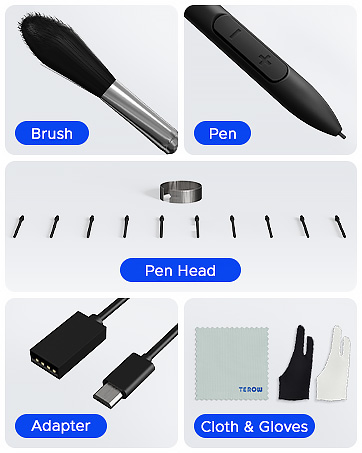
Drawing Pad for pc and computer with Battery-Free Pen with Advanced Tilt Functionality: This computer graphics tablets Equipped with an innovative battery-free stylus that requires no charging and comes with 30 replacement nibs, offers 60° tilt recognition, providing precise cursor positioning at various angles. With 8192 levels of pressure sensitivity, it ensures accurate control over line thickness, adding depth and shading to your artwork
Digital drawing tablet for User-Friendly Design: This digital drawing tablet is designed to be very user-friendly. Simply connect it to your personal computer or laptop, download and install the driver from the official website, and start creating immediately. Note: This graphic drawing tablet requires connection to a computer, laptop, or an Android-based tablet or smartphone to function
Good Gifts for Beginner Drawing Pad: The ienRon drawing pad for computer is tailor-made for beginners in drawing, design, teaching, photo editing, and more. It’s the perfect starting point for anyone’s journey into digital art, unlocking boundless creative inspiration
8 reviews for Graphic Drawing Tablet, Digital Sketch,Design for PC and Computer/Pad-12 Hot Keys, Compatible Windows/MAC/Android,The Adjustable Ergonomic Stand,16384 Upgrade Levels Battery-Free Pen,ienRon 10×6.25
Add a review
$37.98
Harvey –
Amazing product and cheap for a drawing tablet
This drawing tablet is amazing, works well and easy to use. And even works on other apps, so you can use it for other things, not just drawing, you can also skip songs if you don’t want to go to Spotify or any other music platform. Totally recommend!
Rosa A. –
Excellent Performance and Value – I Highly Recommend!
This drawing tablet offers outstanding performance and value, making it a great choice for beginner artists, digital illustrators, and students, while also serving as a solid alternative for professionals on a budget. The battery-free pen is responsive and comfortable to use, with excellent pressure sensitivity and virtually no input lag, providing a smooth and natural drawing experience. Its sleek design is both durable and portable, and the textured surface adds to the overall drawing control. Connectivity is seamless — I’ve easily used it with my PC, laptop, Android tablet, and phone without any issues. For the price, it’s hard to beat the quality and versatility this tablet delivers.
sybille crom –
Easy to use, fun and lightweight , great Value
Exceptional Value , love the sleek Design and its multi -functions , it makes this lightweight Tablet fun and easy to use , the added Pen is a great Tool for added Accuracy.
Amazon Customer –
Really great! But not for Linux
Been using it to learn to draw for a couple months now, and I’m very happy that I did. Drawing with the tablet is very responsive, pressure sensitivity works well, all buttons are configurable (except for one of the two buttons on the pen. which is always right click) with the application/driver included on the device, hovering over the tablet to move the mouse works well. The extras are all super useful, I can’t imagine running out of nibs in the next few years even though it’s noticeably worn in the past month or two. The mouse movement might be the slightest bit wiggly when hovering?If you use Linux, get a different tablet. The configuration application obviously only works on Windows, and the tablet is basically useless because the tablet switches to the drawing area for phones. Someone made a hack for it, but I couldn’t get it to work.
Miriam kidd –
Perfect for making art
This was a ragalo for my 20-year-old son who likes art, it is a perfect gift if your son likes to draw. My super happy, I recommend it.
Nora Jean Stone –
Really impressed for the price. Tons of accessories.
I’m really impressed with this tablet for the price. The amount of accessories is amazing. I recommend using the camera on your cellphone and zooming in on the instructions provided, because the type is so small it is hard to read. When you get to the website it is written in Chinese, so use the translating option on your browser, I use Edge and it worked easily. The pen and tablet worked before I downloaded anything. Still, download the driver and install it. Install the tablet software. I recommend you download the graphics program they offer because it works with this tablet, ignore the Microsoft warnings (YouTube videos recommended that). I tried using Adobe Photoshop CS2 and it got buggy. You can still use your mouse while the tablet is plugged into your desktop computer (I have not tried this tablet on my laptop). That’s nice because it takes a minute to get used to the pen. I have not yet customized the pen options. I explored doing a simple sketch trying out the pencil, paint brush, airbrush functions and erase. Use the 2 finger glove provided, it keeps your drawing smooth because the sweat on your hand sticks to the tablet. I spent less than a half hour setting up. Find the manual for your tablet model on their website and it’s a PDF in English. I plan to print it out.
FH –
A good entry level drawing tablet
This is a good entry level drawing tablet. The only thing that would make it better would be a way to interface with iPhones.
Luis E. Torrescamacho –
Pen Tablet
Nice size, and very responde to my pen commands.