

CalDigit TS4, 18-in-1 Thunderbolt 4 Docking Station, 98W Charging, 3* TBT4 (40Gb/s), 3* USB-C + 5* USB-A (10Gb/s), 2.5GbE LAN, 1*8K@30Hz or 2*6K@60Hz Displays, Mac/Windows/Chrome, 0.8m Certified Cable
$379.99
Related Products


Product description

Universally Compatible*
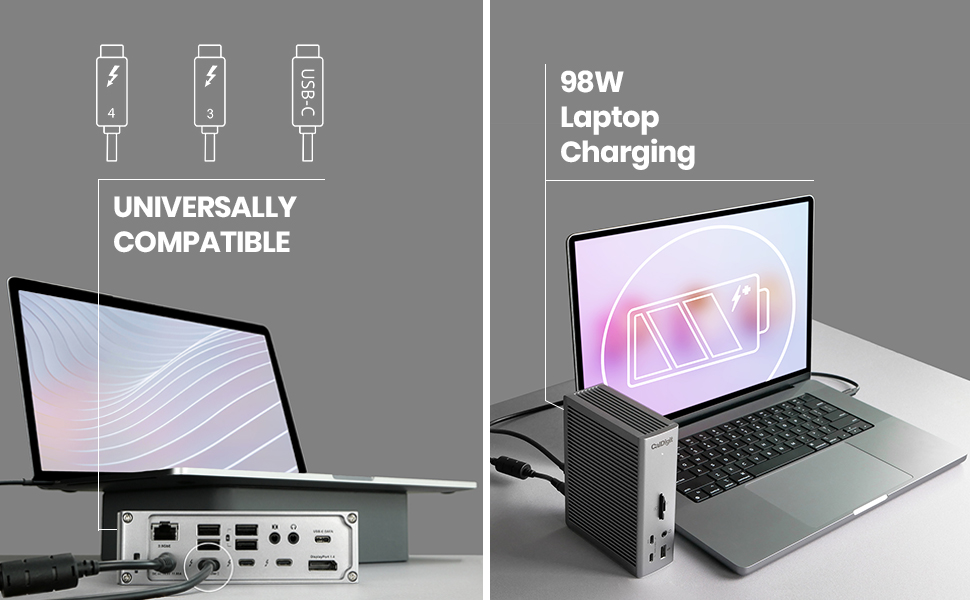
Having the ability to use the TS4 on any Type-C (with data, power, and video support) computer or tablet is incredibly convenient.Compatible with Thunderbolt 5, Thunderbolt 4, Thunderbolt 3, USB4, and USB-C (with data, power, and video support) computers, the TS4 adapts to the host computer it connects to, providing the features available to your computer or tablet. **Devices using less powerful/older interfaces than Thunderbolt 4 or USB4 will see a reduction in performance capped by their max specificationsThunderbolt 3, 4 and 5 PCIntel Thunderbolt 3 Mac¹M4, M Pro, M Max & Ultra Thunderbolt 4 or Thunderbolt 5 Mac¹M1 Thunderbolt 3 Mac¹Thunderbolt 3, 4, & 5 PCUSB4 PCUSB-C (with data, power, and video support) PCUSB-C (with data, power, and video support) Windows TabletThunderbolt or USB-C (with data, power, and video support) iPad²Thunderbolt or USB-C (with data, power, and video support) Chromebook
Fastest Laptop Charging
When it comes to laptop charging the TS4 provides up to 98W of power delivery.
That is the highest charging provided by any Thunderbolt 4 dock, and is ideal for larger screen laptops that require more power.
For laptops or tablets that require less than 98W, the TS4 will only supply the wattage required by your device.
20W USB-C Port
One of the front-facing USB-C ports can supply up to 20W of power for your attached USB-C device.
This is ideal for accessories that require more power, such as Apple’s MagSafe wireless charger.
More is More
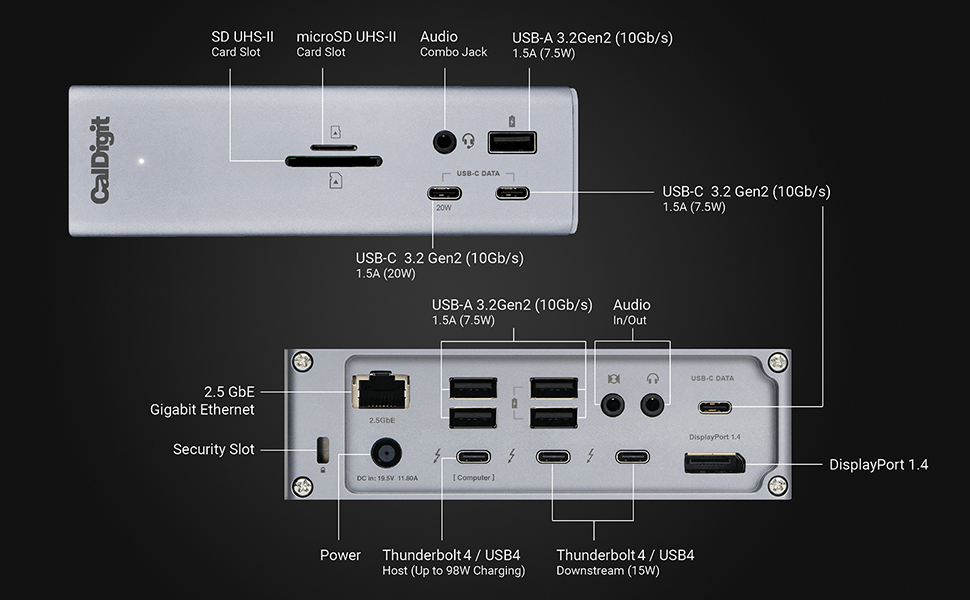
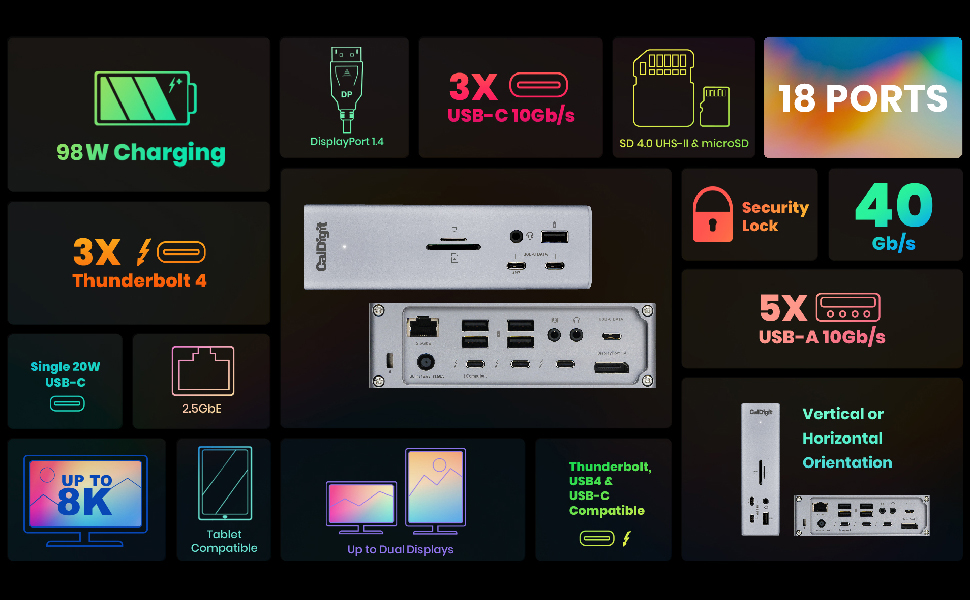
The TS4 offers a staggering 18 ports of connectivity, the most featured on any Thunderbolt dock ever. The purpose of a device like this is to never run out of ports, and for the majority of us, that should certainly not be the case with the TS4.
8 USB Ports
With 8 USB ports on the TS4, a mixture of USB-A and USB-C, you have plenty of port connectivity to connect your USB accessories³.
All of the USB ports on the TS4 offer 10Gb/s performance.
2.5 Gigabit Ethernet
The TS4 is a dock that provides a lot of unique features, and that is certainly the case with the inclusion of 2.5GbE.
2.5GbE is 2.5x faster than traditional Gigabit Ethernet, and is becoming the new standard for routers, switches, and NAS devices.⁴ The TS4’s 2.5GbE functionality represents great value for money.
Of course you can use the 2.5GbE port on the TS4 with traditional 1GbE Ethernet devices.
Single 8K or Dual 6K 60Hz Displays⁵
When it comes to connecting a monitor the TS4 offers outstanding visual clarity.
Single Monitor
If you’re looking to add a single monitor to the TS4 you can either connect it to the DisplayPort connector or to one of the spare Thunderbolt 4 ports. If you wish to connect a HDMI monitor you can either connect an Active DisplayPort to HDMI Adapter, or use a USB-C to HDMI Adapter (sold separately).
Dual Monitors
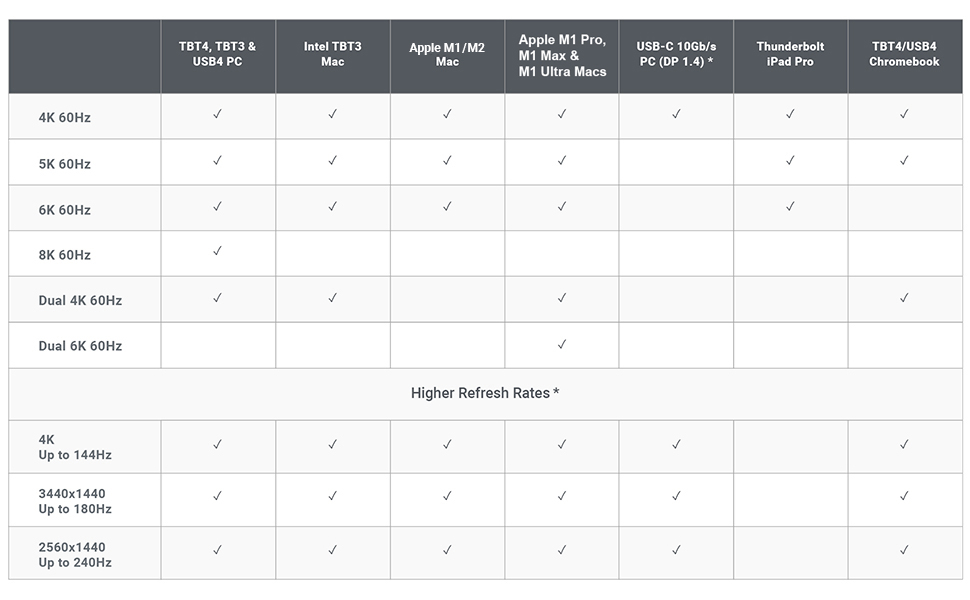
macOS users on M series Pro, M series Max, M series Ultra, M4, or Intel based Macs can connect up to dual displays.M1 – M3 based Macs cannot support dual monitors through their Thunderbolt ports.Windows PC Thunderbolt 3, Thunderbolt 4, and Thunderbolt 5 users can connect up to dual displays.USB-C 10Gb/s devices with MST (with data, power, and video support) can support dual displays up to 1440p 60Hz
Technical Specifications
Interface
3 x Thunderbolt 4 (40Gb/s)3 x USB-C (10Gb/s)5 x USB-A (10Gb/s)1 x DisplayPort 1.41 x SD 4.0 (UHS-II)1 x microSD 4.0 (UHS-II)1 x 2.5 Gigabit Ethernet1 x Front Combo Audio In/Out (3.5mm)1 x Rear Audio Out (3.5mm)1 x Rear Audio In (3.5mm)1 x DC In (19.5V 11.80A)
Minimum System Requirements
macOS 11.4 (Big Sur) or above or Windows 10 (20H2) or aboveThunderbolt 5, Thunderbolt 4, or Thunderbolt 3 Computer USB-C (USB4) or USB-C (with data, power, and video support) ComputerChromebook (Thunderbolt or USB-C)iPad Pro/iPad Air/iPad mini (Thunderbolt or USB-C) or Windows Tablet (Thunderbolt or USB-C)
**USB 4, Thunderbolt 4, or Thunderbolt 5 is required for maximum performance. When used with older or less powerful interfaces such as Thunderbolt 3, Thunderbolt 2, Thunderbolt 1, USB-C (with data, power, and video support), performance will be capped at the capability of the the host interface specifications
Power Delivery
Thunderbolt 4/USB4 Host Port: Up to 98WEach Downstream Thunderbolt 4/USB4 Port: 15WFront 20W USB-C Port: 20W & Remaining USB-C Ports: 7.5WUSB-A Ports: 7.5W
Size & Weight
Height: 5.55” (141.0mm) | Width: 1.65” (42.0mm) | Length: 4.46” (113.0mm) | Weight: 1.41 lbs (0.64kg)
In the Box
1x CalDigit TS4 1x Thunderbolt 4 Cable (0.8m)2x Rubber Feet Strips1x Power Cord & Power Supply (230W)
¹ Requires macOS 11.4 or above
² Functionality is dependent on host computer or tablet’s capabilities.
³ USB-C & USB-A ports are for data only. Users who wish to connect monitors must connect them to the spare Thunderbolt 4/USB4 ports.
⁴ 2.5GbE performance requires a Thunderbolt host & 2.5GbE compatible devices or above.
⁵ Some refresh rates require DP.14 HBR3 and DSC 1.2 support from host, GPU and monitor. Some Thunderbolt 3 hosts that only support DP 1.2 will be capped at a lower resolution & refresh rate. The bit/color depth may vary in order to support higher refresh rates. The support of higher refresh rates may vary due to OS updates. Some Windows PC manufacturers have decided to restrict functionality on their Thunderbolt 3 and USB-C ports such as charging and monitor compatibility. Check to see if your PC supports external monitors.
Add to Cart
Add to Cart
Add to Cart
Customer Reviews
4.1 out of 5 stars 1,658
3.9 out of 5 stars 4,569
3.9 out of 5 stars 862
—
4.0 out of 5 stars 801
Price
$379.99$379.99 $209.99$209.99 $227.00$227.00
— no data
— no data
Host Interface
Thunderbolt 4 – 3 Ports (1 Host, 2 Downstream) Thunderbolt 3 – 2 Ports (1 Host, 1 Downstream) Thunderbolt 3 – 1 Port (Host) Thunderbolt 4 – 3 Ports 4 Ports (1 Host, 3 Downstream) USB-C 10Gb
# of ports
18 15 10 8 8
PD Charging for Laptop
98W 87W 94W 60W Passthrough up to 100W
Max Display Resolution
8K @ 60Hz 5K @ 60Hz 4K @ 60Hz 8K @ 60Hz 4K @ 60Hz
Max Dual Display Resolution
Dual 6K @ 60Hz Dual 4K @ 60Hz Dual 4K @ 60Hz Dual 6K @ 60Hz Dual 4K @ 30Hz
USB-C Ports
3 2 1 0 3
USB-A Ports
5 5 3 4 1
3.5mm Audio Jacks
Combo, Mic In, Audio Out Mic In, Audio Out Combo none none
UHS-II 4.0 SD Card Slot
SD & Micro SD
✓
✓
✓
✓
Ethernet
2.5 Gigabit Gigabit Gigabit Gigabit none
18 Ports of Extreme Connectivity – Featuring an impressive 18 ports, the TS4 has enough connectivity for even the most demanding of workflows. This includes a built-in DisplayPort 1.4 connector, a total of 8x USB ports with full 10Gb/s performance, SD & microSD 4.0 UHS-II Card Readers, 3x Thunderbolt 4 (40Gb/s) ports, 3x Audio ports, 2.5GbE, and a security slot.
Powerful 98W Charging – The TS4’s power delivery is ideal for any Thunderbolt or USB-C (with data, video, and power support) host device, including larger screen laptops that require more power. A single cable will charge your laptop and connect 18 devices at the same time.
Single 8K or Dual 6K 60Hz Displays – Windows users can connect a single monitor up to 8K resolution. macOS users can connect a single display up to 6K 60Hz. For anyone looking to add dual displays, Windows users can connect up to dual 4K 60Hz monitors. Users on M1 – M4 Pro, M Ultra and Max can connect up to dual 6K 60Hz display. Users with M1 – M3 (Non Pro) Macs are limited to a single display only due to host hardware limitations.
2.5 Gigabit Ethernet – The TS4’s 2.5GbE port is 2.5X faster than standard 1GbE, allowing users to connect to faster networks, routers, and NAS devices. This powerful Ethernet port is fully backwards compatible with 1GbE devices. 2.5GbE performance requires a Thunderbolt host connection and 2.5GbE compatible devices or above.
Universally Compatible – The TS4 works with Thunderbolt 4, Thunderbolt 3, USB4, and USB-C* computers, including Apple M1 – M4, M1 Pro – M4 Pro, M Max and M Ultra, Windows PCs, and Chrome OS devices. Also compatible with the USB-C iPhone 15 – 16 Pro, iPads and Windows tablets that feature Thunderbolt or USB-C. **USB-C port must support data, video, and power for functionality
**The TS4 requires a Thunderbolt 4 or fully optioned USB4 port for maximum performance. When used with older or less powerful interfaces such as Thunderbolt 3, Thunderbolt 2, Thunderbolt 1, USB-C (with data, power, and video support), performance will be capped at the capability of the the host interface specifications
8 reviews for CalDigit TS4, 18-in-1 Thunderbolt 4 Docking Station, 98W Charging, 3* TBT4 (40Gb/s), 3* USB-C + 5* USB-A (10Gb/s), 2.5GbE LAN, 1*8K@30Hz or 2*6K@60Hz Displays, Mac/Windows/Chrome, 0.8m Certified Cable
Add a review
$379.99
Nicole –
Best docking station for MAC Users
All my issues are gone with this docking station. My MacBook pro now recognize all the devices connected with no issue and my desk looks clean. A bit expensive but if you are on your computer for long periods of times I see this as an investment. I’ve had no issues AT ALL with this docking station. Before I had to be restarting my computer so many times. MAC would not recognize my second monitor, or my mic , CAC, you name it. If you are a MAC user and you have a whole setup on your desk with multiple devices connected to your computer, this is your deal for functionality, otherwise you will always have issues. I’ve tried many different options and I wish I would have buy this one since the beginning. I kept going from docking station to docking station and trying not to spend this amount of money I ended up spending twice what this docking station cost. So believe me, if you want something that works, that is good quality but that it also looks good this is it. Almost forgot to say that I also use this dock with My Dell 5570, my surface and it is compatible with all of my laptops.
BBGC –
Turns your Thunderbolt 4 MacBook Pro into a desktop computer with one cable
I decided to sell my Mac mini and get one of the new 14″ MacBook Pro M1 laptops with Thunderbolt 4.This dock literally enables me to turn my MacBook Pro into a desktop computer simply by connecting one cable while turning it right back into a laptop once I disconnect said cable. So, now I have the best of both worlds – a laptop AND a desktop computer to replace my Mac mini.The dock works 100% flawlessly. I have it connected to two USB type C SSD drives, a USB type C 4K display, keyboard, webcam, optical drive, and mouse. Performance is on par to being directly connected to the MacBook Pro ports directly. Literally, ALL of this with ONE single cable running to the MacBook Pro… and I STILL have extra ports available on the dock to randomly connect something else like a USB flash drive.I ALSO have it connected via ethernet to my 1.2Gbs Xfinity internet…. so the 2.5GB ethernet on this dock enables me to also get the full potential of my internet speed.(FYI to anyone with ethernet issues on this dock – When first connecting this dock, the MacBook Pro ethernet would NOT work – consistently said an ethernet cable was not connected. There were two thunderbolt ethernet devices listed in the system preferences under Network. I removed both of these devices, indicated that MacOS should NOT install them again next time the MacBook Pro was docked, then disconnected and reconnected the MacBook Pro to the dock…. the correct thunderbolt ethernet device then appeared in the networking control panel. Ethernet has worked 100% fine since then at the advertised speed.)Did I mention this thing fast charges the 14″ MacBook Pro at the full 98W? What is there not to like about this dock???FYI if this applies to you also – I still use the old Apple USB superdrive for DVD-R/W discs…. CalDigit has the driver download to let this work with the dock still pending on their website, but I am sure it will be available soon….UPDATE: Have to revise this review to report that USB C SSD drives occasionally drop connection when the MacBook is sleeping. Not sure if it is the mac or dock, but getting drive disconnected without ejection messages sometimes after wake from sleep.
The Wanderer –
One of the Best docks you can buy!
I’m what is known as a Power User. First let me tell you what I’ve hooked this up to. I recently bought an HP Windows 11 – 17” Laptop. It has 64 Gig of Ram and a 4 TB SSD drive. It comes with 2 USB C Thunderbolt 4 ports (40 Gig). One of them is used for charging the Laptop. It also comes with 3 USB A Ports (10 Gig). Unfortunately it doesn’t come with an Ethernet Port.I bought this incredible Dock for its Ethernet Port and all the other Ports that come with it. It has 3 Thunderbolt 4 (40 Gig) Ports. I use one for charging the Laptop and the other 2 I can use for a lot of other things like copying large SSD Chips etc. it also comes with another 3 USB C Ports (10 Gig each) and 5 USB A Ports (10 Gig each). I can hook up everything I always wanted to this baby!Some people complain that when copying large amounts of data it doesn’t work well. Thats because the people are trying to copy too much at a time and the Chip they are copying to gets overheated. If you copy the correct way you’ll have no problems. I only copy 200 to 300 Gig at a time and then wait awhile for the Chip to cool down before I copy more.Some people complain that their Dock burns out in so many months or a year or so. Thats because they load the Dock with way too many things being used at the same time. Just because it has up to 18 plug-ins doesn’t mean you can use a lot of them always at the same time and not expect the Dock to overheat and eventually burn out. Look at the Specs. It says it can charge up to 98 Watts for your Laptop. The Dock is rated at 240 Watts. In real life it’s only going to be about 200 or so Watts Maximum. So while charging your Laptop you have about 100 Watts left to use for other things that you can plug into the Dock. If the Total of what you are plugging into the Dock goes above 200 or so Watts, then the Dock will start overheating and eventually it will burn out. Common sense right?I’ve bought a few docks in the past that I wasn’t satisfied with. Although this Dock is very pricey it’s worth every cent if you want your Computer to be able to have all the Ports you’ll ever need. It’s almost future proof and is the best one I’ll found so far that is powerful enough to allow you to do anything with your set up! Read the Specs and see if you can find any other Dock that comes close to it!I highly recommend this unit. And btw, if for some reason you get a bad one, just remember that no matter what you buy you could get something once in a blue moon that doesn’t work. Nothing is perfect. When thousands of a product is made there is always going to be a few duds. Simply ask for a working unit from the company. Don’t cry and say “mine was dead on arrival and I will never buy from them again!”. That sounds like a very stupid person saying things like that.Make sure if you use USB C Cables for the Thunderbolt Ports that they are Thunderbolt 4 or 3 Cables rated for 100 to 240 Watts. Anything less and you might as well forget using them as they really won’t work the way they should (up to 40 Gig read and write)If you use USB A Cables, make sure they are at least 3.2 Gen. 2 to get the max out of this Dock (up to 10 Gig read and write). If you use USB C Cables then use Thunderbolt 4 or 3 to get the most out of the Dock (Thunderbolt cables are backwards compatible with all versions of USB C). However you can use any cables you want if you don’t care about using this Dock at its best. But if that’s the case then why bother buying it in the first place!Also remember that those fast speeds also depend on how fast your Computer or Laptop is (and whatever you are plugging into the USB A or USB C or Thunderbolt Ports). If you have an old or slow piece of garbage computer or Laptop, don’t expect this Dock to be able to do miracles.If you want a really great Dock that can do just about everything (see its Specs) then this is the Dock for you!
Cliff Leachman –
The TS4 arrived earlier than exepected and as was said in other reviews this is.solid piece of electrical equipment. Took all of 5 minutes to setup and get working, downloaded the software from the internet and has worked flawlessly since. I have the Macpro Desktop that should be able to handle a 4k monitor, 2 30 inch Cinema on Dual dvi and one HDMI with 1920×1080.. The Macpro can’t handle the load so I thought I would try hooking the 2 30inch Apple cinemas with dual DVI conveters/USBs and voila it’s cooking with gas.The MacPro had the 4k monitor and HDMI outputs and functions perfectly with the TS4 running the Apple cinemas. Couldn’t for the life of me get the HDMI out[it to function on the Mac-ro after the recent upgrade and change of the display function, OWC used ti be my go to for Mac products, CalDigit is now.Cheers Cliff
Eth –
Works well and have had no issues. Very good unit. Works especially well if you have a mac.
Marco –
Es excelente periferico TB, lo utilizo con mi Surface y supera por mucho el dock oficial. Suficientes puertos, es usb c para utilizarlo con otros equipos y con energía de sobra para cualquier dispositivo usb o thunderbolt.Solo hay que considerar que no es portátil o lijero.
Mohammed Alsomeda –
يحتر جدا حرارة عالية تقطيع في تشغيل الفيديو بجودة4K
shadi –
the box is for the ts4 , and the item inside is the older model ts 3 !!!