

CalDigit E5 – Thunderbolt 5 Element 5 Hub – 9-Port, 4xThunderbolt 5/USB4 v2 Ports, 3xUSB-A & 2xUSB-C 10Gb/s Ports, Single 8K, Dual 6K/8K, or Dual 4K@240Hz Displays, 90W Charging, 0.8m Cable 180W PSU
$209.99
Related Products


Product description
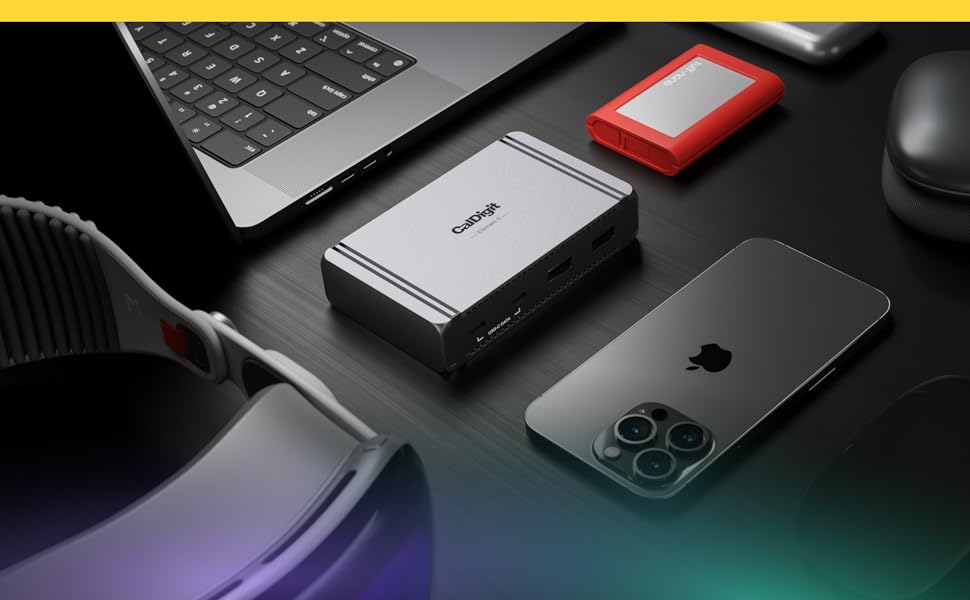
Thunderbolt 5 Element Hub
The CalDigit Element 5 Hub (E5) offers more ports than any other Thunderbolt hub while maintaining the compact size of its predecessor. With high-end features like 90W host charging, up to 120Gb/s connectivity, and support for three 4K displays on Windows Thunderbolt 5 PCs, it’s the perfect solution for expanding workflows without clutter. Connect what you need, when you need.
Ultimate Compatibility
The Element 5 Hub is compatible with Thunderbolt 5, Thunderbolt 4, Thunderbolt 3 Macs, USB4, USB4 v2, and USB-C devices. This also includes USB-C or Thunderbolt iPads, iPhones, Windows tablets and more*.
*The Element 5 Hub does not support Thunderbolt 3 Windows PCs. Users on Thunderbolt 3, Thunderbolt 4, and USB-C host computers, tablets, or phones will see reduced functionality.
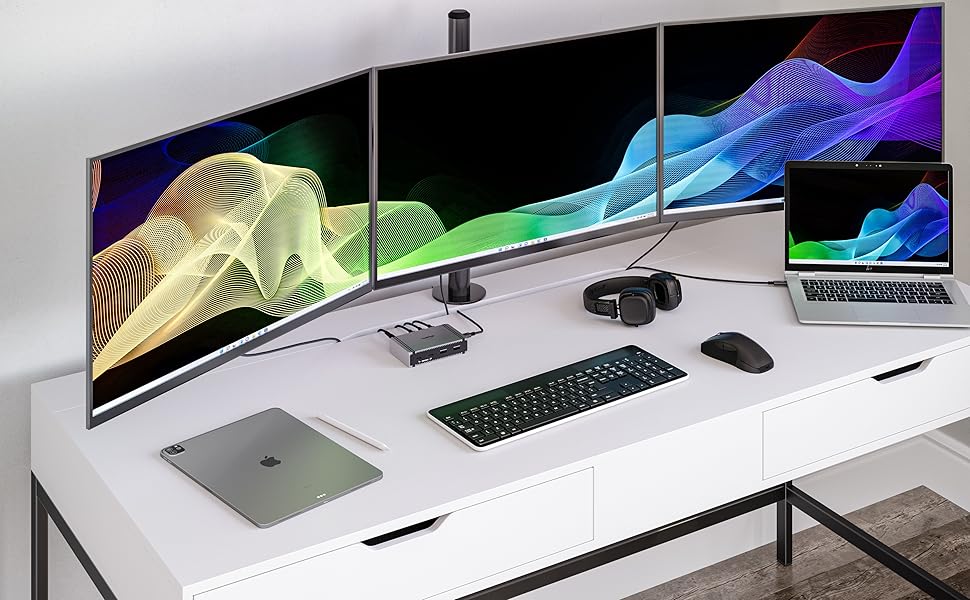
3 Monitors on Windows
Thunderbolt 5 allows for 3 external monitors to be connected to a Windows host computer that supports it, and the fact that the Element 5 Hub has 3 downstream Thunderbolt 5 ports makes it ideal for users that intend on connecting 3 displays*.
*Triple displays requires a compatible Thunderbolt 5 Windows PC. M4 Apple Macs do not support triple displays via a single Thunderbolt 5 host connection. Thunderbolt 4 Windows or Mac host computers do not support triple displays.
Single, Dual, or Triple Displays
Whether you need a high-resolution display, a high-refresh rate display, or up to 3 external displays, the Element 5 Hub has you covered.
Single Monitor
If you’re looking to add a single monitor to the Element 5 Hub you can connect it to one of the spare Thunderbolt 5 ports. If you wish to connect an HDMI monitor you can use a USB-C to HDMI Adapter ***.
Dual Monitors
✔ macOS users on base M4, M1/M2/M3/M4 Pro, M1/M2/M3/M4 Max, M1/M2 Ultra, or Intel based Macs can connect up to dual displays.
✘ M1/M2/M3 based Macs are limited to 1 external monitor by design via their Thunderbolt ports.
✔ Windows PC Thunderbolt 5 and Thunderbolt 4 users can connect up to dual displays.
Triple Monitors
✘ macOS does not support Triple monitors via a Thunderbolt Dock or Hub.
✔ Windows PC Thunderbolt 5 users can connect up to three displays on supported host computers.
✘ Windows PC Thunderbolt 4 users cannot connect three displays natively.

* Dual 5K monitors must be Thunderbolt 4 or Apple Studio Displays. Dual LG UltraFine 5K monitors are not supported. 6K monitors can be a Thunderbolt 4 monitor or an Apple Pro Display XDR. DSC (Display Stream Compression) support is required for 6K and 8K resolutions.
** Higher refresh-rates (above 60Hz) may require DSC (Display Stream Compression) support on the monitors and host GPU. The bit/color depth may vary in order to support higher refresh-rates.
*** Some M3 MacBooks such as the MacBook Air can support dual external monitors up to 5K and 6K when the laptop lid is closed (clamshell mode).
**** Currently M1/2/3/4 Macs can only support up to HDMI 2.0b over its Thunderbolt ports. As such, resolutions will be limited to 4K 60Hz when using an HDMI adapter. If a higher refresh-rate is required, please use a USB-C to USB-C or USB-C to DisplayPort or DisplayPort to DisplayPort connection. For more information about a Mac’s external display support please Apple’s or CalDigit’s support webpages.
***** Results may vary due to OS updates. For external display compatibility over a single Thunderbolt connection on different Windows computers, please refer to the manufacturer’s website.

Bandwidth Boost
The Element 5 Hub activates Bandwidth Boost, prioritizing displays with up to 120Gb/s performance while maintaining 40Gb/s for other devices. This enables support for higher refresh rate displays and up to three 4K 60Hz monitors on Windows Thunderbolt 5 PCs.

90W – Enough Power to Fast Charge your Apple Devices
Traditional USB hubs cannot compete with the Element 5 Hub’s power delivery. This is thanks to the included power supply which provides a “sustained” 90W of power delivery at all times to the host device. With its included 180W power supply, you can count on uninterrupted power delivery, no matter how many devices are connected.
A Powerful Offline Charging Station
The Element 5 Hub can even work for you when it’s not connected to your computer. Keep your USB-A or USB-C devices connected to the Element 5 Hub and it will continue to charge them. All 9 ports on the Element 5 Hub can be used at the same time for offline charging.
42% Smaller Power Supply
The Element 5 Hub’s power supply is 42% smaller than the previous generation, and also 30W more powerful.
This makes it even more convenient when traveling with the Element 5 Hub.
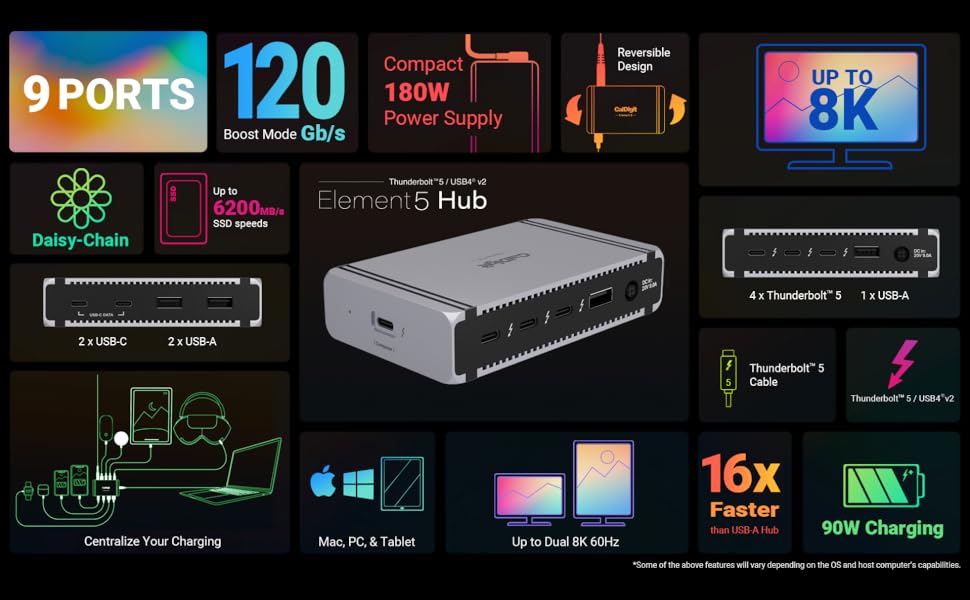
Interface
1 x Thunderbolt 5 Host (Up to 120Gb/s)3 x Thunderbolt 5 (80Gb/s)3 x USB-A (10Gb/s)2 x USB-C (10Gb/s)1 x DC In (20V | 9A)
Minimum System Requirements
macOS 15 or later, Windows 11 or later, iPadOS, Chrome OSThunderbolt 5, 4, and 3 (Mac) computersUSB-C (USB4, USB4 v2) computers, tablets, and phonesThunderbolt/USB4 iPadsUSB-C Chromebooks
Power Delivery
Up to 90W Host ChargingEach Downstream Thunderbolt 5 / USB4 v2 Port: 15W (5V/3A)Each USB-A Port: 7.5W (5V/1.5A)Each USB-C Port: 7.5W (5V/1.5A)
Size & Weight
Height: 1.0″ (25.5mm)Width: 2.75″ (70 mm)Length: 4.48″ (114mm)Weight: 0.44lbs (0.20kg)
In The Box
1 x Element 5 Hub1 x Thunderbolt 5 Cable (0.8m)4 x Rubber Feet Strips1 x Power Supply (180W)1 x Power Cord
Works with Thunderbolt 5, USB4 v2, Thunderbolt 4, USB4, Mac Thunderbolt 3, and some USB-C computers, including Apple M1-M4 (Max, Pro & Ultra), Windows laptops, and Chrome OS devices. It is also compatible with USB-C iPhones and tablets, including iPads and Windows tablets that feature Thunderbolt or USB-C. *Thunderbolt 5 or USB4 v2 is required for unrestricted functionality of the Element 5 Hub. Please visit our website for more details.
Up to 120Gb/s Performance with Bandwidth Boost – The Element 5 Hub features 3x 80Gb/s Thunderbolt 5 ports for unrivaled performance. When you connect bandwidth intensive displays, the hub will enable Bandwidth Boost which will allocate more Throughput for the displays at up to 120Gb/s. This will leave 40Gb/s bandwidth for the rest of the hub. *Bandwidth Boost requires a compatible Thunderbolt 5 Mac or PC only.
90W Power Delivery – Charge your laptop, tablet, or phone with up to 90W sustained power delivery. The Element 5 Hub’s compact and powerful 180W power supply allows the device to provide sustained power delivery at all times regardless of how many devices are connected to the hub. In total, you can connect 9 devices, all of which will be provided with full power. No slow drain, loss of charge, or incompatibility. In fact, the hub also features Offline Charging which allows you to charge devices even when the Element 5 Hub is not connected to a host computer.
Windows: Connect up to THREE 4K@144Hz displays on compatible Windows Thunderbolt 5 host computers.* macOS: connect up to TWO 6K@60Hz or 8K@60Hz displays, or dual 4K@240Hz displays on Macs that support these resolutions. NOTE: Base M1-M3 Macs do not support dual displays. *Triple displays are not supported on macOS, Thunderbolt 4/3, or USB-C PCs. High-refresh rates require a host Mac or PC that supports high-refresh rates.
All FOUR Thunderbolt 5 (80Gb/s) ports support 64Gb/s PCIe technology which means that these ports provide up to 6,200MB/s performance for use with ultra-fast Thunderbolt SSDs. The rest of USB-A and USB-C ports are all 10Gb/s, and are ideal for connecting various USB accessories to the Element 5 Hub.
12 reviews for CalDigit E5 – Thunderbolt 5 Element 5 Hub – 9-Port, 4xThunderbolt 5/USB4 v2 Ports, 3xUSB-A & 2xUSB-C 10Gb/s Ports, Single 8K, Dual 6K/8K, or Dual 4K@240Hz Displays, 90W Charging, 0.8m Cable 180W PSU
Add a review
$209.99
Jeff –
Works great!
Works great with a MacBook Air m4!Attached an hdmi 2.0 adapter for an external monitor. Gets warm but good quality and plenty of ports to use as a dock.
TheDamnChicken –
Cable Management made Easy
Overall it is a great product in a super compact package. It works great connecting dongles, low powered MIDI devices, speakers, and more.A slight nitpick is that the included TB5 cable is short (80cm), so I had to get an extra cable for that.
CharlotteTransplant –
Perfect for my Mac Mini
Great product. Hooked up to my Mac Mini M4 Pro with all of the right ports that I need. I do find that it runs a little warm so keep in a well ventilated space.
online shopper –
Runs Very Hot
This has all the connections I needed and was a great size and layout however, when charging my MacBook Pro 14 inch M2, the dock gets very hot. When my computer is in sleep mode, it cools down. Just wondering why it gets so hot and not much is going through it, it’s just idle and plugged in. It was also bypassing the battery optimization and causing my MBP to charge to 100%. I discovered the free app called AlDente that lets you control the maximum charge. It’s completely necessary with this dock in my opinion. I reached out a couple of times to tech-support and they were very responsive. Overall, I like it and it gives the functionality I needed.
Daniel –
Work very well
Work very well with Macbook and 2 monitor screens. Still has no issue
Scott –
Best hub
It’s the best hub period
Danny Kim –
Love this dock
I love this dock so much, the only very small thing is, I wish it had one hdmi out. Beside that it’s amazing.
Katie Gunderson –
Drives Randomly Disconnect
The idea of the hub is great, but I’m experiencing drives disconnecting on their own through any of the USB-C data ports. To the point where I can’t use them because I can’t trust they won’t randomly disconnect. Lame.
Shaleymoon –
Forget about any other brands get this one and get the dongles you need. It’s backward compatible with even 2017 MacBook Pros. It works perfectly with MacBook Pro M4, M4 Pro, M1.4k display high refresh rates, 5 and 10 gbe Ethernet and fantastic wake up sign to MacBooks through mouse and keyboard and fast charging of peripheral devices. This is what you need and gets the job done perfectly.I had tried multiple other brands and each one would fail somewhere in some of these cases this one does the task regardless of how old the host device is.
Cliente de Amazon –
El mejor Thunderbolt 5 hub, 3 salidas tb5 a 80-120 Gb/s, 2 salidas usbC y 3 usbA todas a 10Gb/s. Compatible con tb5, tb4, tb3 y usbC. Extremadamente pequeño incluso su fuente de poder de última tecnología. Caldigit es marca premium por eso cuesta $$$ y dura toda la vida.
Rley002 –
C’est un petit DOCK, mais tellement bien pourvu en connections, dont le fonctionnement est très efficace.
Richard Yuen –
Not bad. But when connected to Thunderbolt 4 computers, the ports are slower than other Thunderbolt 4 docks/Hubs.