

Thunderbolt4 Hub Dual Monitor, WAVLINK Thunderbolt4 Hub with 3* Thunderbolt 4 Port, 100w PD in, USB-A 10Gb, for MacBook Pro/Air M1 M2 M3, Thunderbolt 4/3 Laptop
$129.99
Related Products





Product description
The video showcases the product in use.The video guides you through product setup.The video compares multiple products.The video shows the product being unpacked. hero-video Merchant Video


Model: WL-UTD49T Color: Grey Ports: 1 x upstream Thunderbolt 4 (40Gb/s+PD90W), 3 x downstream Thunderbolt 4 (40Gb/s+PD15W+8K@60Hz), 1 x USB-A(10Gb/s+7.5W), 1 x DC In (20V/5A) Material: Aluminum Alloy Item Weight: 156g/ 5.5oz/ 0.34lbs Thunderbolt 4 Cable Length: 80cm/31.5in Power Cable Length: 150cm/59in Power Adapter Cable Length: 110cm/43in Product Dimensions: 11.3×7.8×1.7cm/4.4×3.1×0.7in System Requirement: Windows 10/11(with TBT4 port) and Mac 11 or later(with TBT3/4 port)
Bringing technology to life: Do you want to experience the latest technology? Enjoy the convenience of technology with this Thunderbolt 4 docking station from WAVLINK. It comes with 1x upstream Thunderbolt 4 port (40Gb/s; 96W), 1x downstream Thunderbolt 4 port (8K@60Hz; 40Gb/s; PD15W), 2x HDMI (4K@60Hz) video ports, 1x 2.5G RJ45 Ethernet, 4x USB-A, 1x USB-C, 1x 3.5 mm audio/microphone, 1x SD card slot. mm audio/microphone, 1x SD card slot. Enjoy what you want
Thunderbolt 4 Hub dual monitor: This Thunderbolt Docking Station supports single 8K@60Hz or multiple 4K@60Hz for a superb picture quality experience! You can easily switch between Extended Mode and Mirror Mode for gaming/film or office use. *Please note – M1/M2 based Macs only support single monitor; For M3 based Macs, pls close the host screen to support dual display
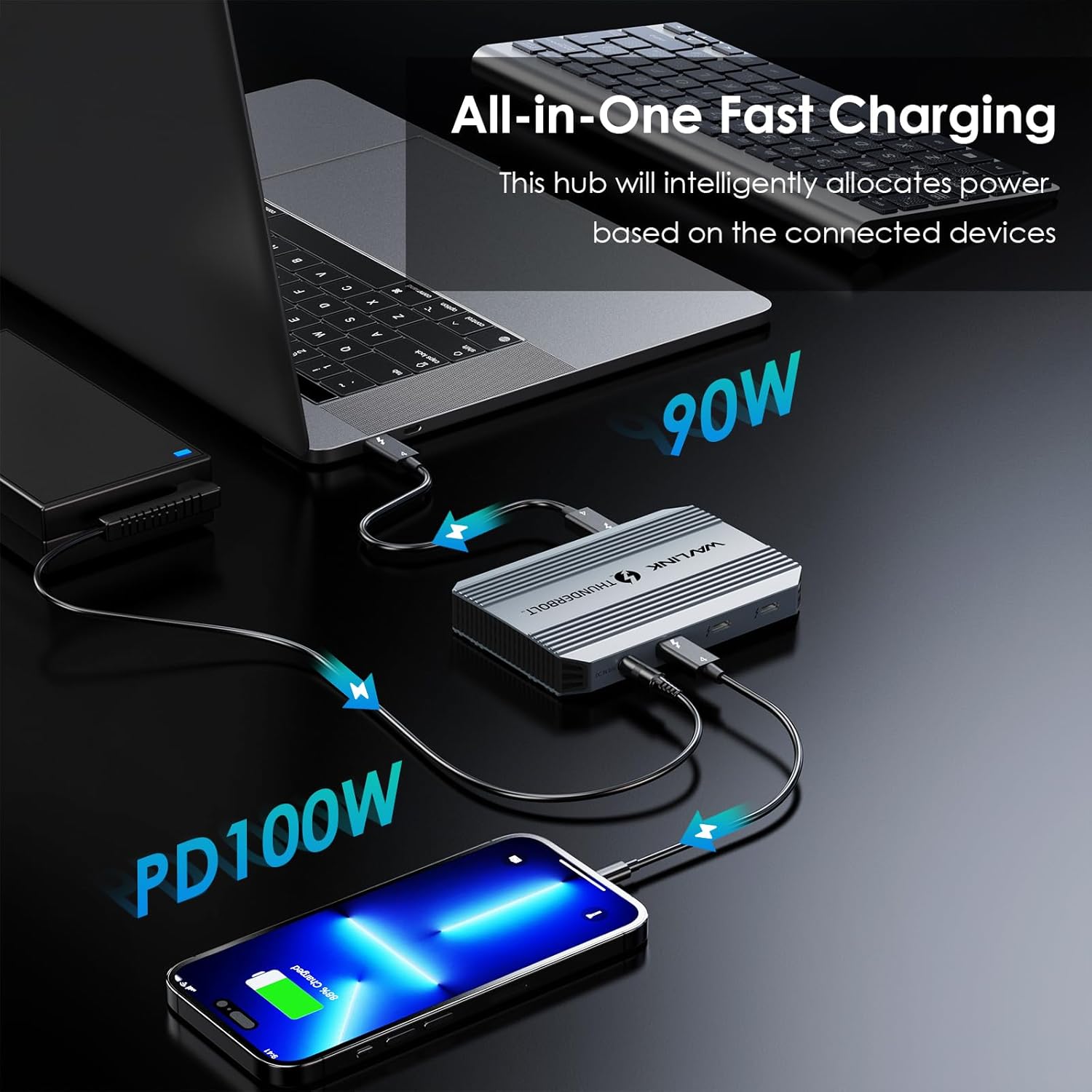
Thunderbolt 4 Hub with 100W Charging – Say goodbye to low battery! Our Thunderbolt 4 hub support up to 100W PD in, the powered hub can quickly power up your device with ultra-fast 90W PD charging, ensuring you have enough battery to support your daily tasks while playing games or multitasking without worrying about running out of power.
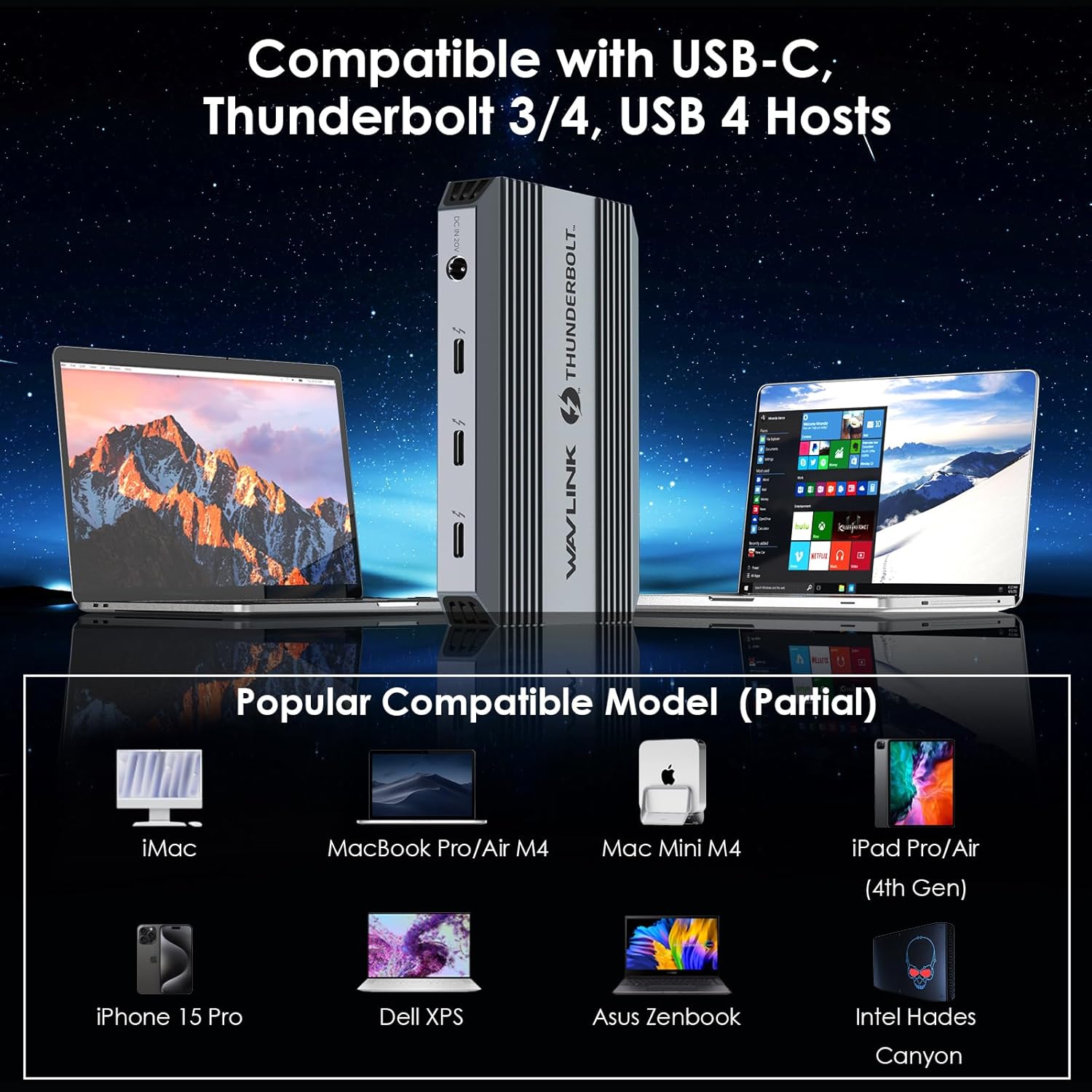
Wide Compatibility & Driver-free – Compatible with Windows 11/10 laptops featuring a Thunderbolt 4 port, as well as MacBooks with a Thunderbolt 3/4 port running macOS 11 or later. It is also backward compatible with USB4. Plug and play, no driver installation required.
Note – M1/M2 based Macs do not support dual monitors, you can only extend ONE monitor, the other monitor will not be displayed. For M3 based Mac, pls close the lid of the Mac to make dual external monitors work. You can extend/mirror dual monitors via two of the three downstream Thunderbolt 4 ports only, cannot reach 3 monitors. Please make sure your device’s USB-C port supports charging and video output.
13 reviews for Thunderbolt4 Hub Dual Monitor, WAVLINK Thunderbolt4 Hub with 3* Thunderbolt 4 Port, 100w PD in, USB-A 10Gb, for MacBook Pro/Air M1 M2 M3, Thunderbolt 4/3 Laptop
Add a review
$129.99
Abel Ramirez –
Awesome product, perfect size!
So far so good! Plugged everything and works great! It is much smaller than I had expected, which is nice. I have two monitors and one usb hub connected. Nothing to install, worked right out of the box. Connectivity is easy only small downside is that the power adapter is large and heavy but it fit perfectly well in my wire tray.
User name –
Robust Thunderbolt 4 Hub with Excellent Charging
The WAVLINK Thunderbolt 4 Hub is an impressive and well-built, solid-feeling device. It truly shines with its performance, offering rapid laptop charging and smooth, seamless display output for single 8K or dual 4K monitors. While I haven’t run extensive speed tests yet, it appears to connect to all devices properly without any hiccups. This hub is a fantastic addition for MacBook Pro/Air users and Thunderbolt 4/3 laptops, providing reliable and high-quality expansion.
mraf –
Very happy but a couple caveats
I got this hub working exactly as I wished with my MacBook M4 but needed to make a couple significant adjustments: 1. The description that it includes an audio port is incorrect – there is no audio port. So I had to buy a bluetooth receiver for my powered speakers – they worked great direct from my M4. 2. The USB-C connection to my main (wide) monitor’s USB-C or HDMI port did not work – after conferring with ChatGPT, I tried the USB-C to DisplayPort connection and all worked flawlessly. The USB-C to HDMI connection worked well for my (non-wide) 2nd monitor. Overall, a great value.
Clemen Samuels –
Perfect Hub for Power Users and Creatives
This WAVLINK Thunderbolt 4 Hub is everything I needed to supercharge my MacBook setup. Right out of the box, the build quality feels premium, and the compact design makes it easy to integrate into any desk setup. I connected two 4K monitors with zero lag, and even tested it with an 8K display — flawless performance. The 100W power delivery keeps my MacBook Pro M2 fully charged while I work, and the USB-A 3.2 Gen 2 ports are incredibly fast for transferring large video files. If you’re a content creator or just someone who needs serious connectivity without compromise, this hub is a beast. No glitches, no overheating — just smooth performance all day.
Matt –
Works great for my Surface tablet
This WAVLINK Thunderbolt 4 hub has been a game-changer for my small desk. It handles everything—charging, data transfer, and dual 4K displays—with ease and speed. The build quality is solid, and the plug-and-play setup was seamless on my Surface. The 90W power delivery keeps my device charged even during heavy use. Highly recommended for anyone looking to boost productivity or streamline their workspace.
motionmonk –
Nice performance, great size for Thunderbolt 4 Hub
My purchase order for a new 2025 Mac Studio should arrive sometime by early May, and I’m so very excited to move up from my 2013 Mac Pro! One of the things I’m looking to take advantage of is Thunderbolt connections to my data storage.The Wavlink Thunderbolt 4 USB C Hub with Single 8K/ Dual 4K Display, 100w PD in, USB-A 3.2 Gen 2 will not run at Thunderbolt 5, but I only have one drive enclosure right now anyway that is TB5 rated. My JBOD Array of hard drives and assorted SSDs will run fine under TB4.I love the size and build quality. It’s solid aluminum, with integrated cooling fins. It’s roughly the size of a 3×5 inch index card (3.1 x 4.4 in) and less than 1 inch tall. It’s very compact! I like the idea of 3 TB4 downstream ports, so I can plug in my JBOD Array (10gbps), my utility Kingston SSD (20gbps), and another peripheral as needed.I tried this with my MacBook Pro and a Plugable Thunderbolt Hub also… the Wavlink does NOT like being downstream to the Plugable Hub, but I’m not sure why. None of the Wavlink ports were recognized. I’m eager to try this with the Mac Studio, and how well it behaves with my drives. I’ll report back once I get it!
Evan Shaw –
Turns Your MacBook into a Port-Powered Beast
⭐⭐⭐⭐☆If you’ve got a shiny new MacBook and too few ports (as usual), this $140 WAVLINK Thunderbolt 4 Hub is like giving your laptop a power-up mushroom. It’s sleek, sturdy, and crazy capable—handling single 8K or dual 4K displays, 100W power delivery, and high-speed USB-A 3.2 Gen 2 ports like a champ.I tested it on an M2 MacBook Air and it handled my external monitor, SSD, mouse, and charger all at once—no hiccups, no overheating, no “Why isn’t this working?!” moments.Pros:• Thunderbolt 4 speed and compatibility with backward support for Thunderbolt 3—super futureproof.• Single 8K or dual 4K display support = crispy visuals for work or Netflix multitasking.• 100W PD passthrough means your laptop stays charged even when you’re maxing out ports.• Solid build quality that doesn’t feel like a cheap dongle add-on.Cons:• Pricey at $140, but not bad for Thunderbolt 4 gear.• Limited USB-A ports—more than one would’ve been nice.• Short cable length on the hub; you’ll need some rearranging if your desk isn’t minimalist.• No SD card slot, which is odd for such a premium hub.Overall, this is a pro-level hub for pro-level setups. If you want speed, versatility, and a sleek look, this WAVLINK hub delivers—just maybe hide the price tag from your wallet.
Hogg Wyld –
Awesome Thunderbolt hub!
This is one awesome Thunderbolt hub in my opinion! It is well made, durable, and high quality throughout and is compact in size. The functionality has been great to date with excellent connectivity and fast transfer speeds. I like that it also allows the power to pass through the main USB C connection to charge my laptop as well. I think this is an excellent docking station overall, and therefore I would not hesitate to recommend it with five stars all the way!
Zebulon –
Très bon dock, bien conçu et efficace pour le travail avec plusieurs écrans. Il chauffe un peu mais la ventilation fait le travail. Dommage pour les limites avec certains Mac. Un ou deux câbles en plus auraient été utile.Les ✅ de l’article :📗 On peut brancher deux écrans 4K en même temps, super pratique pour gérer plusieurs tâches.📗 La charge est rapide, on peut presque oublier son chargeur d’origine.📗 Elle est petite, bien finie, et passe inaperçue sur un bureau.📗 Fonctionne avec plein d’appareils, pas besoin de réfléchir longtemps à la compatibilité.📗 Les fichiers se transfèrent vraiment vite, ce qui est utile quand on travaille avec des vidéos ou des fichiers lourds.Les ⛔ de l’article :📕 Sur Mac M1 ou M2, on peut pas mettre deux écrans, ça limite un peu.📕 Il n’y a pas de câble en plus fourni, dommage vu le prix.👉 Conclusion :🎌 Super station, bien pensée et rapide, elle fait bien le job, sauf si on a un Mac M1 ou M2 où on peut pas tout exploiter.
JQS –
El producto es correcto con la descripción y a un muy buen precio para el rendimiento que ofrece, a falta de probarlo en detalle estoy satisfecho.
zleerichz –
The Thunderbolt dock by WAVLINK is compact and well made. I love how sturdy it feels and it matches my MacBook Pro nicely. It was plug and play straight from the box and it can connect 2 x 4K monitors with ease or 1 monitor that supports 8K.This dock arrives with a power adapter to suit a UK socket. I like the brushed effect on the block, 1 x Thunderbolt 4 cable, and a brief manual.This dock has 4 x Thunderbolt inputs (including the 90W PD max power input), 1 x USB-A 3.2 input. File transfer rates are super fast at speeds up to 40Gb/s.Note from the manufacturer: M1/M2 based Macs do not support dual monitors. You can only extend ONE monitor; the other monitor will not be displayed.For M3 based Mac, please close the lid of the Mac to make dual external monitors work.Overall, there is not a lot to say about this dock other than it looks amazing and performs as expected. It does heat up but has plenty of ventilation slots to accommodate. Non-slip base holds the dock in position nicely. My MacBook already has 3 Thunderbolt ports, but this dock extends my options and also adds a much-needed USB port. I hope that you have found my review to be helpful. Thank you.
Fingolfin75 –
Un hub che è una vera potenza!!! Costruito come un carrarmato e dalle prestazioni eccellenti.Per tutti coloro che vogliono sfruttare appieno la velocità di unità esterne, questo hub lo consiglio vivamente in quanto può arrivare fino a 40gbps di banda tramite usb-c Thunderbolt 4. Eccellente anche il supporto per due monitor con risoluzione 4K a 60Hz. Avesse avuto anche una porta per schede SD sarebbe stato perfetto ma già così rappresenta una scelta di assoluto prim’ordine specie per chi ha un Mac Mini di ultima generazione o meglio ancora un MacBook Air e vuole avere il massimo!
Daniel M. –
Credo che chiunque possieda, come me, il MacBook Air M1 possa capire quanto è fondamentale affidarsi ad un buon hub, visto che questo Mac è dotato di sole due porte USB-C/Thunderbolt (da cui passa anche l’alimentazione), ma le decine che ho provato negli anni hanno sempre e comunque il limite di essere USB 3.2 con una velocità massima di 10Gbps. Questo va bene finche non si hanno grosse pretese, ma quando diventa necessario collegare anche un monitor esterno, diversi SSD esterni e periferiche di ogni tipo (nel mio caso sono davvero tante), tale velocità diventa un limite ed un problema.Per questo motivo un hub Thunderbolt 4, come questo modello di Wavlinik, è la soluzione ideale per superare il problema, grazie alla velocità massima di 40Gbps di Thunderbolt 4, ma alle differenze di questa tecnologia rispetto ad USB.Grazie a questo hub, una volta collegato ad una delle due porte presenti sul mio MacBook Air, avrò a disposizione 3 porte USB-C 4 / Thunderbolt 4, una porta frontale USB-A 3.2 a 10Gbps e contemporaneamente viene anche fornita l’alimentazione al Mac fino a 90W, quindi sufficiente per la maggior parte dei laptop.Oltre all’evidente vantaggio di avere una banda fino a 40Gbps su cui distribuire i Devices collegati, invece che i 10Gbps di USB, e la possibilità di usare SSD esterni Thunderbolt in grado di arrivare a velocità notevolissime, le 3 porte Thunderbolt permettono anche di collegare direttamente display dotati di cavo USB-C o Thunderbolt (ma anche di usare un adattatore), cosa invece non fattibile con gli hub USB-C che necessitano di avere la porta HDMI o Display Port integrata direttamente nell’hub. Sembra una cosa da poco, ma in realtà non lo è perché, oltre all’indubbia comodità e versatilità di questa soluzione, c’è anche il vantaggio che il display avrà a disposizione ben più banda, tanto da supportare gli 8K@60Hz, rispetto agli hub USB che devono distribuire i miseri 10Gbps tra tutto ciò che è collegato.Ovviamente il costo di questo prodotto è decisamente più alto, rispetto allo controparte USB-C, ma le caratteristiche tecniche e la qualità costruttiva e dei materiali lo giustificano sicuramente.Personalmente lo sto usando da quasi un mese, mettendolo continuamente sotto stress, e finora si è rivelato sempre perfetto in tutto. Non posso che valutarlo 5 stelle.