

TECKNET Ergonomic Mouse, Wireless Bluetooth Vertical Mouse, 4800 DPI Optical Tracking, 6 Adjustable DPI, Quiet Clicks, 2.4GHz with USB A Receiver, 12 Months Battery, 6 Buttons, Wide Compatibility
$20.98
Related Products






From the brand


Ergonomic Mouse
Bluetooth Mouse
Vertical Mouse by TECKNET
3-in-1 Bluetooth & USB A Mouse


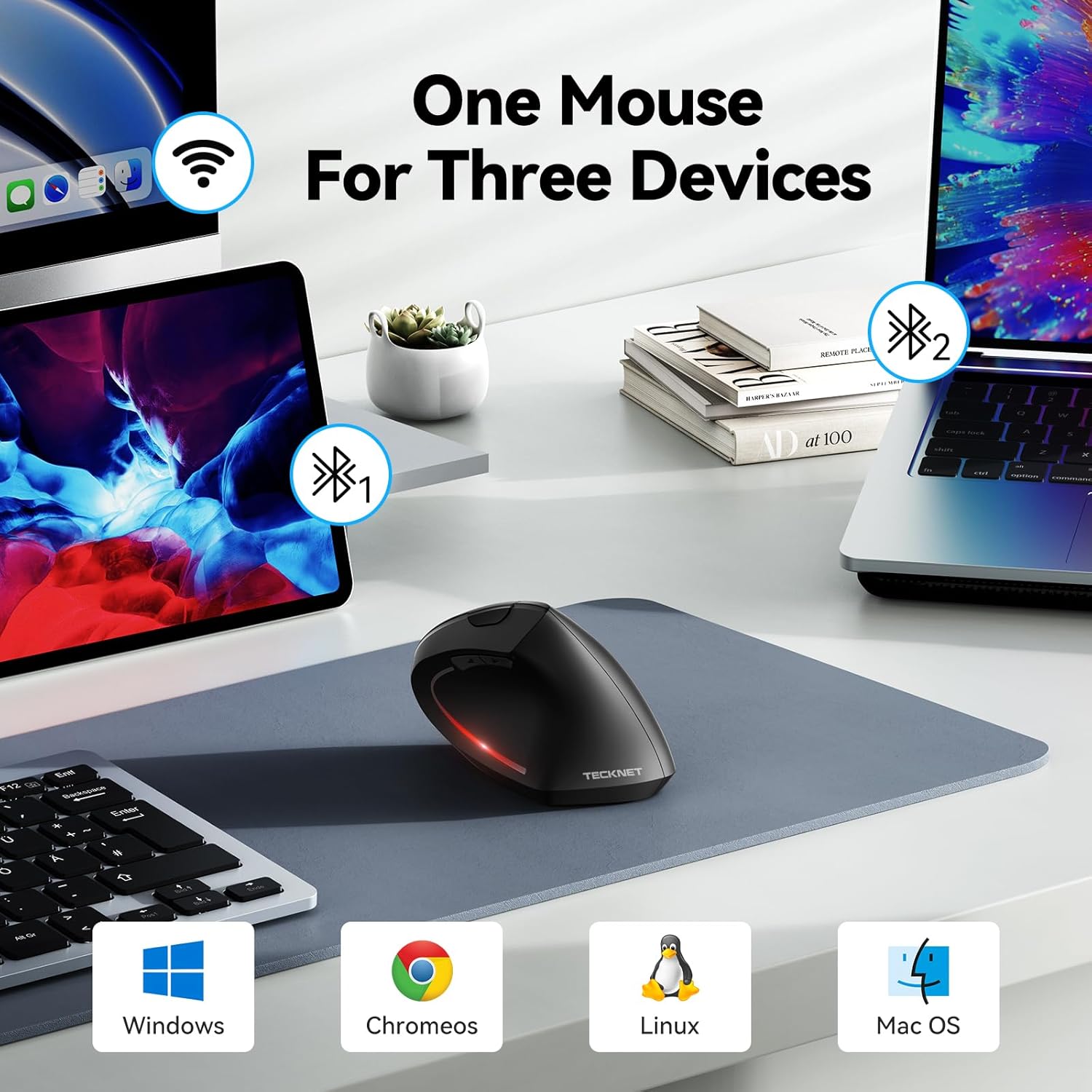
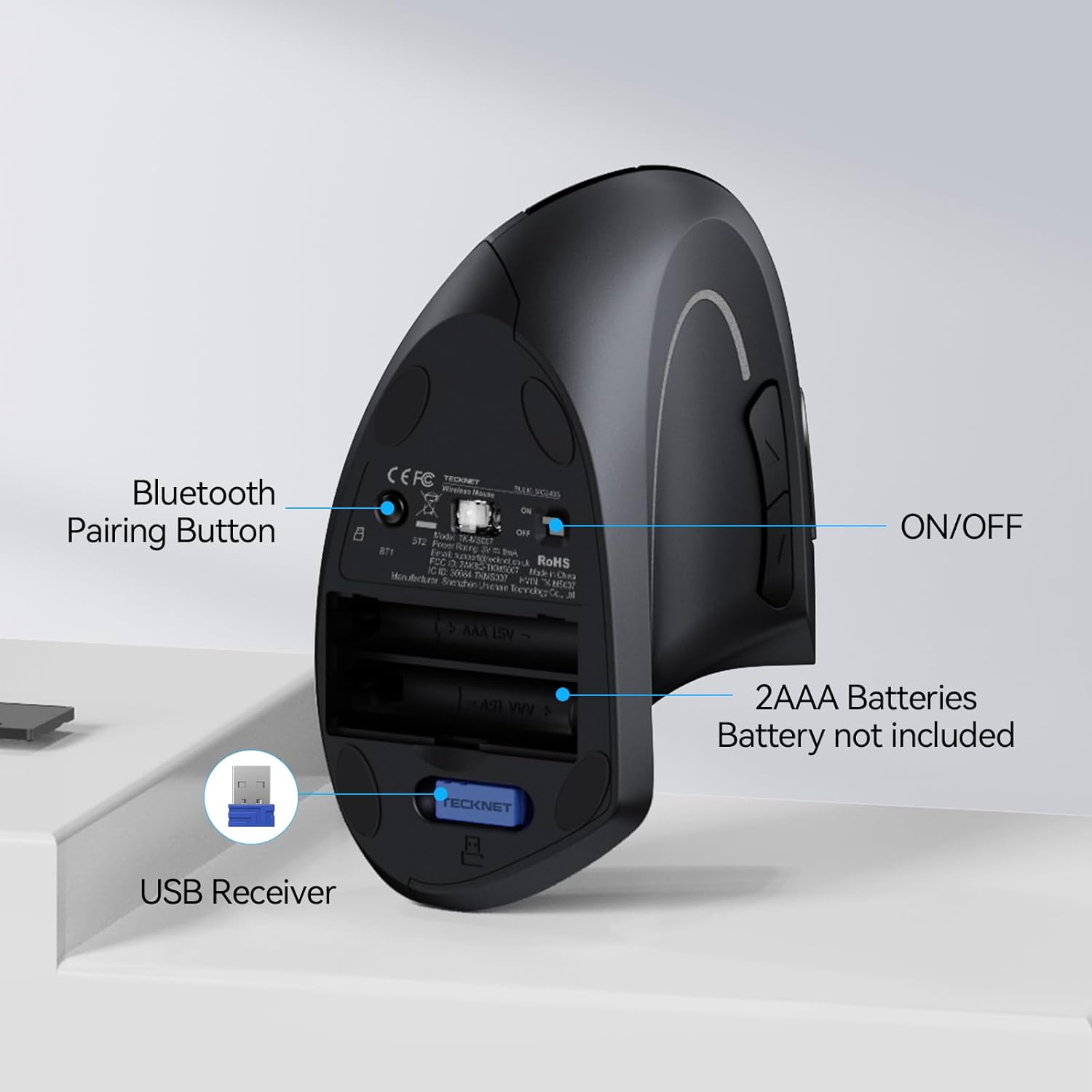
【Seamless Switching Between Three Devices】The ergonomic mouse features Bluetooth (5.0/3.0) and 2.4GHz USB A modes for connectivity. When connected via Bluetooth, The vertical mouse can effectively reduces the usage of your USB-A port (Bluetooth mode can connect to two devices simultaneously), In 2.4GHz connection mode, simply plug in the USB receiver for a quick connection. Press and hold the bottom button of the mouse for 3 seconds to enter the connection and pairing state. Short press the button to switch connection modes and improve work efficiency.(Note: The 2.4GHz receiver is built into the bottom of the mouse).
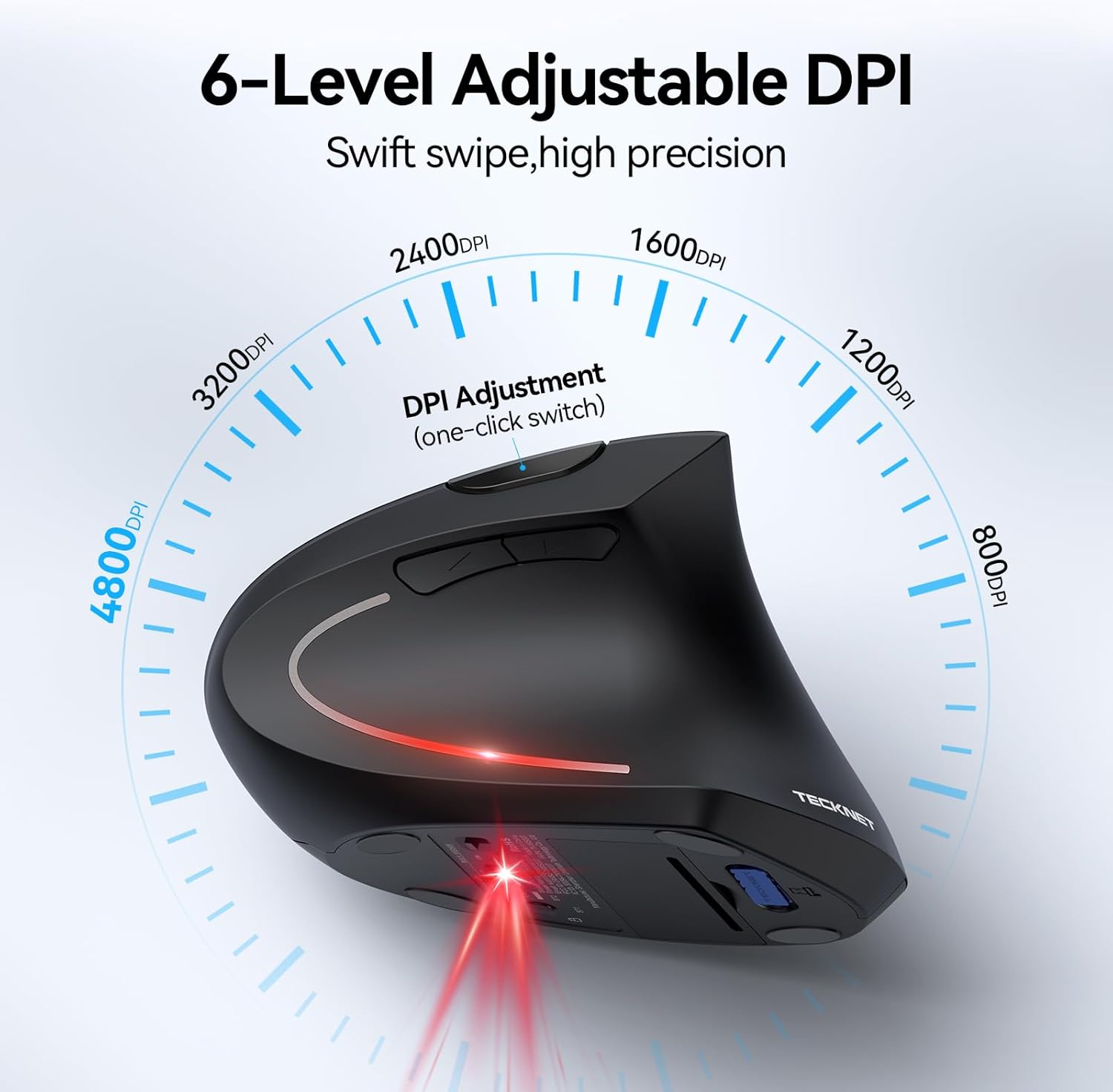
【Higher DPI & 6 Adjustable Levels】This vertical ergonomic mouse is equipped with a high-performance chip and features 6 adjustable DPI levels (4800/3200/2400/1600/1200/800) to meet your daily needs. wireless mouse upgraded technology allows this ergonomic mouse to operate smoothly on different types of surfaces. When changing the DPI, the light will flash, with the number of flashes corresponding to the DPI level.
【Silent Mouse】This computer mouse operates quietly, allowing for usage even in quiet environments like libraries. Additionally, the vertical mouse provides nearly silent clicks, helping avoid disturbances to others and ensuring your work or study remains undisturbed (Note: Only the left and right click buttons of the mouse are silent; other function buttons are not silent).
【Ergonomic Design】The wireless mouse’s ergonomic design offers ultimate comfort by placing your palm at a near-vertical angle on the desktop, reducing pressure and pain on your wrist caused by prolonged inverted mouse usage (Note: Mouse is designed for right-handed use only).
【Broad Compatibility and Low Battery Warning】The wireless computer mouse is compatible with various devices, including Windows, Mac, Chrome, and Linux laptops (side buttons are not compatible with macOS). Additionally, this bluetooth mouse for laptops automatically enters deep sleep mode after approximately 10-30 minutes of inactivity to conserve power; you can awake it by pressing the right or left button. Note: We recommend using branded batteries to ensure the mouse’s longevity. When the battery is low, the LED light will blink (Requires 2 AAA batteries, not included).
【36 MONTHS WARRANTY】If you encounter any problems in using the product, please feel free to contact our professional customer service team, enjoying TECKNET 36 Months Warranty (Registered Only).
13 reviews for TECKNET Ergonomic Mouse, Wireless Bluetooth Vertical Mouse, 4800 DPI Optical Tracking, 6 Adjustable DPI, Quiet Clicks, 2.4GHz with USB A Receiver, 12 Months Battery, 6 Buttons, Wide Compatibility
Add a review
$20.98
Ming Yang –
Nice mouse
I’ve tried several ergonomic mice, and this one stands out. The shape supports my hand perfectly and keeps my wrist in a more natural position, which has noticeably reduced discomfort during long work sessions. The tracking is smooth, the clicks feel satisfying, and the scroll wheel is precise. Setup was quick and the battery life has been excellent. A great upgrade for productivity and comfort.
Jainit kachiya –
Comfortable and Reliable Ergonomic Mouse
After using this TECKNET vertical mouse for a week, I can really feel the difference in comfort and reduced wrist strain. The DPI settings are very smooth, and switching between tasks feels effortless. The quiet clicks and easy Bluetooth/USB connection make it convenient for both work and personal use. Battery life is still strong after a week, and the mouse feels solid and reliable.
Javier –
Solid Ergonomic Mouse That Gets the Job Done
I picked up this TECKNET ergonomic vertical mouse because I’ve been having some wrist strain from long hours at the computer, and this design definitely helps. The shape is super comfortable, and I noticed right away that it reduced the tension in my wrist. It feels very natural to hold after just a short adjustment period. The mouse glides really smoothly and the responsiveness is excellent I never feel like it lags or stutters, whether I’m working in design software or just browsing. That said, it’s not perfect. The build quality feels a little on the lighter side, and the button clicks, while quiet, don’t have quite the tactile feedback I usually prefer. But that’s honestly a minor trade-off for how good it feels ergonomically. I like that it has multiple DPI settings switching between them is quick and helps when I need more precision. Bluetooth connectivity has been solid, and the USB receiver option gives some flexibility. It’s compatible with all my devices without any hassle. Overall, if you’re looking for a comfortable and affordable wireless mouse that performs well and doesn’t wreck your wrist, this one’s a great pick. Not flawless, but definitely worth it.
Nathaniel –
Comfortable, works great for the price
I got this mouse because I was having wrist pain and I heard a more vertical mouse can help. I definitely have less pain now, I use this at work for 8.5 hours a day and it’s comfortable. The quiet click is great and responsive. The scroll wheel is great, no wiggling around or play. It glides nicely on my mouse pad, and the ability to connect and switch between multiple devices is great as I use it for my work and personal laptops. Not sure why the product pictures show a red light on the side, as far as I can tell it does not light up which I don’t really care about. Love the soft plastic texture of it too. Have had 0 connection issues so far.
MSR –
Totally worth it!
I really like this TECKNET ergonomic mouse! It fits perfectly in my hand and helps reduce wrist pain when I use it for long hours. The buttons click quietly, and the scroll and movement are super smooth. I love that it connects easily with Bluetooth or the USB receiver. The battery lasts a long time, and the DPI settings let me adjust the speed just how I like it. Great mouse for work or home use — totally worth it!
NStpaul55110 –
Ergonomic at its best.
I’ve had a few mouse of different shapes for ergonomic use, this design is superior to any of the others. It just fits right and it takes pressure off your wrist. I’m replacing all my mice with this one. It works fantastic and is comfortable to use. Great battery life and it’s very quiet operation. Buy it and you won’t returning it. I promise.
Mark Mansour –
Big relief for my wrist—totally worth it
I switched to this mouse after dealing with wrist pain from long hours on the computer, and the difference was almost instant. The vertical shape feels strange for the first few minutes, but once you settle in, it’s honestly more natural than a regular mouse. My wrist finally gets to relax instead of twisting all day.I love that I can connect it to multiple devices—Bluetooth for my laptop and the USB receiver for my desktop. The switching is quick, and the clicks are quiet enough that I can work in my classroom without bothering anyone. The battery life has been great so far, and the DPI options make it easy to adjust depending on what I’m working on.If you spend long hours on a computer or struggle with wrist strain, this mouse is a game-changer.
Alexyss Moscol –
Long Lasting Battery and Super Comfortable!
I bought this ergonomic mouse for my son, and he’s really happy with it. The first thing he noticed is how long the battery lasts, with his previous mouse, he had to charge it all the time, but this one easily gets him through days of schoolwork and gaming without worrying about cables. The vertical design is surprisingly comfortable, and it actually helps him keep a more natural hand position. It connects quickly and works smoothly on his laptop, tablet, and even his desktop. Overall, it’s been a great upgrade and totally worth it for the comfort and long battery life.
Comprador de Amazon –
Tras tener averias con un Logitech M590 decidí darle una oportunidad a esta marca y por ahora estoy relativamente satisfecho.Los botones izquierdo y derecho son realmente silenciosos, aun mas incluso que los del Logitech M590. El resto de botones (el central y los dos del lateral izquierdo) no son silenciosos y se escuchan como los de cualquier raton.Lleva dos pilas AA y eso hace que sea algo más pesado que la media.De tamaño es grande, mas que el M590 y en mi caso me gusta mas ya que se adapta mejor a mi mano gracias al diseño más ergonomico que tiene.La rueda es menos fluida que en el Logitech M590 aunque con el tacto ligeramente gomoso que tiene no se te resbala y al final te acabas acostumbrando a esta rueda.Por debajo de la rueda tiene el boton para ajustar los dpi de la sensibilidad del sensor según tus necesidades para uso normal, juegos, diseño, etc.Se echa en falta que el fabricante haya desarrollado un software para poder configurar los botones laterales del raton pero en mi caso instale la aplicacion gratuita de X-Mouse Button Control y he podido configurar a mi gusto los botones laterales.
Amazon Customer –
Easy to instal cheap to buy and it works fine
Remo Kath –
Sehr sehr gerne teile ich Euch meine Einschätzung, Wertschätzung und meine ungetrübte Zufriedenheit zu diesem tollen Produkt mit. Seeehr gerne!!!Mein erster Eindruck beim Öffnen der Verpackung war ein ein “wow”. Sieht schon einmal noch besser aus, als auf den Fotos. Und schon dort konnte man die Wertigkeit erahnen.Nachdem ich die Maus dann in der Hand hatte, bestätigte dies noch mehr meinen visuellen Eindruck. Die Materialien könnten auch bei der vergleichbaren Logitech Mouse, welche ich vorher hatte, auch nicht besser sein.Sie liegt fantastisch in der Hand, hat für mich das perfekte Gewicht und sieht dazu auch noch toll aus. Das Paring mit Bluetooth am PC hat direkt und rasend schnell geklappt.Es gibt aber zwei Punkte, die mich dann restlos überzeugt haben. Ich nutze die Maus für mein MediaCenter in Verbindung mit meinem TV. Da die wenigsten sich wohl ein Mauspad auf dem Sofa zurechtlegen, musste sie auch direkt bei mir den Härtetest bestehen. Funktioniert sie auf allen Flächen ohne Ruckler und Schwächen in der Abtastung? JAAAAA. Auf jeder von mir spontan benutzen Fläche. Da wäre zum einen mein Sofa, welchges aus extrem rauen Stoff besteht. Spontane Nutzung der Maus auf meinem Oberschenkel…..KEIN PROBLEM. Auf dem Fell meines neben mir liegenden und in Ermangelung einer anderen Fläche…..KEIN PROBLEM. Auf seiner zerwühlten Sofadecke….AUCH KEIN PROBLEM!!! Ihr merkt sicher schon, dass ihr mir mit diesem Produkt eine riesige Freude gemacht habt. DAS hat die 6x teurere Logitech Mouse nicht geschafft. Für den Preis, dachte ich mir, kann ich auch bei einem Reinfall nichts falsch machen und hätte sie dann für mein Notebook genutzt. Aber weit gefehlt. Meine Erwartungen wurden mehr als übertroffen. Und deshalb ist nun an mir, einfach mal Danke zu sagen, dass ihr dieses Hammer Produkt zu so einem absolut konkurenzlosem Kaufpreis angeboten habt. Dankeschön!!!!Wie lange die Maus bis zum Batteriewechsel läuft, kann ich natürlich noch nicht sagen. Aber ich schätze, dass sie aufgrund der Stromsparfunktion bei Nichtnutzung, seeeehr lange funktioniert.Ich brauche nun also doch noch eine Weitere für mein Notebook und werde sie auch gleich bestellen.Es ist ohne Übertreibung, für meinen Anwendungsbereich die beste Maus, die ich jemals in der Hand hatte. Echt toll!!! Urspünglich hatte ich sie gekaufrt, weil ich das Design mag und die Farbkombination herausstechend und nicht so…..”mausgrau” wie andere fand. Dass dann so etwas ankommt….ich könnte natürlich alle Superlativen hier aufzählen, aber ich denke ich habe meine Zufriedenheit lebendig für Euch vermitteln können.TeckNet® BM306 kompakte Wireless Kabellose Bluetooth Maus, 3 verstellbare DPI Level, bis zu 2000 DPI
Thierry –
Souris reçue un jour avant la date prévue, cela fait toujours plaisir.Installation facile.A l’usage, elle tombe bien en main. Les deux piles lui donnent un poids agréable. Les clics sont silencieux et souples. Rien à dire sur la molette et sur les touches latérales (qui tombent bien sous le pouce).Chez moi, elle remplace une Logitech M185. Je travaille sur deux écrans et la Logitech mettait un petit temps pour passer d’un écran à l’autre. Avec la Tecknet, le passage est immédiat, c’est agréable. Le niveau de finition me donne confiance pour sa durée.Je suis resté avec la précision par défaut en 1200. Pour l’instant cela me satisfait.Seuls petits inconvénients : le récepteur nano est bleu (moi ça ne me dérange pas, mais ça pourrait gêner certains esthètes du PC), et elle se met très vite (10 sec) en veille, ce qui oblige à un clic pour l’activer. Mais c’est juste un coup à prendre et le réveil est instantané.Cela ne m’empêche pas de lui donner cinq étoiles, surtout vu son prix et les prix de la concurrence.Bref, si c’était à refaire, je rachèterais la même………..Rebonjour, aujourd’hui j’ai dû changer les piles de la souris.Et là … plus rien !Je vérifie la charge des piles : elles sont bonnes, mais toujours rien …Par acquis de conscience, je débranche le dongle BlueTooth sur le PC, j’enlève et je remets les piles. Je rebranche le récepteur BT et là … ça fonctionne !Si ça peut vous servir et vous éviter de remplacer une souris qui fonctionne, j’en serai ravi.
marysapy –
Premetto che l’ho acquistato principalmente come regalo. Infatti, viste le recensioni positive e incuriosita dal design e dalla connessione bluetooth che non necessita di ricevitore USB che va ad occupare le porte sul PC, nonché dal prezzo, ho voluto effettuare l’acquisto. Il mouse arriva all’interno di un pacchetto dalle ridotte dimensioni (più il pacco Amazon esterno) ma giusto per proteggerlo e contenerlo. Oltre al mouse ci sono il manuale di istruzioni (in inglese) e il tagliando della garanzia (18 mesi + 6 mesi registrando il prodotto online sul sito del produttore). Per evitare di “regalare” un accessorio difettoso ho voluto provarlo di persona per testare funzionalità e praticità nell’uso. Il design è molto bello, le dimensioni si adattano perfettamente alla mano di chi lo usa e i materiali appaiono robusti, ma di qualità. La connessione al PC tramite bluetooth è facilissima da stabilire, basta accendere il mouse con il pulsante on/off presente sulla parte inferiore (vedi foto) e attivare il bluetooth del mouse stesso premendo per 2-3 secondi il piccolo pulsantino presente sempre nella parte inferiore. Il bluetooth del PC rileva subito la periferica e la connessione viene stabilita immediatamente senza errori o problemi di disconnessione. Bella e pratica la possibilità di selezionare le velocità di DPI a seconda delle proprie esigenze. I tasti destro e sinistro, così come i pulsanti laterali e la rotellina rispondono bene al tocco e agli input senza ritardi nella risposta o nella selezione di pagine web, testi o quant’altro. Per funzionare necessità di 2 pile AA da inserire nell’alloggio batterie presente sempre nella parte inferiore (come da foto). Per quanto mi riguarda, articolo consigliato sicuramente, sia per funzionalità e design sia e soprattutto per l’ottimo rapporto qualità/prezzo. Spedizione Amazon come sempre velocissima e puntuale.