

ProtoArc Ergonomic Mouse, EM11 NL Bluetooth Rechargeable Wireless Vertical Mouse, 3 Multi-Device Connectivity for Computer/PC/Laptop, 2.4GHz Optical Mice for Windows, Mac OS, Black
$18.16
Related Products



Product description
ProtoArc Bluetooth Rechargeable Vertical Mouse
The video showcases the product in use.The video guides you through product setup.The video compares multiple products.The video shows the product being unpacked. ProtoArc Bluetooth Rechargeable Vertical Mouse Merchant Video
ProtoArc ergonomic mouse features an ergonomic design, specifically crafted for users who spend long hours on the computer, effectively reducing wrist strain
Note: All buttons are not programmable and the forward and back buttons are not compatible with Mac OS systems
Easily connect your ProtoArc vertical mouse to boost your productivity


All-Day Power with Fast USB-C Charging


 Gift Of Productivity


ProtoArc EM11 NL ergonomic mouse delivers exceptional comfort for long hours, seamless multi-device connectivity, and impressive battery life in a premium ergonomic design.


1 Ergonomic Vertical Design
2 1-2 weeks Adaptation Time
3 Natural Handshake Posture
4 3 Adjustable DPI
5 Product Features
Measure Your Hand First 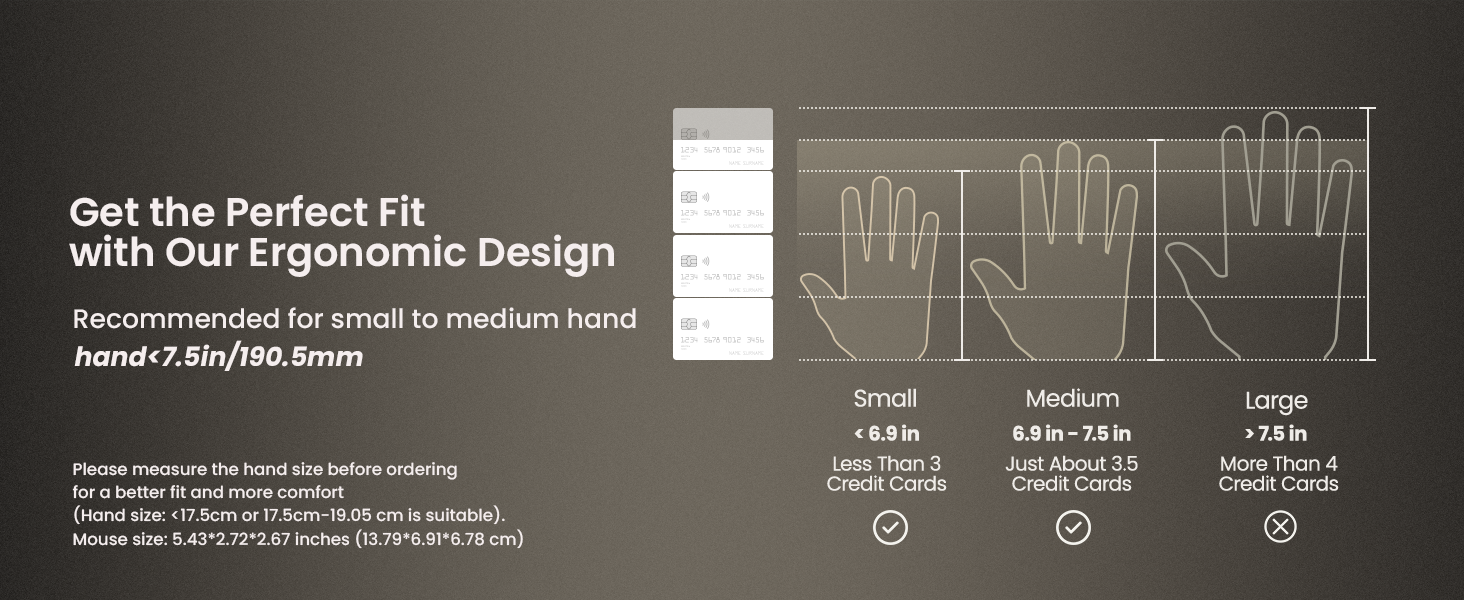
Warm tips: Since it takes a learning curve to get used to the shape when using our ergonomic mouse for the first time, it may cause inconvenience to your mouse grip, but our ergonomic design will help reduce the pressure and pain on your wrist caused by long-term use of the mouse
Wireless Ergo Combo is Designed for Comfort and Productivity
 Pair with EK01 Plus Backlit Ergonomic Keyboard
Type more naturally with ProtoArc EK01 Plus. The ergo keyboard with cushioned palm rest, curved split keyframe and responsive scissor keys – Reduces wrist strain, keep your hands and shoulder relaxed
 Pair with EK04 2-in-1 Wireless Ergonomic Keyboard
ProtoArc EK04 wireless ergonomic keyboard with separate number pad provides greater flexibility for your workspace setup, greatly helps to improve your work productivity.
 Pair with MP50 Ergonomic Mouse Pad with Wrist Rest
ProtoArc ergonomic mouse pad features an 8-degree tilt to provides stable support for your wrist and palm, effectively alleviating fatigue from prolonged use, while also helping to improve discomfort
 Pair with EK04 Mini Wireless Ergonomic Keyboard
ProtoArc EK04 Mini compact bluetooth ergonomic keyboard offers a space-saving solution to maximize workspace efficiency without sacrificing comfort and functionality.
 Pair with EK04 N Ergonomic Wireless Number Pad
ProtoArc EK04 N ergonomic number pad with wrist rest can enhance work efficiency and provide typing comfort for long-term data entry work.
 Pair with MP10 Leather Office Desk Pad Protector
ProtoArc MP10 Leather Office Desk Pad Protector features high-quality vegan PU leather, it shields your desk from scratches caused by hard surfaces like phones and watches
Is the EM11 NL ergonomic mouse compatible with Mac OS?
EM11 NL is compatible with Windows 8, Windows 10 or higher, Mac OS X 10.12 or higher, and Android 4.3 or higher. Please note: the side buttons are not compatible with Mac OS
Does the EM11 NL support programming?
We’re sorry, the EM11 NL currently does not support customization. However, our upcoming upgraded version, the EM11 Pro will offer this feature
What hand size is the EM11 NL designed for?
Recommendations for Hand Size: We recommend that small to medium hands use our ergonomic vertical mouse. Please measure the size before ordering for a better fit and more comfort.(Hand size: <17.5cm or 17.5cm-19.05 cm is suitable)
Does the EM11 NL have LED or RGB lighting?
No, the EM11 NL does not feature LED or RGB lighting
What is the battery life of the EM11 NL?
It takes only 2 hours to fully charge. The mouse offers up to 200 days of standby time and provides 100 hours of continuous usage. Based on 4 hours of use per day, this translates to approximately 25 days of battery life
Connect up to 3 Devices: This ergonomic wireless mouse features dual BT 5.0 and 2.4G USB connectivity modes for simultaneous connection of up to 3 different devices, and is compatible with Windows 8, Windows 10 or higher, Mac OS X 10.12 or higher, and Android 4.3 or higher
Rechargeable Ergonomic Mouse: The Bluetooth Vertical Mouse has a built-in 500mAh Li-Ion battery that can be conveniently recharged using the included Type-C cable
Ergonomic Vertical Design: The ergonomic mouse wireless keeps your wrist naturally straight, putting your forearm and wrist in a more natural and relaxed position, which can reduce discomfort and strain, helping to improve productivity and reduce the risk of repetitive strain injuries compared to a standard mouse. Warm tips: We encourage you to relax your palm and hold the mouse naturally when using a vertical mouse
Learning curve: Since it takes a learning curve to get used to the shape when using our ergonomic mouse for the first time, it may cause inconvenience to your mouse grip, We recommend that you take 1-2 weeks to get used to it, as many users find that it will help reduce the pressure and pain on your wrist caused by long-term use of the mouse and improve comfort
Notes: We recommend that small to medium hands use our ergonomic vertical mouse. Please measure the size before ordering for a better fit and more comfort
Adjustable Dpi & High Performance: 1000/1600/2400 DPI levels provide higher sensitivity than standard optical mice for precise optical tracking; with the back and forward buttons, you can easily navigate websites and increase work efficiency. Note: All buttons are not programmable and the forward and back buttons are not compatible with Mac OS systems
Quiet Clicking: The silent click sound of the left and right mouse buttons help you focus on your work, Note:the middle scroll wheel and and the back/forward buttons are not silent.
9 reviews for ProtoArc Ergonomic Mouse, EM11 NL Bluetooth Rechargeable Wireless Vertical Mouse, 3 Multi-Device Connectivity for Computer/PC/Laptop, 2.4GHz Optical Mice for Windows, Mac OS, Black
Add a review
$18.16
K. Colvin –
Comfortable, Smooth, and a Game-Changer for Long Workdays
The ProtoArc EM11 vertical ergonomic mouse has been a fantastic upgrade for my workspace. I spend long hours at the computer, and this mouse has made a noticeable difference in reducing wrist strain. The vertical design feels natural from the moment you start using it, and within a day or two, it becomes second nature.The Bluetooth connection is reliable and quick with no lag, and I love that I can switch between devices effortlessly. The mouse glides smoothly, tracks accurately, and feels incredibly responsive whether I’m working, browsing, or doing basic editing.Battery life has been excellent as well. A single charge lasts much longer than I expected, and the rechargeable feature makes it even more convenient. The overall build quality feels solid, and the matte finish gives it a premium feel.If you’re looking to ease wrist discomfort or simply want a more ergonomic setup, this mouse is absolutely worth it. It’s comfortable, efficient, and a noticeable improvement over a standard mouse. Highly recommended!
Ben –
I LOVE This Mouse!
This is such a great mouse! I have been struggling with wrist pain for a while from using a mouse all day for work. I was recommended to get a vertical mouse by my doctor. He said they keep your wrist in a more natural position. I spent a while looking for one that I like, and I basically narrowed it down to either this or the Keychron M5. The only other ones that seemed appealing were the 2 Logitech models, but they were both far too expensive. I have also heard horror stories about their durability.Finally, I saw this model on sale for $19, so I pulled the trigger. I am very happy I did. Even after just a few days my wrist pain improved. The grip feels very natural. The way they describe it like a handshake is very accurate. I am happy that I don’t have to deal with so much pain in my wrist anymore after a long day sitting at my PC.I think the multiple connection methods are nice too. I can keep the USB dongle plugged into my desktop workstation and switch to the Bluetooth whenever I need to use it with my laptop. I don’t use it with my laptop that often, but I do have a Thunderbolt dock at my desk that I use occasionally. Switching input methods works well.I have not noticed any input latency or lagging. Nor have I had connection drop-outs. There are no drivers or software to install. That is greatly appreciated because I can’t stand having peripherals that need to install special drivers and applications to configure the settings. This has none of that crap. You just connect it and you are good to go. I’m a Linux user as well, and I’ve had no issues. The DPI switch is nice to be able to change the sensitivity.I was worried the silent buttons would feel mushy, but they don’t at all. Somehow they have a very tactile click without making any noise. The noise isn’t an issue for me, but I can imagine anyone working around a bunch of other people would appreciate it. The scroll wheel feels really nice too. It has a nice soft-touch finish and smooth operation. The forward and back buttons feel nice, but they are not silent like the left and right click. It’s not that big of a deal, but it would have been a nice touch.For those who are gamers, I don’t think this would make a great gaming mouse. For that I will probably hang on to my ultra lightweight mouse that has a honeycomb shell for ventilation and weight reduction. This mouse is by no means the heaviest mouse I have used, but it is nowhere near as light as my gaming mouse.I cannot speak on the battery life since I have not had it that long, but I will say after a week I have not had to charge it. at all. I just pulled it out of the box and started using it. Perhaps if I have an issue with the battery life I will update this review in the future.You really cannot go wrong with this ergonomic mouse.
Smitty0803 –
HIGHLY RECOMMEND!!
When I tell you that this is a game changer…immediately you feel how much more comfortable it is from the original mouse. Your hand sits in a more natural position. It feels really durable. Connectivity was super easy – hard press on the button on the bottom until it flashes, pull up the bluetooth devices on your laptop/desktop, choose the ProtoArc…DONE. I chose the black one but it looks like they’ve got all kinds of different colors. Functionally it works great…no latency and it moves really smooth on my mouse pad. I’m a professional photographer and hours of photo editing are going to feel just that much better now without my hand getting sore. I definitely love the look of it as well. I would highly recommend to anyone especially for those that do lots with the mouse.
cv –
Not a large mouse, but still good
I bought this mouse as I need an ergonomic mouse for my home laptop, that meet a couple of criteria:- Bluetooth capable ( I don’t like dongles)- Relatively inexpensive (I was aiming for sub $50)- Comfortable for large hands ( I am over 6′ tall)This mouse does well at all 3 of these. The bluetooth works well it is responsive and the mouse has no issue working on Windows 11 or Linux Ubuntu. Expense wise this is one of the cheaper options, this is why I was willing to risk the purchase even though I am unfamiliar with ProtoArc as a brand. Size wise at best I would call this a “medium” sized mouse. I have a Logitech vertical ergonomic mouse at work that is very well sized, and I was hoping this one was similar. unfortunately it is not. At this time this is not a deal breaker as, at home, I am not on my computer for hours at a time, unlike at work. Due to the low cost of the item I can forgive it not fitting my hand , but I am casually looking for a replacement. So would I buy this know what I know now: probably not. I would try something else as I would rather have a larger mouse and other than the cost savings there is nothing that stands out. I still gave it four stars as the product is good, it just doesn’t fit me, and that is not the products fault.Note: it would be nice if amazon had a built in reviewer that showed real life size that was independent of the manufacturer presentation for products like these (keyboards, mice headphones, headphones, etc).
Christian C. H. –
De lo mejor para trabajar
Omar A. –
Súper cómodo, la batería dura bastante entre cargas y el sensor funciona a la perfección en la mayoría de las superficies.
Sebastian –
Wow, amazing product, perfect for hand, comfy, well designed and executed, and packed and delivered. Well done, i am impressed.
Jake Ner –
De gran calidad
Suiluj –
The mouse latency works better without lag. the difference is the unique design , when use it for the first time you may feel uncomfortable until few weeks.