

Perixx PERIDUO-606 Wireless Mini Ergonomic Keyboard with Portable Vertical Mouse – Adjustable Palm Rest Stand – Membrane Low Profile Keys – US English
$59.99
Related Products




Product description

Keyboard Specifications: Wireless 2.4 GHz Technology 7 Multimedia Function Keys Keyboard with Built-in Scroll Wheel Dimensions: 13.82 x 8.94 x 2.56 inches (35.1 x 22.7 x 6.5 cm ) Weight: 1.5 lbs (682 g) Plug-and-Play Installation System Requirements: Windows 7, 8, 10, and later versions
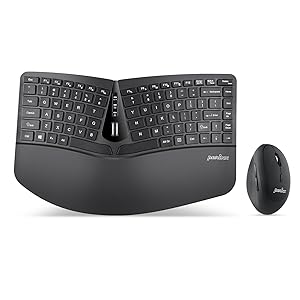
PERIDUO-606 Wireless and Compact Keyboard and Mouse Set
PERIDUO-606 is a wireless compact keyboard and mouse set, featuring a detachable palm rest that can adjust your typing angle, An ergonomic combo for endless comfort, and it is equipped with all the necessary shortcut keys for media control, browsing, and e-mail surfing by using the FN key.
How to Rebind the Keyboard Connection to the Receiver:
Plug the receiver into the USB port on the computer.Insert fully charged batteries into your keyboard.Switch the keyboard on.Press the “Connect” button for several seconds. If the number lock light keeps flashing for 8 seconds, it means that it’s connected.
Features:
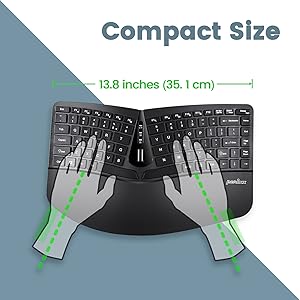
Compact 3D-split keyboard
A compact, tenkeyless keyboard with a split key design, the keys are separated into two groups for the left and right hand to reduce bending your wrists outward while typing.
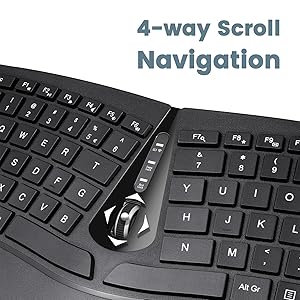
Comfort and convenience
The tilt scroll wheel of the keyboard can be tilted 4 ways for page navigation (up, down, left, and right). Additionally, comes with a built-in tilted foot stand to adjust the height to suit your arm positions.
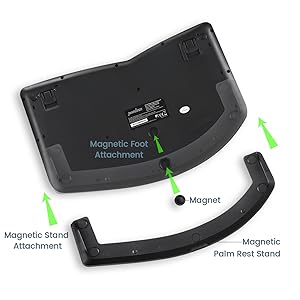
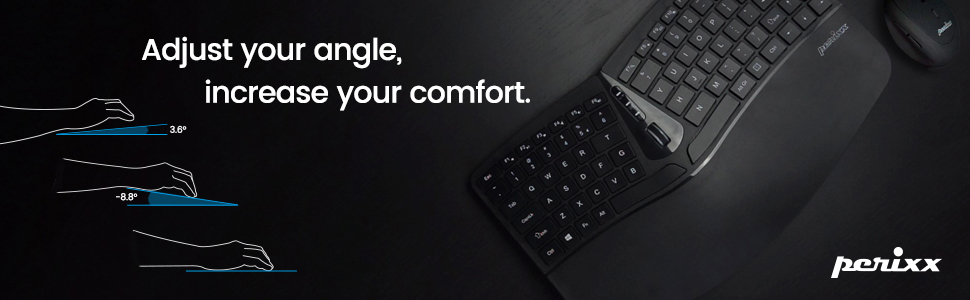
True ability to adjust to your perfect typing angle
It has adjustable feet for those who need to see the keys more easily, and it also comes with a magnetic palm rest extender that can be attached to the bottom of the palm rest. This setting will give you a negative tilt position to give you a neutral wrist position.
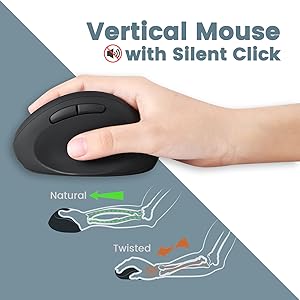
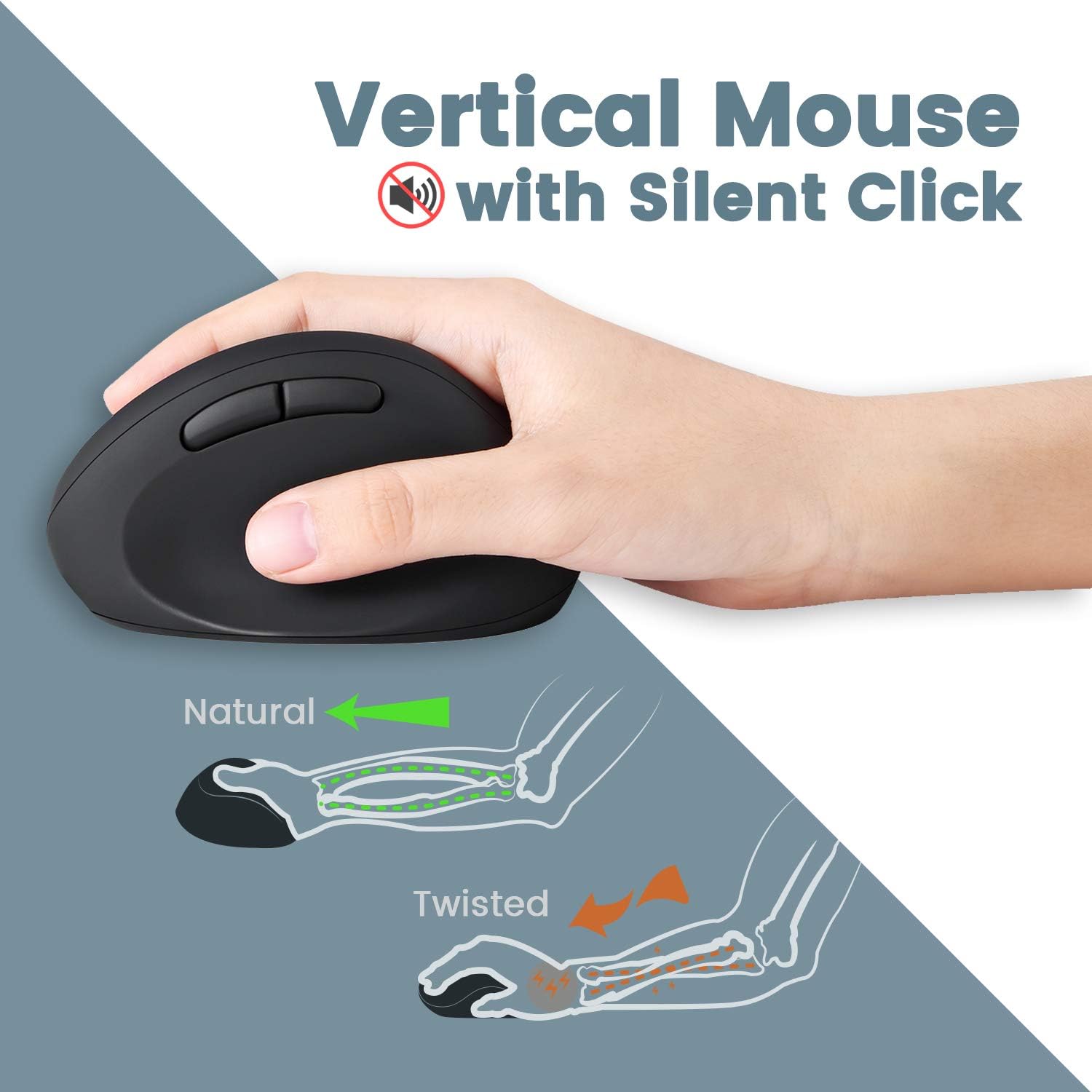
Mouse Specifications: Silent Click Vertical Mouse 5-Button Dimensions: 4.5 x 2.64 x 2.28 inches (11.44 x 6.7 x 5.8 cm) Weight: 0.18 lb (80 g) Adjustable DPI (800/1200/1600)
Vertical Mouse High Resolution Optical Sensor
This set comes with a wireless ergonomic vertical mouse with a high-definition optical sensor with 800/1200/1600 DPI that will provide you comfortable tracking movements to work for long hours, which makes it a perfect combination to increase your productivity every day.
How to Rebind the Keyboard Connection to the Receiver:
Insert fully charged batteries into your mouse.Switch the mouse on.Press down on the right mouse button and the scroll wheel at the same time for several seconds.Plug the receiver into the USB port on the computer.
Questions & Answers about PERIDUO-606:
Q: Where can I find the receiver?
A: In the receiver compartment inside on the backside of the keyboard.
Q: Why I only have one receiver?
A: The keyboard and mouse share the same receiver, so you only need one receiver to connect both devices.
Q: How to rebind the connection of the keyboard and mouse to the receiver?
A: Please check the keyboard and mouse product description sections above. Under “How to Rebind the Keyboard Connection to the Receiver” and “How to Rebind the Mouse Connection to the Receiver.”

ALL-IN-ONE COMPACT COMBO – Mini keyboard and mouse value kit with split key design and without number pad area; Portable slim keyboard design with curved keytop geometry with naturally arched shape and integrated adjustable palm rest stand that promotes a neutral wrist position
WIRELESS CONNECTIVITY – 2.4 GHz wireless technology with approximately 33 feet (10 meters) operating distance; One Nano USB receiver for both mouse and keyboard; You can find the receiver in the receiver compartment located on the backside of the keyboard
SPLIT-KEY KEYBOARD – A one-piece design that simply separates the keys into two groups for the left and right hand to reduce bending your wrists outward while typing; Designed specifically in order to reduce the pressure from your hands while computing and give you the benefit to type relaxed and effortlessly; Keyboard dimensions: 13.82 x 8.94 x 2.56 inches
SILENT VERTICAL MOUSE – 5-button mouse with ergonomic design and adjustable DPI resolution (800 / 1200 / 1600); Mouse dimensions: 4.5 x 2.64 x 2.28 inches
SYSTEM REQUIREMENTS – Windows 7, 8, 10 and 11; Easy installation with Plug and Play feature, Package Includes: 1 Keyboard, 1 Mouse, 1 Armrest, 1 Movable Magnet (for height adjustment), 1 receiver (found in the keyboard) manual, and 12-month limited warranty
11 reviews for Perixx PERIDUO-606 Wireless Mini Ergonomic Keyboard with Portable Vertical Mouse – Adjustable Palm Rest Stand – Membrane Low Profile Keys – US English
Add a review
$59.99
James –
Excellent keyboard in a narrow ergonomic layout
This has been the best option I’ve found for a ergonomic keyboard & mouse that fits a narrow workspace. Good feel to the keys. Mouse is quite comfortable. This setup is relieving my right wrist pain.It takes a little time to get used to the mouse movements due to the different sensor placement as compared to flat mice. And I sometimes accidentally hit the up arrow due to its placement next to a relatively narrow right shift key.Both of these are just part of a normal adjustment period.I would definitely buy this again.
Proper Noun –
This keyboard has issues which keep me from recommending it. Sorry.
I wanted to love this keyboard badly enough that I actually managed to make it work for me.However, while it’s totally serviceable, I don’t know if love is what would describe my feelings toward this keyboard.Right out of the box this keyboard has major issues. Sper long 7, T, N, H, L Shift keys which would stick in the corners due to for whatever reason not being stabilized.Clipping the corners of the box switches, created a wobbly which helped clear the corner when pressing it down with such leverage. I also lubed all the switches with vaseline as some of the better switch lubes contain silicone so they’re no good for membranes. That barely alleviated anything and also made it stick a little in other spots. However I noticed that for a chiclet style keyboard, this thing has a lot of travel. I decided to shorten the travel on the sticking keys by stilting them with toothpicks (method pictured here) which was a 95% fix to the mentioned issue but made them feel too short compared to the other keys so what did I do? I shortened the key travel on all of the keys.What did I end up with? A perfectly serviceable ergonomic keyboard with easy short travel and a compact layout that reduces excess movement. That all sounds very good but since the keys are stilted on those rubber domes, it has increased how rubbery the board feels over all. I wouldn’t call it bad, but it is a little weird to get used to. Solution to this and to the additional wobble stilting produced is to get thin plastic shims and glue them in place to the button of the key caps. This is what I will eventually do and that should definitely improve things. But the other thing I will do is add stabilizers to the weirdly long keys they’ve gone with on some of these letters.I really love the design and layout of this keyboard, I actually like it more than the microsoft surface because of how portable it is. But unfortunately in it;s current implementation, I would never recommend this to anyone unless they were willing to do some enthusiast level modding to get it tip top. Out of the box, it’s not even usable IMHO.I really beseech Perixx to revisit the hardware choices they made for the switches in this keyboard and consider scissor switches or even compact mechanical switches of some sort because this keyboard would be totally killer if it worked.PS: I definitely voided the warranty on this thing to get it to work.
Anna –
Keyboard stopped working in 2 weeks
I got this to replace Microsoft Ergonomic Sculpt. I was skeptical, but actually really like the size and feel of it. Unfortunately, just 2 weeks after getting it, the keyboard has stopped working. They mouse still works, and the keyboard shows up as connected to my computer but does not work. User manual is worthless. I’ve requested a replacement.
Zoe L. Martell –
Great if you have small hands!
I had been searching for an ergonomic keyboard that would work with my small hands, and I finally found one! The full-sized ones are simply too big for me, and I couldn’t get used to typing on them. This one, however, fits well, and it didn’t take long to get used to using it. I’m very happy I bought this. The mouse that came with it is also very nice, and I like the fact that they use the same receiver.
Ba –
Sculpt knockoff that outperforms the original
Been hunting for a 70% style ergonomic keyboard to replace the microsoft sculpt which has serious hardware bugs (certain key sequences do not work, all keys stick down eventually, etc) that they’re not interested in fixing). After trying the x-bows which cost a fortune and brought back my carpal tunnel worse than i’ve had in a decade I decided to look for an as-close-to-sculpt knockoff as possible and here we are.Considering the price this is a good keyboard better than the sculpt in that it’s almost the same design and comfort level without the major hardware flaws. This is just slightly smaller than the sculpt but otherwise has a similar size and arc so if you’re comfortable on any of the microsoft style ergonomics you’ll be comfortable enough here. The only deficits comparatively are* The key switches feel slightly stiffer and if you press on the outside edge of wider keys they can stick and not press down as evenly as the scissor switches on the sculpt.* The small size takes some getting used to. the keys on the bottom row are miniscule especially ctrl, win, fn, alt could’ve been left at a larger size for better usability.* The small magnetic foot on the bottom is a nice swallowable size for my toddler so I removed it and added a couple of stick on pads instead. The sculpt is equally dangerous as it has a magnetic only battery cover. I remain baffled why anyone would design anything with batteries or magnets you can just pop off and swallow but seems a trend in keyboards.update: The key switches cause the keys to have a sort of creaky sound when touched, but not pressed that is slowly driving me nuts as is the stickyness of some of the larger keys when not perfectly pressed. Still serviceable but a bit annoying.
TMC –
Good size but error prone
I needed a replacement for Microsoft Sculpt ergonomic keyboard. This Perixx technically works. Some of the buttons are quite small, such as the right Shift key. This makes it pretty easy to miss when typing quicky and instead hit Page Down or the arrow key. Also, lately I’ve noticed that the keyboard gets stuck. Just now, I tried typing numbers but all I got were symbols. Other times when I click on the screen, text gets selected. As though a Shift key is registering as constantly pressed, even though it’s not. The fix is to put the computer to Sleep and wake it up. I’ve done this several times now and I haven’t had the keyboard for too long. Typing itself is fine and the ergonomics is fine. Just disappointing that these keyboards (Perixx, Sculpt) are rather shoddy and not reliable.
Eddy Petrișor –
I ordered this set in the hope it would help my RSI and let me put the mouse closer to the keyboard as it was ten-key-less, but I was so disappointed when saw the hard plastic hand rest, but even if that was a disappointment, I was hoping the front raiser to be decent enough to compensate for the extremely short traveling distance chiclet keys…The raiser has a bad design as it has 3 points of support, one in the dead center, but about 1 cm apart from the raiser body, while the corners of the keyboard have no support, giving the feeling of it might break in half if I were to put on the weight of may hands on the keyboard…Then comes the fact they keyboard uses 2 AAA batteries, while the mouse uses 1 AA.Add the mouse is very small, while any small move is accelerated right away, making it unusable for me.I sent it back in spite of its split layout design and TKL layout…
Amazon カスタマー –
ok
Amazon カスタマー –
・気に入った点この価格帯で品質はよくマウスもセットはコスパがかなりいいと思いました。打鍵感はメンブレン方式で深すぎず浅すぎすという感じで丁度いいです。肩こりが和らぎました・改善点手の大きさのせいか左手を置く位置が本体左橋ギリギリになってしまう。中央のホイールではスクロールのみでポインタは動かせまん。・総評コスパはかなりいいと思います。左手のスペースが狭いのはキーボードのホイール位置を中央とすると、少し左側にずらしておくとちょうどいい感じです。何より肩こりが和らいだので買ってよかったと思いました。※追記(2021/7/28)エンジニアでプログラミングを行うため普通の人よりタイプ数が多いのかキーの文字が薄れてきました。ブラインドタッチはできるのであまり関係ないですが記号などは把握していないため、記号のキーが消えるとどこにあるか迷うかもしれません。そのため星を一つ減らした評価に修正しました。
JM –
Good price for compact wireless ergonomic combo. No complain about the mouse. It is good size for me and reduce the soreness noticeably compared to non-ergonomic ones.Keyboard is not good. Keypress is not smooth. It has this cheap wobbly plastic feel. When you pressed, the corner of the button kind of get obstructed. My cheap 20 bucks logitech keyboard is much more better in term of this. The position of the enter also the size, and delete buttons are not easy to access.Overall, it is a so so experience.
Alison –
I struggle with a bad shoulder and a friend suggested this set up. I’ve used it a week, and no more shoulder pain.If you do a lot of scrolling through documents, the keyboard scrolling wheel is a must