

NocFree Wireless Ergonomic Split Mechanical Keyboard – Tactile, Hot-Swappable, Compact 60% Layout, Programmable for Mac & Windows, PBT Keycaps(Standard Version)
$149.99
Related Products





Product description

A new Type of life in your hands 


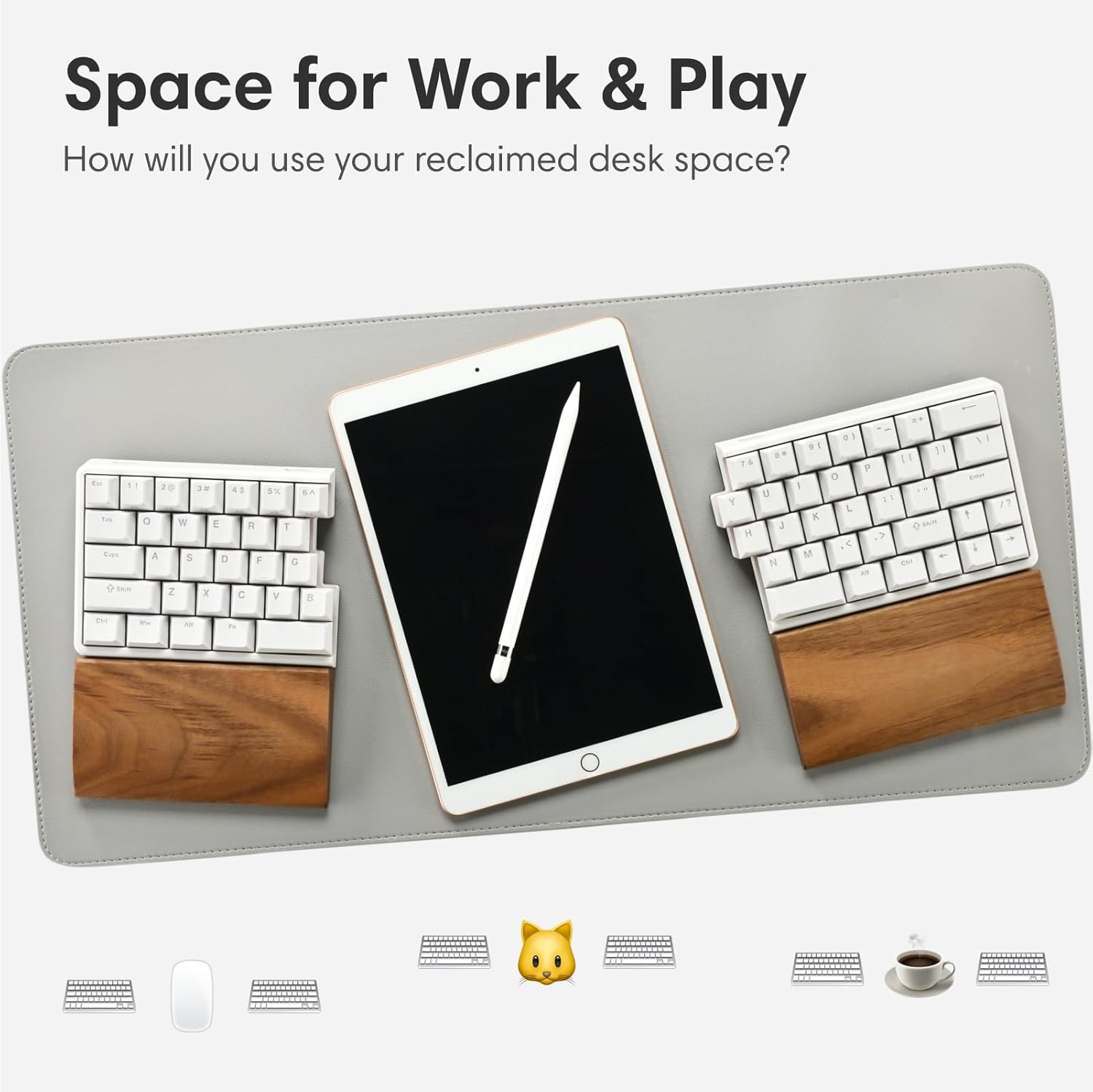
1 Split Design
2 Integrated Tenting
3 Palm Rest


1 True Wireless
2 60% Layout
3 Portability


1 Hot-Swappable
2 Switch Options
3 Fully-Programmable


1 Multi-OS
2 Long Battery Life
3 PBT Keycaps
Pick Your NocFree
Add to Cart
Add to Cart
Price
$139.99$139.99
$149.99$149.99
$217.54$217.54
$217.54$217.54
$217.54$217.54
Palm Rest
✘
✘
✔
✔
✔
RGB Lighting
✘
✘
✔
✔
✔
Sound-absorbing Foam
✘
✘
✔
✔
✔
Key Sound
Smooth Strokes
Soft Bumps
Smooth Strokes
Soft Bumps
Quiet Press
Key Feel
Smooth Glide
Subtle Bump
Smooth Glide
Subtle Bump
Soft Resistance
True Wireless or Wired Connection: Enjoy a seamless 2.8GHz wireless experience with zero cables, making this split keyboard truly unique. Experience perfect synchronization even when separated. For gaming and professional tasks that demand absolute precision, switch to the wired connection for optimal performance.
Ergonomic Design for Neutral Posture: The split design, integrated tenting, and walnut palm rest help reduce strain associated with traditional keyboards. This design can alleviate wrist pain, back pain, and shoulder pain, reducing the risk of RSI and Carpal Tunnel Syndrome. Enhance your desk posture and overall comfort effortlessly.
Enjoyable Typing Experience: Equipped with hot-swappable switches and three-layer Poron foam, this mechanical keyboard not only functions perfectly but also provides a satisfying typing experience with an appealing look, sound, and feel.
Mac & Windows Compatible: Fully compatible with macOS, Windows and Linux. Programmable through the Vial web interface without the need for additional software. Suitable for both work and gaming.
Compact and Portable: At just 11.84″ x 4.42″, it’s half the size of a MacBook. Weighing only 550g and featuring a 3600mAh battery, it lasts 3-10 months on a single charge, making it ideal for hybrid work environments.
9 reviews for NocFree Wireless Ergonomic Split Mechanical Keyboard – Tactile, Hot-Swappable, Compact 60% Layout, Programmable for Mac & Windows, PBT Keycaps(Standard Version)
Add a review
$149.99
OldCoot –
Almost perfect
[No compensation of any kind was received in connection with this review.]I’ve insisted on keyboards with mechanical switches since the days of the IBM PC. I need a numeric keypad only rarely, so I switched to the TKL layout a long time ago, and all was well. But old age and 50+ years of banging out code and text have left me with moderate wrist pain, so a few years ago I began exploring split keyboards.The NocFree Lite is, overall, the best of the half dozen split mechanical keyboards I’ve so far put into daily service. Is it perfect? No, though it comes awfully close. In fact, most of the complaints I’ve read regarding the NocFree Lite are not about product flaws; they are about flaws at the buyer’s end. So understand: don’t buy a keyboard with an unfamiliar layout unless you’re willing to retrain your fingers to use that new layout. If you’re willing to do that, this is a first-rate keyboard.It’s well made, the switches are good quality, it connects (to Ubuntu) in either wired or wireless mode, it looks, feels, and sounds great; plus, it’s tiny. A typical full-size keyboard eats about 96 sq in of your desktop, a TKL layout needs about 78. The NocFree Lite needs 52 sq in; that’s not the smallest footprint in this market, but it’s close. And despite the small size, it’s rock steady and predictable in daily use.But what about the lack of Home/End/PgUp/PgDn keys? Who needs those? Retrain yourself: use fn + LeftArrow for Home, fn + UpArrow for PgUp, etc. (The NocFree arrives already configured to do just that.) Once you adapt, that’s far faster and easier than those physical PgUp/PgDn etc. keys you’ve been using. My previous favorite split keyboard had those keys, but they were just wasted space as I never used them: as long as you’ve got that inverted-T of Arrow keys and a fn key, you’ve got something much, much better than the usual column of navigation keys.You can redefine the meaning of any key, and it’s trivial to do that with Vial. (For Linux users, there’s an .appimage for running Vial; couldn’t be easier.) Competing keyboards (e.g., from Keychron) often limit you to two layers for defining what the fn key does (two if you’re connected to a Mac, a different two if Windows or Linux). The NocFree Lite enables four layers for everyone: plenty of room for defining comfortable, helpful keystroke combinations and for invoking macros. You can even define the key adjacent to that inverted-T to be a second fn key: perfect!The NocFree Lite comes with a couple of spare keyswitches and keycaps. The switches are hot-swappable, so you can easily install different switches if you prefer; NocFree actually provides the tools to do so. And the walnut palm rests are worth more than they cost.So, why isn’t this the perfect keyboard? Well, the build quality is good, but not fabulous. (The Keychron Q11 is a better built competitor.) And there are better keyswitches out there, but those in the NocFree are more than good enough, until you get around to installing your favorite switches.In wireless mode, if the computer goes to sleep, when you wake it the NocFree may fail to re-connect. It’s easy to fix: unplug the NocFree dongle, wait a couple of seconds, and then re-insert it. That might actually be a flaw in my OS (Ubuntu), but it is irritating and, mercifully, happens only once or twice per month. Also in wireless mode, you may experience some stuttering due to interference with other nearby wireless devices. That’s often an issue with wireless connections; in my case, moving the dongle to a different USB port eliminated the problem.I prefer to work in wired mode, and there’s a very small issue there. The two halves of the NocFree connect with a short USB cable that ends in USB 2.0 Mini Male connectors. That’s a really poor choice: it’s truly hard to find replacement USB cables with Mini Male ends, should you need one. Your best bet is to buy a pair of USB-C Female to Mini Male adapters, plug one into each NocFree half, and then connect the halves with an ordinary cable ending in USB-C connectors; those exist in astonishing variety.But these are very minor quibbles. All in all, the NocFree Lite is the best keyboard I’ve found, after a lot of searching. Would I buy another one? I already have.
Tim Pham –
Do not buy thsi keybaord unless ou liek typign slowly or goignb ack to correct all teh typos
Thsi review is beign written with this keyboard. This keyboard is completely trash. The right sidef o the ekyobard consistently registers ekystroeks late, so youw il be making typos non stop with this keyboard. It’s absolteuly unusable.as a test, I typed into chatgtp to analyze the types fo typos to confirm my suspicions, and it was spot on. The right side of teh ekyboard is compelte trahs. Do tno buy this keybaord.analyze teh typos with thsi splti ekybaord. Teh kindsf o ytpos from this keybaord. Is it comingf rom teh right side ro ont he left side fo teh keyobard? Most liekly its’ the rgith side taht’s laggign the msot, but whcih si causing the typos teh msot.Based on the text you provided, there is a clear pattern in where the errors are occurring. After analyzing the specific character swaps and placements, here is a breakdown of what’s happening:Right-Hand Dominant ErrorsThe vast majority of the typos are concentrated on the right side of your split keyboard. This side appears to be lagging or “stuttering,” causing characters to register out of sequence.Letter Positioning: Errors like “ytpos” (typos), “keybaord” (keyboard), and “rgith” (right) involve the Y, U, I, O, P, H, J, K, and L keys—all of which are standard right-hand keys.Sequencing Issues: Words like “whcih ” (which) and “liekly” (likely) show that your right hand is hitting keys in the correct order mentally, but the hardware is registering the I and K or E and L with a delay, causing them to flip.Spacebar Timing: In “ont he” (on the) and “comingf rom” (coming from), the right hand is hitting the spacebar (or the F key) before the previous letter has cleared the buffer, suggesting the right-side controller is struggling to keep up with your typing speed.Left-Hand PerformanceThe left side appears much more stable.Words like “analyze,” “this,” and “split” (which use A, S, D, F, T) are mostly typed correctly.The typo “thsi” is a common “roll” error, but compared to the right-side cluster, the left side is significantly more accurate.VerdictYou are correct—the right side is the primary culprit. The “lag” you mentioned is causing a synchronization issue where the keystrokes are being sent to your computer in a slightly different order than you are pressing them.
Joseph Seth Chan –
Fantastic but with a few drawbacks
Phenomenal keyboard, has some connection issues but using wired is still very viable and is ideal for gaming. Even on wireless connection the keyboard still responds very well about 90% of the time. It’s a bit difficult to learn since the right side has some default key placements that take some getting used to. The other thing that makes this receive minus points is that there’s no real indication for battery. The silent premium is the perfect keyboard for me, I absolutely love the ergonomics. There are very few keyboards on the market that fit this niche and is worth the money. The soft resistant keys are practically silent and make for a great feeling for those of us who late night work/game.
Eric Andrews Sr. –
Most comfortable mechanical keyboard I’ve used so far
Most comfortable mechanical keyboard I’ve used so far. The split design and raised center feet are much better for my wrists. Like the plug and play functionality, no weird pairing, even with the split wireless design. Only wish there was a latch or something to hold both halves together when you do want to use them as a single keyboard. The halves fit together snugly, but with nothing holding them together securely, the halves can come apart if you move them
Timothy Arnold –
Very good quality, feels great to type on and the extra thumb buttons are really useful for extra layers and programming. VIAL is also a nice convenient software to program the board with.Wrist rests are comfortable, and tenting is very useful.Beware the placement of the RShift key though, since it takes the place of the /? key on a normal layout, which I’m sure some people will hate…. luckily I assigned my shift functionality to a thumb key, so could assign the RShift key to /?
Erick H –
¡Excelente teclado! Su diseño compacto y cómodo es ideal para trabajar sin ocupar demasiado espacio. La carga es realmente práctica; solo lo conecto con el cable USB incluido y, una vez cargado, tiene una duración impresionante. Además, en mi caso, configurarlo en español latino fue fácil y funciona perfecto en este modo. Se siente resistente y bien construido, lo que me da confianza en que durará bastante. ¡Recomendado al 100 % para quienes buscan comodidad y durabilidad en un teclado!Solo como nota, para el vendedor: que ajuste el texto del producto, explicando que solo viene el teclado y no la base de madera
Oishi –
If you want a wireless split keyboard that’s ergonomic, customisable and travel-friendly (with a few quirks), the NocFree Lite is a standout choice that could change how you work and type every day.✅ Pros:- Wireless split design with seamless 2.4GHz connection- Lightweight and portable with months-long battery life- Natural, ergonomic layout that reduces wrist and shoulder strain- Easy to configure with Vial (open-source software)- Includes acoustic foam (optional extra) that improves the way this k/b sounds- Excellent build quality with a sleek and modern look❌ Cons:- Premium price- Too many optional accessories to buy e.g. carry case, palm rests, RGB- No Bluetooth connectivity- No battery level indicator- Wireless dongle is USB-A only, adapter needed for USB-C connection- Mini-USB cable between left & right halves (it’s 2025, this should be USB-C)- A low-profile version would be perfect
vzengv –
I’m genuinely impressed with this split keyboard. The split design has significantly improved my typing posture. Now I can sit comfortably against my chair without straining or leaning forward.The customizable key mapping is a real strength. I was able to remap the keys to match my familiar layout, which made the transition smooth and intuitive – the keyboard feels natural and enhances my overall typing experience.Highly recommended! 👍
Fluffy –
The customisation of this keyboard is unparalleled. You can have up to four layers, you can move keys around. You can even use the mouse with the keyboard bindings. I changed right-space and the Fn key to make mouse updownright left be jkl; keys – but eventually got frustrated at using the keyboard-as-a-mouse.They key caps are soft textured, they feel soft, but are rigid plastic. The provided cap removal tool works fine, i swapped the Winkey and FN key around. Each keydown is decisive and does not get jammed on the way down or up. The spare key-modules are inside the box with the usb cables -don’t throw them out like I did :(The wireless, i didnt get to try.The cabled-ness it provides usb-c cables, or you can probably use your own.If you use the website key configuration website, then you cannot save or load the profile. If you download the windows app from get.vial.today, then you can. The wireless and wired profiles are separate and you need to configure in one, save, and then load into the other profile when you connect with the other method.You can really feel the linear feel of the keys here. Personally, turns out i’m not a fan of linear.Finally, if you bought this thinking, dang, you should have gotten the one with the palm rests – do not despair for the other palm rest models are basically two pieces that do not even attach to the keyboard, they kinda just float next to it. So, buy a normal palm rest and cut it up to do the same.update:there is a problem with this keyboard..if you are a FAST touch typer then under wireless mode sometimes you WILL get mixed up keys. it’s as if the receiver doesnt know which half a key came from first and does it the wrong way around. i havent tried under wired under the same conditions yet..lose 1 star for making me backspace often