

meross Smart Plug Mini, 15A & Reliable Wi-Fi, Support Apple HomeKit, Siri, Alexa, Echo, Google Assistant and Nest Hub, App Control, Timer, No Hub Needed, 2.4G WiFi Only, 4 Pack
$10.70
Related Products




Product description

 Apple HomeKit Supported!
Integrate your device easily into your Apple ecosystem for even more convenient ways to control it.
 Voice Control
Free up your hands with voice commands. Easily set up with Apple HomeKit, Alexa or Google Assistant.
 Control From Anywhere
Control your smart device remotely and freely with Internet access even when you’re away.
1 Apple HomeKit
2 Hands-Free Voice Control
3 Remote Control

 Fast Response
Millisecond response and no drop-off with superfast local control when you’re at home.
 Offline Control
When the Internet is down, you can still control smart plugs in Home Wi-Fi network via Meross app.
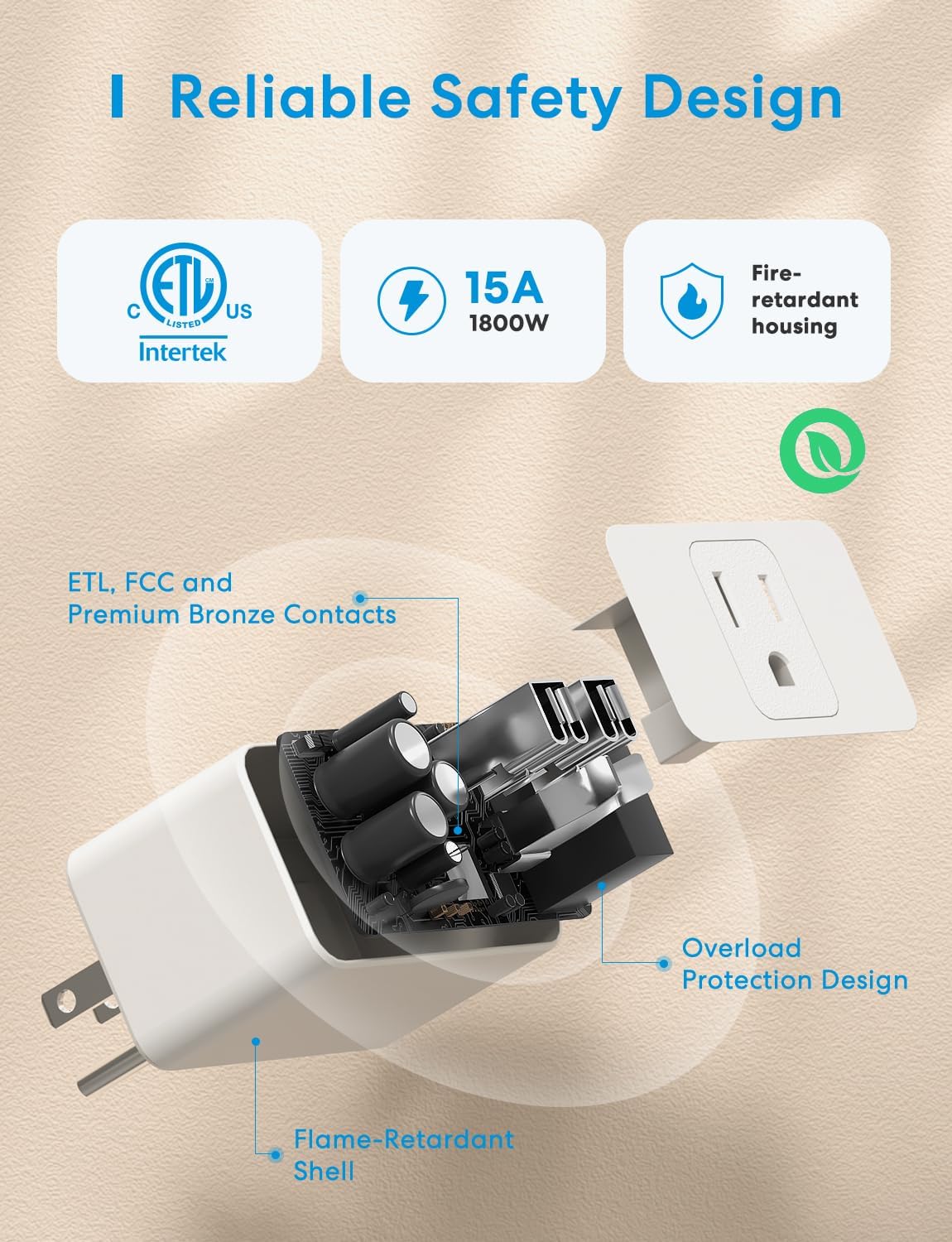
 Reliable Safety Design
PC Flame Retardant Design
ETL and FCC certified
15A Max Load
1 Superfast Local Control
2 Offline Control
3 Reliable Safety Design

More smart devices from meross
Add to Cart
Add to Cart
Add to Cart
Add to Cart
Add to Cart
Customer Reviews
4.4 out of 5 stars 877
3.6 out of 5 stars 86
4.4 out of 5 stars 2,909
4.3 out of 5 stars 547
4.3 out of 5 stars 447
4.4 out of 5 stars 1,072
4.3 out of 5 stars 3,142
Price
$42.79$42.79
—
$29.99$29.99
$75.99$75.99
$39.99$39.99
$31.82$31.82
—
Works with Apple HomeKit
✔
✔
✔
✔
✔
✔
✔
Works with Amazon Alexa
✔
✔
✔
✔
✔
✔
✔
Works with Google Assistant
✔
✔
✔
✔
✔
✔
✔
Superfast Local Control
✔
✔
✔
✔
✔
✔
✔
Offline Control
✔
✔
✔
✔
✔
✔
✔
No Hub Required
✔
✘
✔
✔
✔
✔
✔
Remote Control: To enable HomeKit remote control, you need a HomePod, an Apple TV 4K, Apple TV HD, or an iPad. Set any of these Apple devices in your house as a HomeKit bridge and connect it to your home 2.4GHz Wi-Fi network. Keep in mind that once your HomeKit bridge is set up, it has to be kept online. If it is powered off or disconnected from the Wi-Fi, it will fail to respond when you intend to control the device remotely.
Voice Control: You can control your devices hands free, just give voice commands to turn on/off the connected devices. Compatible with Apple HomeKit, Apple Watch, Siri, Carplay, Amazon Alexa, Google Assistant.
Compact Size: Smart plug occupies only one socket, the device allows you to stack two mini smart plugs in the same outlet, which is convenient and practical.
Schedule: You can schedule connected devices to turn on and off automatically by smart plugs. Save energy when lights are not needed or left on by accident. Sunrise and sunset setting are supported.
Quality: The meross Smart outlet is made of PC flame retardant material, and has been approved for safety and quality assurance. Certified by ETL and FCC, it supports home appliance up to 15A.
10 reviews for meross Smart Plug Mini, 15A & Reliable Wi-Fi, Support Apple HomeKit, Siri, Alexa, Echo, Google Assistant and Nest Hub, App Control, Timer, No Hub Needed, 2.4G WiFi Only, 4 Pack
Add a review
$10.70
Kent W –
Works well for Christmas lights once you set them up
These are a full 15-amp remote switch, so the box is a little wider that I had hoped, but you can plug 2 into a standard American outlet, one over the other. Works great with Alexa – BUT – you have to install the Meross app first, then once it’s operating the Alexa app takes it over. Should work with other automation systems. There’s a manual on/off button on the side. Took just a few seconds to setup. You cannot put furniture too close to the wall due to the thickness of the box and the plug plugged into it – need about 3 inches of clearance. Worked great with the Christmas tree.
Shahar Tamari –
Easy homekit setup – just ignore the instructions
Pro:size – two plugs easily fit in a standard double outlet and on standard size power strip (on compact strips you would still be able to fit a two-prong plug next to it.) This is a huge improvement over the old TP-link plug that took up 2 spaces on my power strip even when it was placed on the top (see picture.)Operation & Integration – once connected the plug just work. I quickly forgot that they weren’t always there; waiting for my command. I can turn off all the lights in the house from the iphone flip-up screen.Installation – Like a lot of Meross products, the plug has EZ mode and AP mode. The detail instruction sheet takes you through EZ mode. However, the plugs were all in AP mode (slow blink) and I could not get it to blink fast even after 3 resets. Once you get over the fact that the instruction sheet is quite unhelpful and follow the instructions below, and you will find that installation is a breeze.1. Plug it in. Make sure that the light blinks green/amber. If it’s steady green, as in a previous setup, press and hold the button for 5 seconds to get it into setup mode.2. on you iPhone, go to Settings | Wireless. wait a few seconds until the plug shows up under the heading “set up new device…” The name is “meross_sw_B210” or something similar… Click on it.3. You now get a message that allows you to “Add to Home & Wi-Fi” (see picture.) Smash that link to turn on the camera and scan the top of the plug to add it into Homekit.4. After about 30 seconds Homekit allows you to select the room and name of the new device. The phone automatically switch back to you home wireless network.cons:Not a huge issue, but the position of the button on the side of the plug could be challenging to your less techie household members. The ability to share homekit settings with everyone can mitigate the issue, but I’m a bit concern that I’ll get a talking-to the next time my wife tries to turn on the floor lamp in the den.I have a couple of floor lamps and my Roku device connected to plugs. No more having to get up to manually reset Roku. A voice command to Alexa does the trick. The 4th plug is connected to my electric tea kettle to schedule it for my morning brew (until I get a smart tea kettle, but that’s a battle for another day.)
Brian S –
Great for the Apple Homekit network
Great smart plugs for the Apple Homekit environment. Have used several of these plugs throughout our house to manage lighting and other electric devices. Easy to set up and configure. They stay connected and operate as expected. Never an issue.
Robert Ames –
Works Well, Updates are Slightly Wonky
Simple, works, supports a clicker/toggle button on the left-side to turn on/off manually.Light indicating “on/off” can be enabled/disabled (ie: usually green==on, off==off, but you can turn off the light all the indicator light all the time w/o putting a piece of tape over it).Updates are semi-frequent (I’m describing the iOS / Apple / HomeKit experience), but they’re a little difficult to successfully manage.#1 updates have to be run by a secondary (junky) app, otherwise homekit complains of “out of date firmware” notification#2 the app for updating doesn’t match the iOS / HomeKit naming (it’s always: “Plug, Plug, Plug, Plug, etc…”) so if you have a single plug which hasn’t updated it’s kindof tricky to figure out which one it is for troubleshooting (pro-tip: turn off all the lights/outlets, then turn them on one, by one, switch over to the app, and rename the only outlet which is turned on).#3 the app is kindof gross. It’s got coupons and probably spyware and what not. From a HomeKit perspective, the app is _necessary_ b/c of the updates it provides, but not well integrated.On the plus side, they’re really affordable, and I’ve been super happy to have them.My suggestion is to pair this with 1-2 `Eve` brand outlets which support usage monitoring.1) Pick the target device (lamp, xbox, fan, whatever).2) Run it for a few weeks w/ the “better” Eve outlet with usage monitoring. See about how much it costs to run that device per day/week/month, etc.3) Switch it over to a cheaper Meross plug, and then keep in mind about how much it costs4) Repeat with your next device…5) 100% buy these Meross plugs for anything which you can “turn off” easier and “will pay for itself”.For me, I’m able to physically power-down my X-Box overnight w/ one of these plugs, which saves ~$2-5/month compared to accidentally leaving it on overnight. That means these plugs pay themselves off in 2-3 months… BUT you need a usage-monitoring plug in order to figure out where it makes the most sense to have app-control.I’m unaware of the vampire-load of each of these plugs, but that info is probably in another review or answered question.Summary:- They’re easy to set up- They work well with HomeKit- They’re mostly OK to keep up to date- The app isn’t great (but you don’t need to use it often)- They’re simple and I’ve been very happy they’re cheap enough to put them in a bunch of places!
Amazon Customer –
Compatibility with Apple Homekit.
Setup is easy on HomeKit. I did have a bit of trouble with 2 of the units but if I got away from the router and took the Mini Plug and the iPhone into the garage away from close proximity to the router they hooked up fine. I’ve ordered more.
Armando R. –
Llevo varios años usándolos, se enlazan fácilmente a HomeKit y con algunas actualizaciones de firmware a través de la app de Meross se han hecho muy estables.
Matthew Ferguson –
These plugs work as you’d expect once setup. They react VERY quickly through HomeKit when working with automations, Siri, or manual control through the Home app or the Meross App.Setup:This was the most involved part. As others have stated, HomeKit setup can be a little tricky if you haven’t done it before, that being said I didn’t run into nearly as many issues as other reviewers seemed to have had. I setup directly as a HomeKit device through the Meross app following the on screen HomeKit prompts. I also set up the devices in a kitchen outlet first so I don’t have to bend over behind a couch for the initial setup. This also allowed me to keep the phone within a foot of the device for setup which seemed to help. The first time I tried I was standing 6 feet away with my phone in my hand and it didn’t complete the setup, the please wait wheel just kept spinning. Once I left the phone on the counter directly under the plug (~1ft away) it setup instantly, the HomeKit prompts do tell you to stay “close” to the device while setting up. Each plug must be set up individually, as such I recommend doing just one at a time so you don’t get confused about which is which. Once the HomeKit setup was complete, you have to add the device to the Meross app again as it is not done automatically during the HomeKit setup. This isn’t a bug, this is a HomeKit thing, not a Meross thing. In the Meross app you tap the “+” button in the top right and. The HomeKit plugs are recognized in the Meross app as unlinked deviced at the top of the add device page in the app. Once added to the app, it will prompt you for a firmware update, let the device do the update (1min), and then your done. You can not control the plug through the app or the home kit app.Use:It’s a plug that you either turn off or on. My use case was for a pair of floor lamps that didn’t have a dimmer, but required me to lean over my couch to turn on/off. The device reacts EXTREMELY quickly through HomeKit. The lag time between hitting the “switch” in the Home app is non existent.Conclusion:Over all I’m very happy with the plugs. Sure they may have limited use cases, but if you have an application for an automated outlet, these work great! They are also ETL listed so you know they aren’t some cheap product that will accidentally burn your house down.
Gus TC –
Muy útil y de muy buena calidad, funciona perfectamente con Apple HomeKit
Angel Luis Ramírez Limón –
El producto me encanto. Es súper funcional y muy fácil de instalar y programar a través de la aplicación. Perfectamente compatible con la app Home de IOS y se puede activar o desactivar por voz con Siri. Lo recomiendo altamente. Instale dos dispositivos en exterior para una fuente y unas luces de jardin y su conectividad es muy estable a pesar de que el módem de internet no está tan cerca.
AC –
Ya tengo vatios enchufes de esta marca y Refoss que usan la misma App, funcionan excelente con HomeKit solo que sin de precio más elevado, hay unos que no indican HomeKit, estos solo funciona con Alexa.