

Insta360 Link 2C – 4K Webcam for PC/Mac, 1/2″ Sensor, Auto Framing, HDR, AI Noise-Canceling Mic, Gesture Control for Streaming, Video Calls, Gaming, Works with Zoom, Teams, Twitch & More
$149.99
Related Products


Product description
The video showcases the product in use.The video guides you through product setup.The video compares multiple products.The video shows the product being unpacked. Insta360 Link2C KV Merchant Video


1 4K Resolution
2 1/2″ Sensor
3 HDR & Low Light
4 True Focus
5 Natural Bokeh


1 Professional Audio
2 AI Noise-Canceling
3 Intelligent Audio Modes


1 Auto Framing
2 Gesture Control


1 Smart Whiteboard Mode
2 Whiteboard Mode
3 DeskView Mode
4 Portrait Mode
5 Privacy Mode


1 Virtual Backgrounds
2 Creative Filters
3 Remote Smartphone Control

1 FAQ
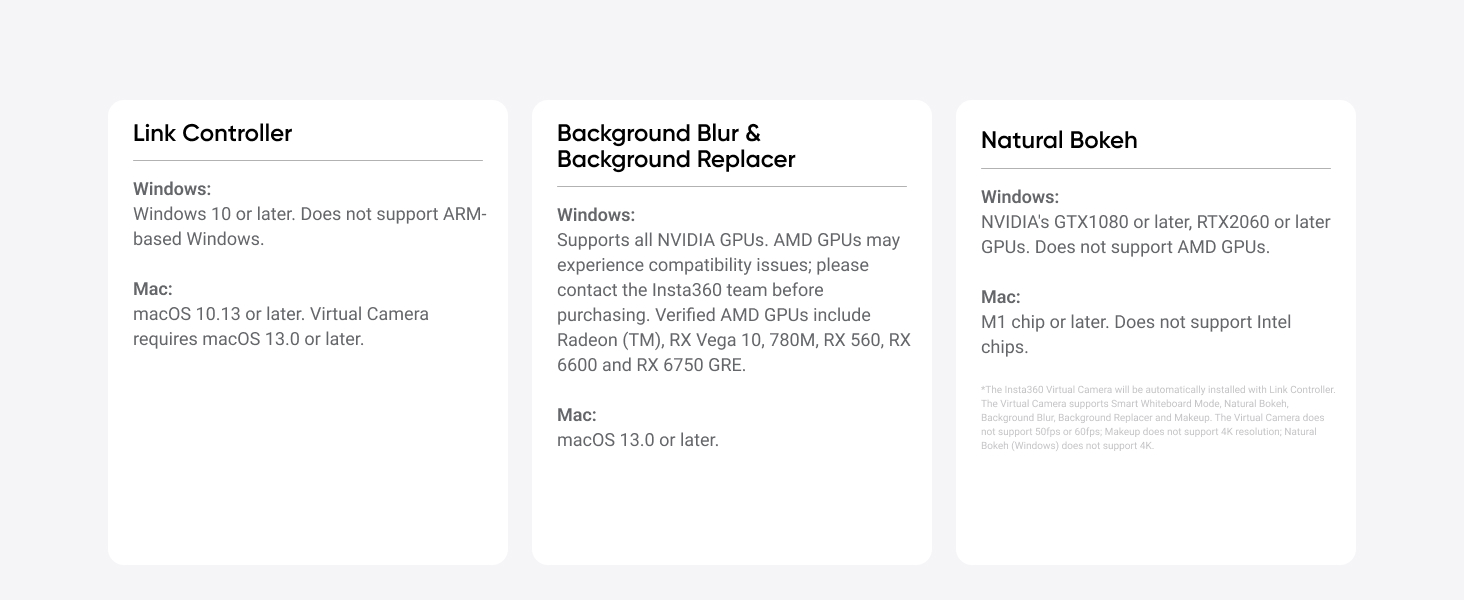
2 Compatibility List
Premium Image Quality: Upgrade to Link 2C 4K webcam with a 1/2″ sensor. Captures true-to-life webcam 4K visuals with HDR and low-light performance for stunning video in any lighting condition.
Professional Audio: Experience best-in-class audio with advanced AI noise-canceling algorithms. Filter out unwanted background noise for clear communication, even in busy environments.
True Focus: Insta360 Link 2C streaming camera with Phase Detection Auto Focus (PDAF). No more blurry shots—this web cam ensures instant focusing and crisp video for every stream.
Natural Bokeh: Get a DSLR-like look with this Insta360 Link 2C web camera. Replicates natural depth of field straight from the Link Controller, making it a superior camera for computer setups.
Auto Framing: Insta360 Link 2C automatically zooms and adjusts to keep everyone clearly in sight, whether it’s one person or a group.
Gesture & Remote Smartphone Control: Control your webcam remotely from your smartphone, or use simple hand gestures to start AI Tracking/Auto Framing, zoom in or out and activate Whiteboard Mode.
Specialized Modes: Features DeskView and Whiteboard modes. Link 2C is ultimate webcam for streaming and creativity, functioning perfectly as a versatile webcam for Mac and Windows.
Advanced Desktop Software: Fine-tune settings, access advanced features and personalize your experience with the free dedicated Link Controller software.
Privacy Mode: Insta360 Link 2C has an easy-access privacy switch for privacy whenever you need it.
Universal Compatibility: Fully compatible with all major video conferencing software and live streaming platforms, including Microsoft Teams, Zoom, Twitch and more, for a seamless experience.
12 reviews for Insta360 Link 2C – 4K Webcam for PC/Mac, 1/2″ Sensor, Auto Framing, HDR, AI Noise-Canceling Mic, Gesture Control for Streaming, Video Calls, Gaming, Works with Zoom, Teams, Twitch & More
Add a review
$149.99
Data –
Great quality webcam with lots of features.
I’ve been using the Insta360 Link 2C for over a month now and really like it. The video quality is excellent at 4k. The image is sharp and looks amazing. The autofocus works incredibly fast and without issue. I held up my phone to the camera to show someone some text and the camera focused on it no problem and the image was crystal clear. When I moved the phone away, it instantly focused back on me with perfect clarity. The camera is very easy to use and the software has plenty of easy to use features. Background removal/replacement works good and has plenty of stock images to pick from. If you’re into artificial makeup, the software even has the ability to give you some makeup. There are also hand gestures you can use to zoom the camera in/out. It’s amazing.I highly recommend this webcam and consider it a great value for the money.
R. Reed –
Best webcam under $130!
By far the best webcam under $130. Quality is excellent and the customizable features are a plus.While it can be customized with the downloadable software, I just plug it in and it works great for my Teams calls. I can even use the hand gesture to track me.The magnetic mount is great because I can fine tune the angle the camera. That was a concern when I was trying to decide between this model and the step up model with built in gimbal.The large sensor allows for natural blurring. Don’t expect completely blown out backgrounds like a proper camera and lens setup. The lens and sensor size doesn’t physically allow for that.The sensor size also produces much better image quality in a darkened room although any digital image sensor benefits from a well lit room.If you’re considering this cam or any model from Logitech, just get this. You won’t regret it.
Bryan S Dickens –
So much better than the MEET 2 4K! Better software, better hardware higher quality webcam.
It’s actually considerably better than obsbot, in my opinion. I’ve had 2 se and 1 4k obsbot and sold the last one I had with a mini pc I had. I fell for the paid reviewers on YouTube the instalink has much better software and its much more natural looking, the obsbit is oversaturated and that not an opinion, its not as good, oversaturation is a flaw not a benefit. Get this one, and unless you truly need a gimbal just get this. The no. Gimbal ones seem to actually work better and or less prone to stutters.
Moises Pastor –
Great webcam for professionals and live streaming
Great webcam, really good camera and image quality, appreciate the privacy feature of closing the camera cover (one of my buying pain points), it’s autofocus and following feature is CRAZY!The base is okay, it all depends on the thickness of your monitor’s border, but yiu can use a selfie stick with a base or a tripod to mount it on that and works.It’s a great value for the money because it also brings its own software where you customize the lighting, the limits of what people will see and you can adjust throughout your calls, a great function that physically can’t be seen, but for sure it ups the product’s value.
IVK –
Great product!
I’ve been using the Insta360 Link 2C for a while now, and it’s hands down the best webcam I’ve tried. The 4K video quality is incredibly sharp, making a huge difference in Zoom calls and recordings. The AI-powered tracking is smooth and actually useful—it keeps me perfectly centered even when I move around during Zoom calls.I bought it as a substitution of my phone-as-camera and it works well.What really stands out is the low-light performance. Unlike other webcams that struggle in dim lighting, this one keeps the image clear and well-exposed without looking grainy. The autofocus is quick, and the different modes, like DeskView and Whiteboard, add a lot of versatility.It’s definitely on the expensive side, but for the quality and features, I think it’s worth it. If you want a high quality webcam that just works flawlessly, this is a solid choice.
R.M.F. –
Amazing Quality!
Wow, I watched a lot of YouTube video reviews of this camera and it’s even better than I thought it would be. As an owner of an expensive DSLR, I really wanted to use my actual camera with lenses on video calls…but it was just so complicated and required tripods & special lighting. The Insta360 Link 2C is just so convenient. Super simple to setup: just plug it in and download the Insta360 app. Within the app you can dial in the settings exactly how you want (I like a softer, film-like look with warmer tones & less contrast…really easy to achieve in the app).One thing worth noting: if you’re using this on Zoom calls, make sure the video feed is coming from the “Insta360 Virtual Camera” (the app with all of your camera adjustments) and not the raw video feed of the “Insta360 Link 2C” which won’t have any of your adjustments. Also, be careful with stacking AI adjustments on top of AI adjustments…the only thing I adjust in Zoom is to “mirror” my feed so that I can move naturally. All the other lighting adjustments and touch-up are handled in the Insta360 app.The built-in microphone sounds even better than the samples I heard in online reviews. Better than using the microphone of your headphones, but not quite as good as a dedicated mic…somewhere in between. Gets the job done for meetings.
Petar Pletikosic –
nice web cam
Nice magnetic mounting and compatible with tripods. nice video quality (my everyday use is work calls on teams/zoom)
ADRIANO CASTRO –
Produto excelente, qualidade incomparável. Realmente entrega o que promete, nível DSLR.
Anu –
Image quality is really good. Audio quality is also fairly good. You need to disable noise cancellation option on Teams to ged good audio quality if you’re using Teams. This worked without installing the controller software on my office laptop.
Nathan –
I’ve only been using this for a few days but so far, so good. The picture is super sharp. The focus mode is excellent. I am told the audio is also very good – not the same as using a dedicated microphone – but acceptable to day-to-day video conferencing – I’ve had zero complaints about people hearing me clearly. If you are after a cost effective, quality upgrade to your built-in laptop camera then I would highly recommend.
Jen S. –
Update: Insta360 reached out and let me know they update their site with the Mac requirements. Nice to know they read and take this feedback. Customer service seems good!I recently purchased the Insta360 Link 2C for work use, and I have mixed feelings about it. On the positive side, the camera delivers impressive 4K video quality and the accompanying software is intuitive and easy to navigate. It’s a great tool for professional video calls or content creation when it works as expected.Unfortunately, as a Mac user, I encountered a significant compatibility issue. Some features, like the bokeh effect, require an M1 processor or newer, which was a surprise. Nowhere in the product description was this limitation mentioned, and even their support site fails to list any minimum system requirements. This lack of transparency was disappointing, as it would have influenced my purchase decision.Overall, while the camera itself is impressive, Mac users with older devices should be aware of these limitations before buying. Insta360 should update their product descriptions and support site to provide clearer compatibility guidelines.
Julio Cesar –
La calidad de imagen y su baja granularidad (el ruido que aparece en la imagen) son excepcionales, es muy rápida, se siente fluida y la claridad de imagen es superior incluso frente a otras opciones como la logitech brío 4K, es sin duda alguna de lo mejor que hay en el mercado