

ELEGOO UNO R3 Smart Robot Car Kit V4 for Arduino Robotics for Kids Ages 8-12 12-16 STEM Science Kits Coding Gifts for 8 9 10 11 12 13 14 15 16 Year Old Boys Girls Teens Cool Engineering Building Toys
$59.99
Related Products


Product description
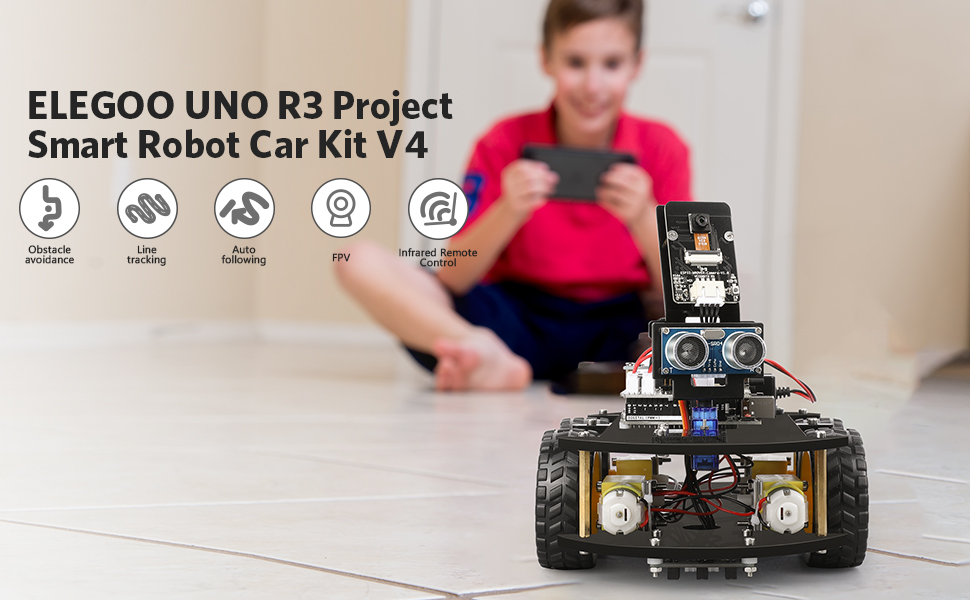
ELEGOO Smart Robot Cat Kit V4
ELEGOO Smart Robot Car V4.0 with camera is an educational and fun kit based on ELEGOO UNO R3 controller board (Arduino-Compatible) designed for both beginners and professionals to learn electronics, programming and robotics. With our easy-to-follow tutorial assembling this robot car kit would be very intuitive and simple regardless of whether you are an engineer or a novice. Building up your own robotic project has never been so easy and fun. Just follow our tutorial and step by step you will have your own running car kit within no time. This kit enables you to have a good quality time with your children and empower them to develop and inspire their imaginations.
ELEGOO Smart Robot Cat Kit V4.0 has multiple modes such as auto-go, infrared control, obstacle avoidance and line tracking modes. In each mode, you will learn how to load programs and command the car to run as instructed. The great interactivity that you can have with this robot car could definitely motive your curiosity and interest to find out why and how it works this way. Learning electronics is not as complicated as you might think, especially with our smart robot car kit it will become more interesting than ever. If your kids, family or friends are attracted to the electronics and robotics world this kit would be a great choice and perfect kit for them to start their first step on the electronic journey.
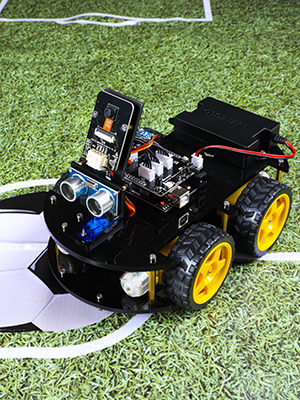
 ELEGOO Smart Robot Car V4.0 with camera
FPV control experience and using Wi-Fi for Video transmission and control the robot car’s movement.Developed from Arduino open source platform. DIY assembly and construction will help to cultivate children’s concentration and hands-on ability.2000mAh Lithium battery: charged via USB with multiple circuit protection for safeGraphical programming provides special building block functions, and with a variety of car functions, is conducive to stimulate children’s creativity and imagination.
ELEGOO Smart Robot Car V4.0 with camera
Product Parameter:
Programming Software: Arduino IDE、ElegooKitInput: Infrared Photoelectric Sensor, Ultrasonic Sensor, ButtonsOutput: Motor, Servo Gimbal, LEDVoltage: 7.2~8.4v (7.4v Lithium Battery Pack)Battery Life: 2 hours (Line-tracking Mode)Distance Measuring Method: Ultrasonic Ranging SensorMotor Driven: Dual-channel TB6612 Driver ChipTracking Method: Infrared TrackingMotor: 1:48 DC Servo Motor 1:48Communication: Uart / WIFI
Camera: OV2640 (1024×768) WIFI Mode: ESP32-WROVER Single-axis gimbal: SG90 Servo Size: 263*145*80mm Weight: 1140g
ELEGOO Smart Robot Car V4.0 with camera

ELEGOO ElegooKit APP
A smart robot car on your phone
It wouldn’t be smart enough if you can’t control your robot car with your phone. Simply install the ElegooKit APP from APP Store and Google Play and team with the car through wifi, you can control your car freely. In our tutorial you will also learn how to programm and control it.

FPV Mode
Be your eyes
FPV control experience and using Wi-Fi for Video transmission and control the robot car’s movement. Imagine that your are driving the car. Please be noted that the horizontal control range is 0-180°, you cannot control the camera vertically.

Obstacle Avoidance
Fear of damage no more.
Under this mode the ELEGOO robot car will automatically detect obstacles ahead of it no matter which direction it is from with the ultrasonic sensors on the platform by sending waves and calculating the distance. Keep your car away from collision and enjoy the fun.

Line Tracking
Follow your runway
The line tracking modules at the bottom of the car make sure it follows the runway you design with its infrared transmitter tube and an infrared receiver tube. Make sure your runway is clear enough and long enough then you can enjoy a wonderful car racing show.
Add to Cart
Add to Cart
Add to Cart
Add to Cart
Add to Cart
Customer Reviews
4.7 out of 5 stars 16,262
4.7 out of 5 stars 7,804
4.7 out of 5 stars 2,497
4.3 out of 5 stars 300
4.7 out of 5 stars 3,333
4.8 out of 5 stars 14,303
Price
$44.99$44.99 $65.99$65.99 $36.99$36.99
— no data
$47.99$47.99 $6.98$6.98
Control Board
UNO R3 MEGA R3 / / UNO R3 /
Compatibility with Arduino
✓
✓
✓
✓
✓
✓
Assembly Requirement
No No No No No No
Reasons to Buy
Tutorial of 24 Projects, Cost-effetive Starter Kit Tutorial of 33 Projects, Powerful Mega R3 Control Board Tutorial of 34 Projects, Updated Version, Compatibility with Arduino IDE and STM32. Breadboard Cable Resistor, Capacitor, LED, Potentiometer, and 235 Items in total for Arduino Tutorial of 33 Projects, Complete Stater Kit with UNO R3 Copper-clad Aluminum, Good Quality
Projects Tutorial Included
✓
✓
✓
No
✓
No
ELEGOO Smart Robot Car: An educational STEM kit beginners (kids) to get hands-on experience about programming, electronics assembling and robotics knowledge. It is an integration solution for robotics learning and made for education.
Complete Package: Contains 24 kinds of module parts including obstacle avoidance, line tracing module, infrared remote control and also you can control it via phone and tablets of Android and iOS system, etc.
Easy to Assemble: All the module interface has been modified with XH2. 54 ports as to make it much easier and convenient to assemble the car and reduce the chances for errors.
Refined Tutorial: HD rendering instructions on how to assemble the robot car from scratch and all the necessary programs and codes are included.
Upgraded Package Design: More minimalism design and make it a perfect kit for your kids and friends. Note:(Applicable Age : 8+)To use Elegoo starter kits requires basic electronic knowledge. If the user has no experience, it would be better to have someone lead and teach them while studying.
12 reviews for ELEGOO UNO R3 Smart Robot Car Kit V4 for Arduino Robotics for Kids Ages 8-12 12-16 STEM Science Kits Coding Gifts for 8 9 10 11 12 13 14 15 16 Year Old Boys Girls Teens Cool Engineering Building Toys
Add a review
$59.99
J. Pilkington –
Great Educational Robot Kit – Fun and Easy Build!
We had a fantastic experience building the ELEGOO robot car kit. The directions were clear, straightforward, and very easy to follow — at no point did we get stuck or confused during assembly.There are many small components included, and while some pieces come with spares and others do not, everything was well organized and fit together smoothly. The build process was actually part of the fun and made it a great hands-on learning experience.Once assembled, the robot performs really well. The controls are responsive whether using the remote or the mobile app, and both options work reliably. Watching it drive around and avoid obstacles is incredibly satisfying!Overall, this is a fun, well-designed kit that’s perfect for beginners and a great educational project for kids and adults alike. Highly recommended!
John Wagener –
Well designed and a great value
Great beginner kit with clear instructions.I thought parts were high quality for the price point.Would be even better if the instructions gave information about the components as you are installing them to educate the student as they build the car. IE: the line following component works by … …One area for improvement is the controls aren’t perfect and the device is a bit challenging to control as a remote control, but since our goal was to understand the electeonic components this is five stars for us.
LaRon Lowe –
Easy to assemble.
This kit is really great. I purchased this for my 8 year old grandson. He was able to put together without supervision. The step by step instructions were great. You can use your phone or the included remote that came with the product. He played with it a few time but has it on display to preserve it i guess. But he does take it out from time to time and play with it. Money well spent.
Jim S –
We got past the IDE compiler errors, but it’s really been a challenge to drive or expand it tho.
I really like it a lot. My 9yo grandson, and 12 yo grandson each built one. The manual combined with the YT video steps were very helpful but you definitely need both and it’s difficult in a couple spots where it’s easy to get confused by the nearly symmetrical config of the top and bottom base plates.. the screw length for the ESP32 CAM to it’s mounting bracket appeared to be too short, so I used a couple linger screws n the kit, But just today found out I had installed the Ultrasonic Sensor Bracket that mounts onto the servo backwards.. flipping it would have solved the problem which appeared to be that the screws were too short.. And when we built the second one I only then realized we’d built the 1st incorrectly .. I ran fine but the motors are supposed to be sandwiched Between the top and bottom plates, not below the bottom plate.. and altho this mistake is possible / easy to make.. with that plate flipped over the line sensors don’t work well since they ride almost an inch higher off the taped line on the ground.Anyway both ran perfectly well initially but we found one stared disconnecting from the WiFi a lot every time you’d try to move it. This appears to be the WiFi is too weak in this parents house so we’re not only getting a repeater to extend it to that part of the house about 100 ft away, but there is also a s/w fix in the CAM32 module that can change the WiFi RF channel and fixit there in s/w too.. I’ve never had this problem at my house tho..so have not tried to fixit in s/w since it’s not broke here.Another problem is the IR remote must be within 3 to 4 feet or so max and pointing directly at the receiver on the top board.. we find it works much much better in FPV mode using WiFi.It’s set up to run WAY to fast in all directions so does wheelies if you go forward and spins in circles if you try to gradually turn left or right. Elegoo service emailed a fix for these issues since pressing 9 to reduce speed only seems to work in IR Remote controller mode, and only till you cycle the POWER ON/OFF.The battery worried me too.. I was not sure if it can be left unattended on the charger, but have been assured there is a BMS that will prevent over charging if it’s left plugged in over night…. and line following mode didn’t initially work at all, since we had the motors mounted below the bottom B plate not above ..but I haven’t tried to adjust it’s sensitivity yet.. the FPV cam is fantastic tho.. and it’s a ton of fun to try navigating it since it’s ridiculously sensitive with the factory s/w .. I also followed the steps to set up the Arduino IDE library but the main V4 .ino system file Would not initially compile without errors .. The vendor support has resolved that with an update that allows it to run on the latest IDE 1.8.19 as well as the latest AVR UNO Board manager 1.8.5. And I can now report it also compiles and runs with the latest RC2 Change 3 IDE version too..one thing I’d like to add is a camera that tilts up and down OR mini grabber arm, and there IS a servo2 slot that is on the board to support that., Its used with the Conquer version of the robot and it’s controllable via WiFi with the same Elegoo App. It’s got a block language but very limited features and flexibility in that mode.. I did get a second one as soon as I confirmed that I can mod their systems code and add new options to it. I have an MBot Mega robot too and like this one’s documentation and potential programmability a lot better., but honestly the main code in both robots is way too complex for beginner Arduino programmers .. they’re Starter Kits are far better to use as programming learning tools.An old update.. I spent a couple days trying to figure out why I was getting IDE pre-compiler errors due to missing custom libraries. I finally resolved it but only by moving to a laptop and using the Add Zip option to install each library folder independently and the normal way. I finally got a one line reply from support saying that they’d read my email sent 4 days ago… pretty sorry response.. I want to know what mods in the s/w are required to slow its and speed down, and how to switch WiFi RF channels .. and have yet to determine why they want us to add library’s Manually with a copy/paste.. that’s left my main PC in a state where it can’t compile without numerous can’t find library errors.Update 3/1/2022.. I was using support@elegoo.com and it’s actually service@elegoo.com so that explains the delayed replies. I did get answers on where in the UNO V4 code to adjust the too-much-speed issue and the ESP32 code to switch Wifi channel rf frequencies but have not done either yet since at this point, after completely deleting ALL library folders and re-installing the IDE from scratch, now I can compile the V4.0 .ino without errors , upload and run the 4 ea demo examples without errors, but cant re-install the main (unmodified) factory V4.0 ino file and have it run properly, it appears to load with all the needed library files and Uploads without error, but will not run at all.. So it’s broken and completely useless till we figure out what happened.. I have sent them a very detailed e-mail with the symptoms and hope we can resolve it soon..An update 3March 2022: Service@Elegoo.com has been great. They did confirm the V4 main code is NOT compatible with either the Arduino UNO board manager 1.8.4 or 1.8.5.. and when I installed the 1.8.3, it auto removed the 1.8.5 And properly installed 1.8.3 and that restored the factory main board so it would fully run again in FPV mode . I also modified the line needed to control the max speed and set it to 100 and also 150 instead of 250 and now can more easily drive it around with out doing jerky wheelies and spinning in circles all the time..it’s still too sensitive and prone to spin in wheelies when turning tho.support answered most all my other questions tho and will send an update notice out when their code is made compatible with the latest Board manager release and IDE 1.8.19. It appears either using the copy/paste manual mode to add their 4 libraries, or the recommended AddZip option will work, but I prefer to use the recommended AddZip way and they may change their ReadMe1st.pdf install guide to reflect that too.All in all I think the robot is a great way to expose kids to Robotics and advanced Arduino programming, and it’s fun but as a teaching tool to teach programming, Elegoo’s other learning kits are a LOT simpler and more effective in teaching programming skills especially for beginners.. this code in the robot is VERY complex and difficult for a novice to debug or understand since it’s tightly linked to the integration of the Elegoo App on your tablet, the ESP32 CAM and it’s WiFi, and the UNO R3 board and it’s got a complex control structure that’s too deep for beginners.But it’s perfect for me and so I bought a 2nd one so I can tweak and mess with / mod the code in it at the same time the kids can play with the other one.. we’ll be racing each other soon..update 3-8-2022: the vendor’s service@elegoo.com line has been fantastic.. They just sent me an update which not only translated all the comments that were in Chinese to English, but moreover the code now both compiles and runs under IDE 1.8.19 with the latest AVR UNO Board Rev3 1.8.5 version board code. They have helped me a lot and sent a table listing all the UNO Digital and analog pins that are used, and have answered all my questions so far..Unfortunately almost All the Digital, serial I2C and Analog pins are already in use on the UNO so to avoid both the I/O conflicts and the huge problem integrating add-on features like a Laser under servo control and the grabber arm I plan to add a stand alone ESP32 and control it with a second IOS App , or by using a spare RC receiver and it’s RC transmitter one way or the other. I don’t think that will be hard to control since one kid can drive and the other shoot the laser at targets or switch controllers. Integrating new code using the existing ESP32 and Elegoo IOS App is just too difficult to do for me as a non-programmer.
Amit and Keya –
Best kit to get kids interested in robotics!
This kit is priced right, has good features and made from decent-quality parts.It comes with everything you need to take kids (recommended ages 9 – 14) on a step-by-step journey into robotics.- Easy-to-assemble robot kit, with clear instructions and a rechargeable battery- Remote control for getting started quickly- App-based control by connecting to the robot’s Wi-Fi- Relaying the robot’s camera’s view to the app- Block programming (like scratch.mit.edu) in the app- Advanced python programming once the kids have explored basic block-based programmingI highly recommend it.
Jose –
Wish I had this has a kid too
My son loves this robot car kit. Very hands on and a good challenge. Good quality.
S. Kosloske –
Really nice “beginner” robot kit
SUPER fun kit. Quite easy to assemble if you’re are an experienced model builder. If you’re new, just make sure to lay out the parts needed for each step, and take your time. IMHO, they need to have a “parts kit” page that shows what pieces/sizes are in each bag, to make it easier to find for each step. The small parts bags are labelled for each section, but I found that you need to cross-over to other bags in some steps.Lots of devices for a “beginner” kit. It includes 4 separately controlled motors for the wheels, a camera, ultrasonic sensor, line-following sensor. There is a servo on the camera/sonic “face” so you can turn it. A few extra parts are included for further experimentation.Works great after assembly, using just the remote. It’s pre-loaded with the code that it needs, so there is no programming necessary for it’s basic uses. The IOS app is easy to connect and use.Looking forward to programming this beast.
Dipakbhai Darji –
Good for kids
na –
The base/top plates are sturdy, even though they are plastic. Instructions are clear enough to understand and assemble. The UNO comes pre-programmed. So once you assemble it, you can start using it like a toy. App control is seamless. All default functions work well. I haven’t figured out yet how to customize the programming, for example, do various other computer vision tasks.
Areli Enriquez –
Es maravilloso! Totalmente apto para niñas y niños inquietos y curiosos!
Amazon Customer –
Very nice
Hossameldin M. –
Received as described. Excellent product, items quality is excellent, I have assembled it with my 12 years old son. He enjoyed a lot. It worked perfectly after Assembly.This product is worth for money. Highly recommended.