

Creality K2 Plus Combo 3D Printer, Multicolor Printing with 16 Colors, 600mm/s High-Speed Printing, Dual AI Cameras for Monitoring, Full-Auto Leveling, Large Build Volume 350×350×350mm
$1,299.00
Related Products


Product description
The video showcases the product in use.The video guides you through product setup.The video compares multiple products.The video shows the product being unpacked. Creality New 3D Printer K2 Plus Combo Merchant Video


1 Quiet(< 45db) Printing
2 Easy Setup
3 Rapid Printing
4 Smart Filament Monitoring
5 RFiD Multicolor Filament
 AI Camera Monitoring
Chamber AI Camera for Continuous Monitoring. Toolhead AI Camera for Precise Flow Rate Adjustment
 Rigid Matrix Frame
Matrix frame made of aerospace-grade aluminum with dual Z-axis and 4 rods for solid stability and no layer shifts.
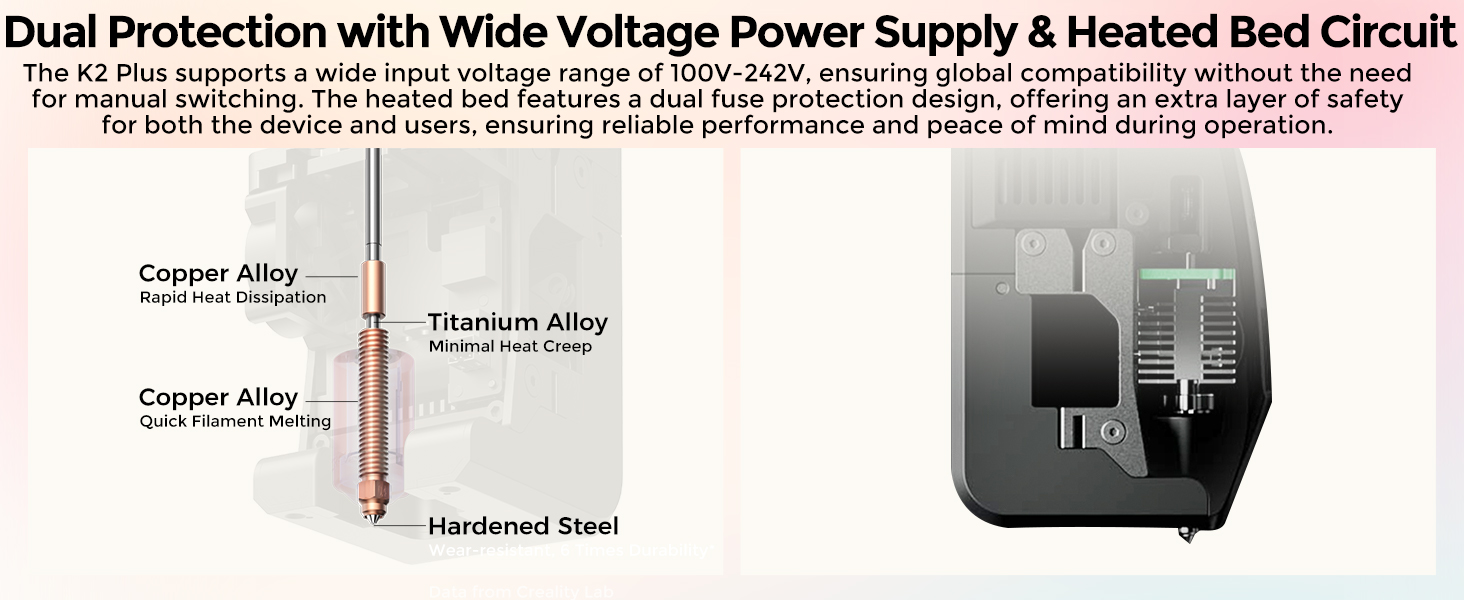
 High-Temp Nozzle
Reaches 350°C with a hardened steel tip, ideal for high-melting-point, wear-resistant materials.
 Active Belt Tensioning
Pressure sensor monitors belt tension, ensuring flawless prints without manual adjustments.



Multicolor Printing with CFS: The K2 Plus Combo includes the K2 Plus 3D printer and one CFS (Color Filament System) unit. The CFS has four slots to hold different filament colors simultaneously. With dynamic mixing, the system enables up to 16-color blending in a single print. Filaments are not included in this combo.
Ultra-Fast Speed & High Precision: Achieve an incredible 600mm/s print speed with up to 30,000mm/s² acceleration while maintaining fine details at 0.05mm precision. Despite its speed, the printer operates at just 45dB, ensuring quiet yet efficient performance.
Spacious Build Volume: With a 350×350×350mm print area, you can create large models, intricate designs, or multiple parts in one go. The aerospace-grade aluminum alloy frame ensures stability for high-quality, accurate prints.
Smart Filament Management: The included CFS unit allows for automatic filament switching between four different colors. It also provides sealed storage and drying, keeping filaments in optimal condition for smooth and reliable printing.
Next-Gen AI Automation & Monitoring: Equipped with dual AI cameras and 18 sensors, the system actively monitors the nozzle and print chamber, detecting spaghetti faults, flow inconsistencies, and errors. This intelligent automation reduces print failures and ensures a hassle-free experience.
10 reviews for Creality K2 Plus Combo 3D Printer, Multicolor Printing with 16 Colors, 600mm/s High-Speed Printing, Dual AI Cameras for Monitoring, Full-Auto Leveling, Large Build Volume 350×350×350mm
Add a review
$1,299.00
Love to hunt –
K2 Plus Combo is an amazing machine
This item shipped and arrived fast for a very heavy item. This machine weighs a lot and the box is wide so you may or may not want to have 2 people to carry this into the house and set up. Once in place this machine is very easy to set up and get started whether using a CFS or not. I had an issue with one printer being used but Amazon took care of it. This second K2 Plus Combo has been an amazing printer for me so far. I have printed with PLA, TPU, ABS, PETG, and more without issues or any modification to the drive system or hot end, I am running 100 percent stock on this machine besides a bottom drawer print and a side tool holder. Tip when using TPU feed from the top or side with a dry small roll and it is not sticking together real bad. Don’t waste your time on the spring mod in the extruder it will only give you more headaches. The K2 has put and some amazing prints for me and the quality is top notch especially with me running 300mm’s per second on the 2nd and later layers. The build volume is amazing. The adhesion of the stock build plate is amazing and I do not use any glue or additives on the textured side, only an IPA clean after print. I have printed on the reverse side / smooth of the stock plate and only used glue stick and it worked great for me many times. The enclosure and fans work very well to climate control this printer. I occasionally leave the front door open a little when printing PLA but it is not necessary. The fans like any fan do have some noise but in my opinion this machine is not overly loud when in operation especially with the lid on and door closed. I have only used Creality brand Hyper series filaments because the speeds, heat, bed temp, etc… all all preset and the RFID series preloads all of these. I have used some cardboard rolls on the side without issue and added them into the system and saved so they are always there now when I need them. One thing I could nit pick on is the fact that you are stuck with Creality’s slicer, at least until someone upgrades this system into their slicer. There are many ways to work around this online but I have not rooted mine and will patiently wait. O make sure once you create an online account to take advantage of registering your system on Creality’s website for 1 free year of premium membership. The cost is a bit high on this system try to catch it on sale and check Creality direct for great RFID rolls on sale in singles and bulk. For functionality and what this machine can do I rated it 5 stars.
rodney d saylor –
Perfection
Phenomenal! Is not too strong. The packaging was elite, setup instructions easily followed. Up and printing in an hour. So far every project nut has been perfect. I could not be happier!!!Update: Have printed 45 very large models with pla and petg, absolutely zero issues. This thing is a dream. Zero issues with the printer or the CFS. Printed the poop chute you can see in the pic as the second thing I printed.
Phil S. –
What a monster!
I’m amazed by this machine. The performance is incredible, the features are exceptional, and the software is stellar.Speed, accuracy, and control are all top notch. If you’ve got the need for a solid printer in this price range, you’d be hard pressed to find something better.
Gaiking –
The Standalone Printer is currently a better option, sadly!
Specifications (Pros and Cons)• Actively Heated Chamber• 350x350x350 Build Volume (Largest fully enclosed FDM Core XY printer available)• Hardened Steel Extruder and Gears• High Flow Nozzle Included• Solid Metal Frame Build• Lidar Advanced AI Print Detection• Automatic Flow Rate and Pressure Advance Calibration• Kit includes the hub for connecting up to 4 CFS devices at once• Built-in Fluidd Software for easy monitoring of advanced machine information and metrics• No option for CryoGrip Pro quality build plates (limited to PEI variants)Package Contents• Tool kit for complete maintenance of the printer• 50/50 PEI Smooth / PEI Textured build plate• Extra High Flow Nozzle• 4 – 0.5 kg spools of filament (Red, Blue, Black, and White)Performance EvaluationThe Creality K2 Plus 3D Printer is highly impressive, with its actively heated chamber and large build volume setting it apart from other FDM printers. The hardened steel extruder and gears, coupled with the high flow nozzle, ensure reliable and high-quality prints. Additionally, the solid metal frame build adds to its durability.The integrated Lidar advanced AI print detection and automatic flow rate and pressure advance calibration make it a sophisticated machine. The built-in Fluidd software allows for efficient monitoring, troubleshooting, and management of machine metrics, enhancing the user experience (Bambu offers no such solution and that is a problem).However, the lack of CryoGrip Pro build plate options is a minor drawback. Although the PEI plates have been reliable, with only two failures in over 200 hours of printing, the CryoGrip Pro plates could further optimize bed adhesion and reduce maintenance needs. Bambu also has their own Supertack plate that is similar and both reduce energy usage and increase reliability, sadly Creality offers no such solution for this feature.A key advantage is the actively heated chamber (a feature not available in the X1C, P1S, or other similarly priced competitors), which allows for the printing of various filaments. It keeps optimal conditions for each filament, eliminating the need for ridiculous vented riser solutions.Creality CFS Filament Management SystemSpecifications• No filament drying option• Built-in Hygrometer LED that displays on the front of the CFS• 4 colors per CFS• Rubber bushings allow for the use of cardboard spools but wear out faster• Not truly optimized yet as filament bleed can create issues with support material invading prints or random color specs after filament changes• Easy maintenance without tools for most servicing of the device• Lagging behind the AMS 2 Pro and Prusa MMU options in many areasPerformance EvaluationThe CFS filament management system has a solid design, allowing for easy maintenance without tools for most servicing tasks. The built-in Hygrometer LED provides valuable information on chamber humidity and temperature, and the system supports up to four colors per CFS.However, the lack of filament drying options and the faster wear of rubber bushings are notable drawbacks. Additionally, the optimization issues, such as filament bleed causing support material problems and random color specs after changes, hinder its overall effectiveness. Compared to AMS 2 Pro and Prusa MMU options, the CFS system still has room for improvement.Overall EvaluationThe Creality K2 Plus 3D Printer stands out with its impressive features and reliable performance, making it one of the top choices for FDM printing. The main limitation is the build plate options, with the CryoGrip Pro plates offering superior bed adhesion.On the other hand, the Creality CFS Filament Management System, while decently designed, lacks optimization and falls short compared to other advanced options. Its ease of maintenance is a positive aspect, but the issues with filament bleed and lack of drying options make it a middle of the road offering.The Creality Cloud Slicer has issues due to a janky implementation. Creality reskinned ORCA slicer to resemble CURA Slicer, resulting in a buggy system that often crashes. While using ORCA slicer is an option, it requires repetitive printer setup and manual color data input due to the proprietary CFS design. I wish they had stuck with ORCA, as this software’s flaws are a major turnoff for me.If I were buying again, I’d get just the printer. It’s excellent, but the software and CFS are not as well optimized as I would like.Creality has improved its brand from one requiring tinkering to one with mostly dependable printers. This benefits consumers, but further progress by the manufacture is needed, to improve the CFS and Build Plate Options.I returned the printer because I couldn’t return just the CFS. Creality Cloud is frustrating for cutting models and slices files slower than ORCA Slicer, PRUSA Slicer, or Bambu Studio. With that said, I would highly recommend the printer, if you purchase it as a stand alone device. One other note, I discovered the rear left corner of the heat bed was dramatically offset from the other 3 corners and that has also created an issue with even wanting to keep the machine itself.
MWilliams –
Printer Failed Within a Year
Out of the box this product was great, used it to print for about a year. Quality was good, there was no setup or calibration, everything just worked. Aside from the supplies need to deal with the near toxic liquid resin, everything was going great. I liked it so much I bought two, even though the small print area was less than helpful for some of the things I wanted to print.However, here we are a year later and the second one has failed completely. The UV light inside has just stopped working. I store and use the two machines side by side and I can run the cleaning function on each one and it’s VERY clear that the UV light fails to activate on the second printer. I’m just holding my breath now, waiting for the first one to fail.No word from Creality support.
diego v. –
muito boa, atende as expectativas.
Jose Diaz –
Pas mal pour le prix.
Marco –
Prodotto di buona qualità, si possono sentire con mano tutti i componenti da montare, si può sentire la qualità del prodotto con mano.Molto semplice il montaggio (libretto delle istruzioni chiaro), mi ha occupato circa 40 minuti.Ho voluto controllare a comparatore se effettivamente era tutto in squadro, ed era effettivamente così.Ho avuto un problema con il sensore di finecorsa dell’asse Z, era molto variabile, ciò causava una adesione errata sul piatto.Ho trovato il problema, provando a sostituire un finecorsa degli altri assi con quello dell’asse Z, infatti il problema su quell’asse era sparito, ho deciso quindi di sostituire il sensore di finecorsa dell’asse Z con uno più performante.Parametri standard per stampa PLA in estate (stanza non raffreddata):Temperatura ugello: 210°Temperatura piatto: 60°Adesione: 3 linee di BRIMRisultati perfetti, anche su lunghe stampe.Parametri standard per stampa PETG in estate (stanza non raffreddata):Temperatura ugello: 250°Temperatura piatto: 65°Adesione: 3 linee di BRIMRisultati ottimi, fa parecchia adesione, anche troppa.Nel complesso, rapporto qualità prezzo molto vantaggiosa.Consigliatissima
Client d’Amazon –
Je suis un gros débutant en impression 3D. J’ai suivi les conseils d’un copain qui a une ENDER 3. Profitant des promo, j’ai opté pour la ENDER 3 V2 et constaté qu’il y a une grosse communauté autour de cette imprimante et de l’impression 3D en générale.Alors le produit est TRES bien! Les profils en alu inspirent confiance et solidité.Le montage n’est pas compliqué, faut seulement faire un peu attention.En cas de difficulté pour le montage ou le calibrage vous trouverez sans difficultés des tutos en vidéo sur le net.Les deux points négatifs que je vois pour l’instant:-La lenteur d’une impression (mais ça c’est pas la faute de la ENDER 3 V2, c’est le “défaut ” de l’impression 3D. Et encore, tout est relatif, car pour des pièces peu volumineuses ça peut aller “vite”. exemple: une pate en forme de S de 25mm de large et de 3 mm d’épaisseur, il faut compter 1h40 d’impression. Mais une fois terminée, c’est TOP!-Le bruit du ventilateur. Allez c’est le seul vrai “défaut” de la machine. Le ventilateur souffle! et donc il fait du bruit (attention, c’est pas le bruit d’un aspirateur non plus) mais c’est un peu ennuyeux. Il ne faut pas mettre l’imprimante dans sa chambre si on veut dormir tranquille. Mais honnêtement, c’est pour trouver un point négatif au produit.Et le résultat? Punaise, je suis bluffé! c’est HYPER propre! pas parfait bien sur, puisqu’il ne s’agit pas de moulage, mais le résultat est très fin!Je ne peux que recommander cette imprimante à ceux qui débutent comme moi!BRAVO CREALITY vous avez fais du bon boulot!!!!
Nacabuk –
Sonrasında kablo bağlantıları ile oynayınca çalıştı. İnanılmaz kaliteli baskı veriyor. Fan sesi biraz fazla gibi ama eksen sesleri çok az. Creality kalitesini konuşturmuş. Montaj videosu çekmeye gerek duymadım. Kılavuzda Türkçe anlatıyor. Teşekkürler.