

Catsights Portable Monitor Touchscreen for Mac 13.3″ 2.5K Touch Screen Monitor with Protective Sleeve, USB-C Plug & Play 1500:1 0.22″ Ultra-Thin Laptop Screen Extender for Mac Laptop PC Switch
$289.99
Related Products






Product description
The video showcases the product in use.The video guides you through product setup.The video compares multiple products.The video shows the product being unpacked. 4096 pressure drawing function Merchant Video


1 Connect to MacMini
2 Connect to MacBook
3 Connect to Laptop
4 Connect to Ipad
5 Connect to Switch


1 Ultra-thin design 2 Active Stylus 3 Standby Clock 4 support IOS touch 5 Aluminum alloy stand

 Designed for MacOS
 Active Stylus
 Plug and play
 How to Open OSD menu


1 Designed for MacOS
2 Multi-touch Compatibly
3 Dimensions
4 Package List
5 Catsights APP Introduce
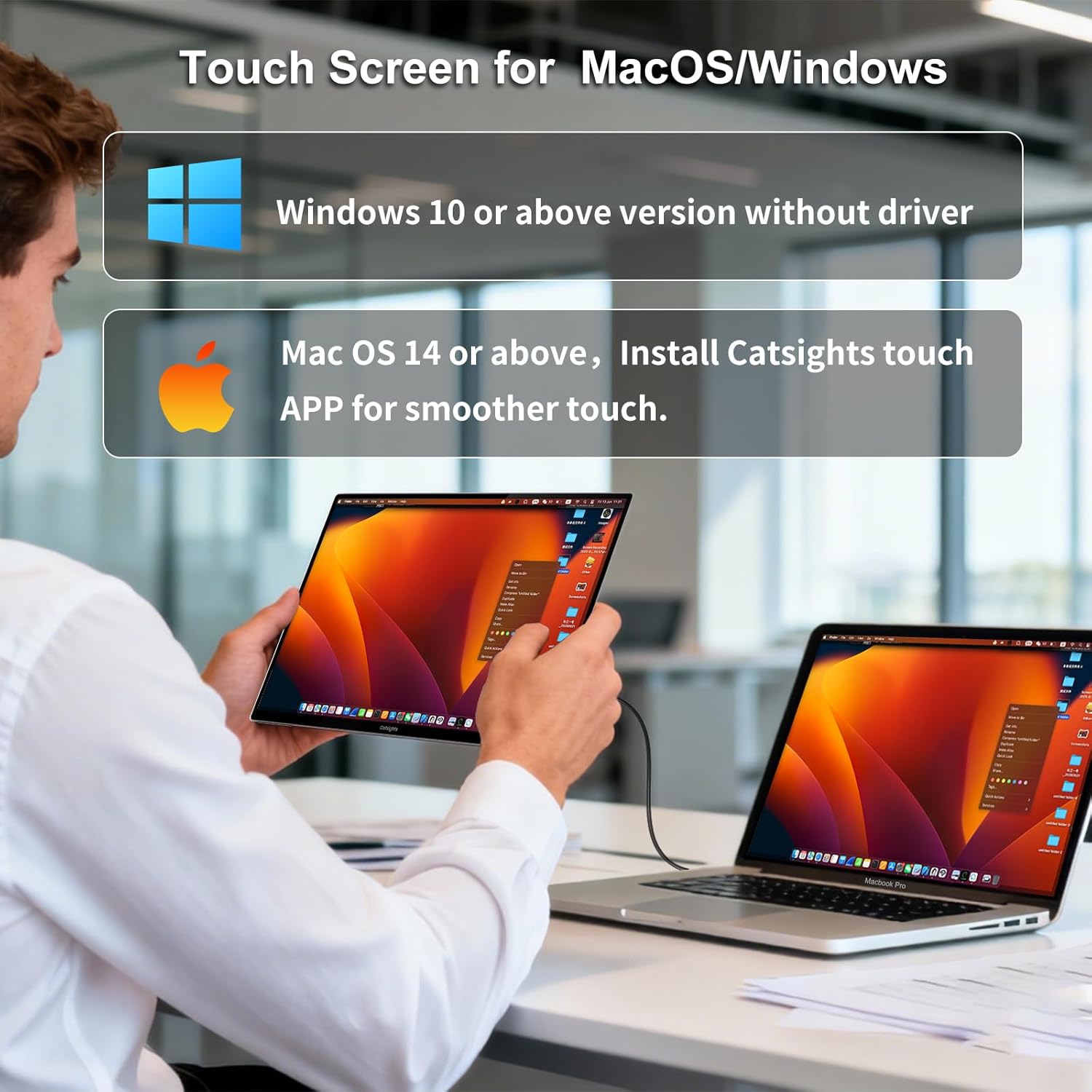
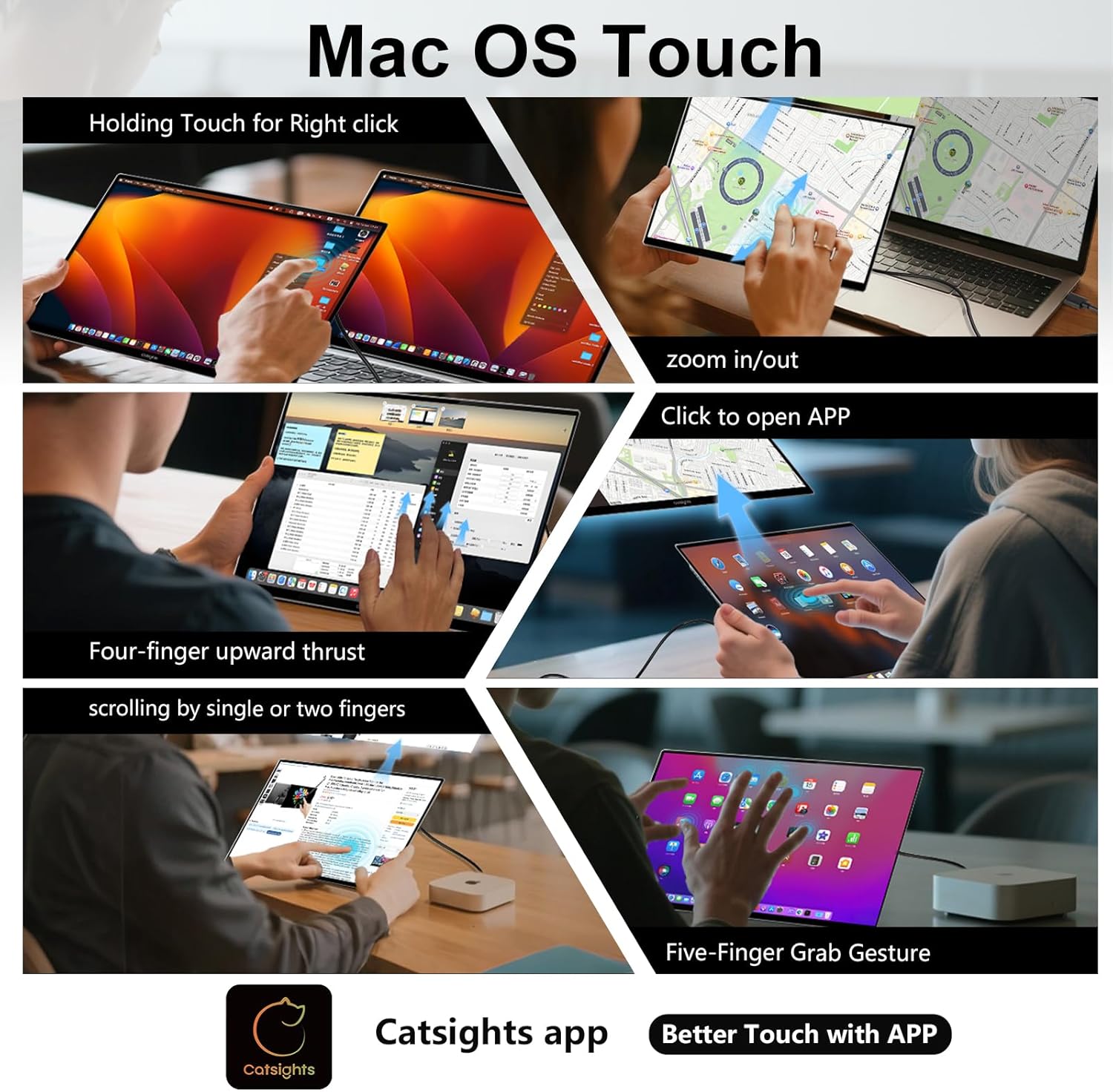
【Magic Trackpad Touchscreen Portable Monitor】Catsights One S Portable Monitor is compatible with Windows/Android/iOS/MacOS. You can get touch function for your laptop, PC, ipad or MacBook by connecting via Type-C interface. Offering MacBook-level touchpad functionality, the laptop screen extender supports macOS 14.1 and later—smoother after installing the Catsights app (includes a USB drive built-in app for direct installation, or download via manual/guide image). Touchscreen monitor also supports Windows/Android/iOS/iPad devices without app installation (𝐍𝐨𝐭𝐞: Only supports iPhone 15 and later, and only iPads using the M-series kernel).
【2.5K FHD IPS & Ultra-Thin Aluminum Metal Body】This portable monitor for laptop features 13.3 inch 2.5K Ultra HD IPS touchscreen with 300 cd/m² brightness, 60Hz refresh rate, and 1500:1 contrast ratio. Combined with HDR, the monitor extender delivers outstanding image quality and accurate, vibrant colors.Also crafted from an aerospace-grade CNC aluminum unibody chassis, the unit boasts a pure black panel (blue-light free). This design offers an exceptional tactile and visual dual experience. Its ultra-thin 0.22-inch body weighs only 1.12 pounds (520g). The lightweight and portable design make touch screen monitor the ideal choice for mobile users in need of a second touch screen.
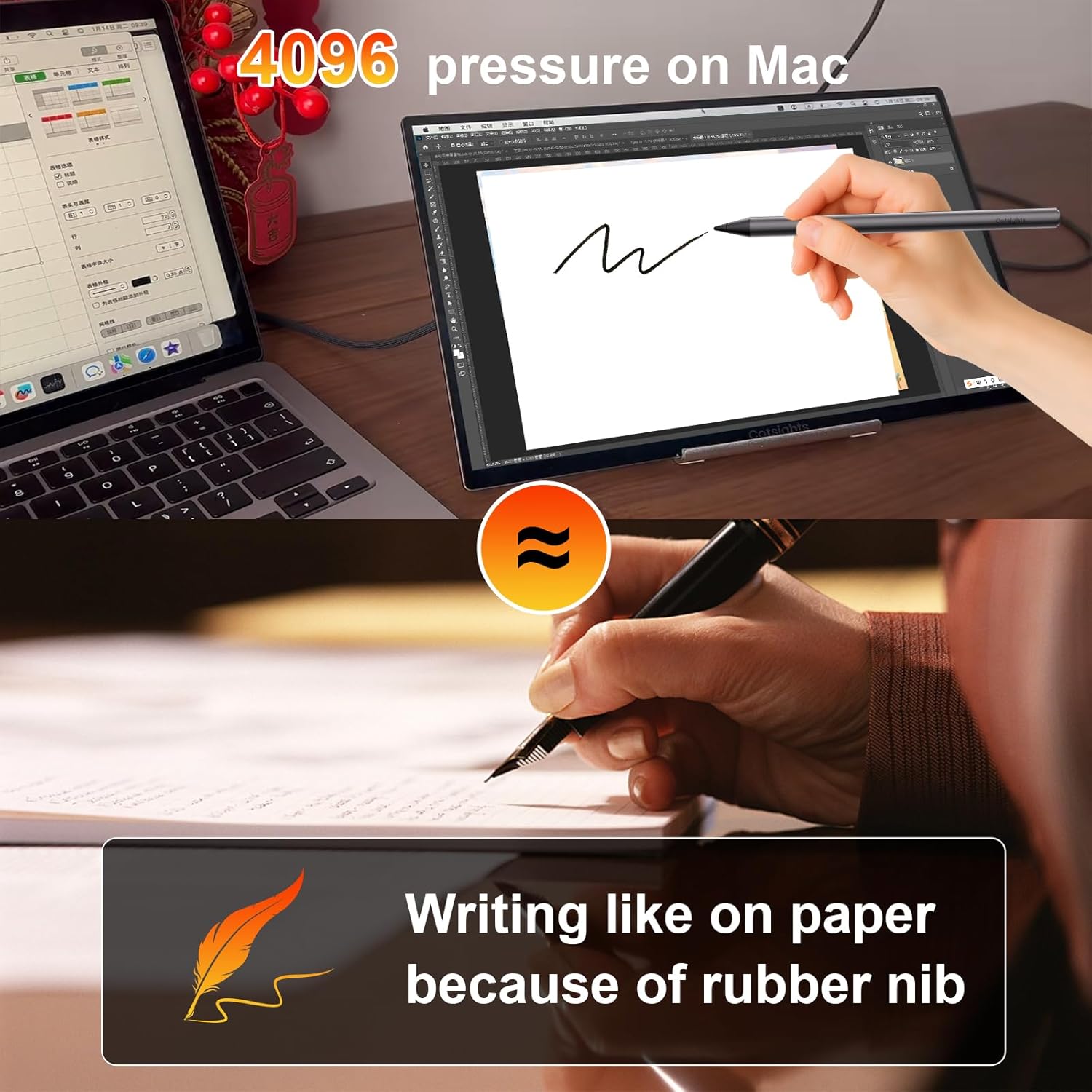
【USI stylus Included & Standby Clock Display】Catsights portable monitor touchscreen features 4,096-level pressure sensitivity (compatible with Windows & macOS), can delivers precise brush strokes, line weight variation, and eraser pressure control. Auto-adjusts pen pressure for natural writing and drawing. Optimized the portable gaming monitor for Adobe Photoshop, CLIP STUDIO PAINT, and other major drawing.Transform your laptop monitor extender. When idle: the Standby Clock Mode automatically turns it into a sleek desktop clock.
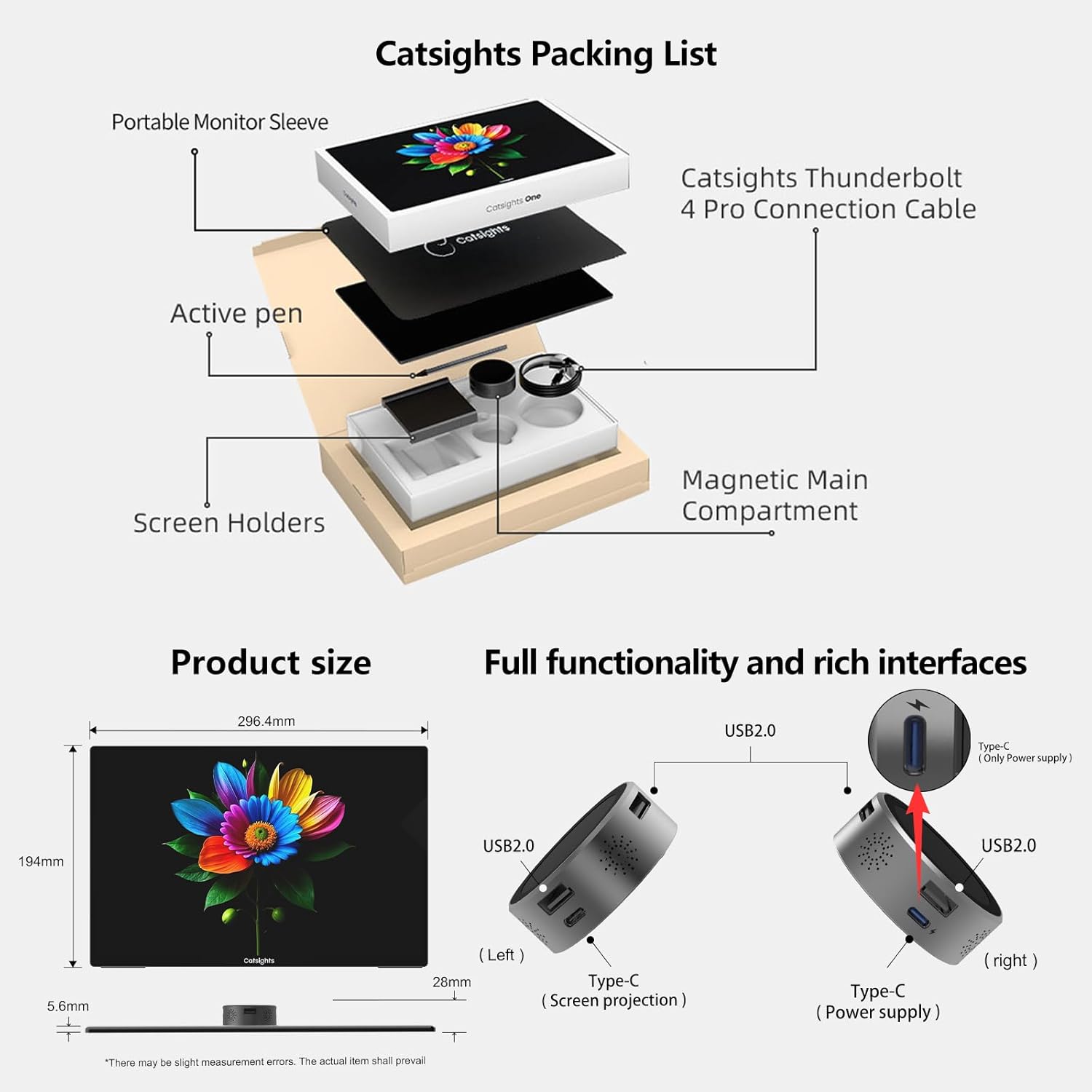
【Reverse Charging & Protective Case Included】When connected to AC power, your portable touchscreen monitor transforms into a charging hub to simultaneously power (up to 45W PD tested). Battery anxiety solved.Mini monitor comes with a monitor cover, specially designed for your portable laptop monitor. It’s lightweight, durable, and easy to carry. Made of scratch-resistant and durable materials, it effectively reduces screen wear and provides enhanced protection.
【Modular Magnetic Design & Expanded Connectivity】 Detachable mainboard hub with: 2× typeC ports. 3× USB-A ports (for mouse/keyboard/thumb drives). !!!𝐍𝐨𝐭𝐞: ① 𝐓𝐡𝐢𝐬 𝐩𝐨𝐫𝐭𝐚𝐛𝐥𝐞 𝐦𝐨𝐧𝐢𝐭𝐨𝐫 𝐝𝐨𝐞𝐬𝐧’𝐭 𝐢𝐧𝐜𝐥𝐮𝐝𝐞 𝐬𝐩𝐞𝐚𝐤𝐞𝐫𝐬.② If the portable screen doesn’t light up, please try using an external adapter to power your device. (Adapter not included in accessories) ③ We offer a 30-day return policy and a 12-month warranty. ④ For any questions, please contact us through the Amazon order page or contact our after-sales support team at catsights@catsights.com
8 reviews for Catsights Portable Monitor Touchscreen for Mac 13.3″ 2.5K Touch Screen Monitor with Protective Sleeve, USB-C Plug & Play 1500:1 0.22″ Ultra-Thin Laptop Screen Extender for Mac Laptop PC Switch
Add a review
$289.99
Marcus gannon –
Awesome product! Blown away.
Straight out of the box, the Catsights 13.3-inch monitor impresses with its sleek, lightweight design and solid build quality. The 2560×1600 resolution is incredibly sharp, and the 350 nits brightness provides vibrant visuals that are perfect for indoor use.Pros: The touchscreen responsiveness is excellent, making multitasking effortless—especially when using it as a second screen for my Mac mini M4. It’s a true plug-and-play device that’s ultra-portable, versatile, and ideal for anyone seeking a reliable, travel-friendly display.Cons: While it doesn’t support VESA mounting and has limited stand options, the compact form factor and simple connectivity make it easy to set up and use wherever you are.Overall: The Catsights monitor is a fantastic addition for anyone looking to extend their screen space seamlessly with almost any Apple product. Whether you’re working, gaming, or creating content, it delivers on portability, clarity, and overall convenience.
Liquan Pei –
Useful secondary screen with
I have been using the secondary screen for a few days and love it. I bought this screen because of its lightweight design, the magnetically attached small screen at the back, and the overall look and quality. When I received it, it met my expectations, and my wife even thought it was an iPad when I opened the box.Using it as a secondary screen to watch videos, browse code, and documents is a smooth experience. The brightness is good and adjustable, the resolution is high. In addition, it supports touch control on Mac, which is very easy for me to get used to.If you are looking for a secondary screen and want to use it when you travel and work in different places, this is a great option as it is very lightweight and have high quality.
DuaneV –
Nice portable usbc monitor
This portable monitor is great. Excellent image quality and small and compact for on the go. Pen function is just a little odd to use and wish the stand was built in.
Mohammad Ali –
Color accurate display
The best portable monitor I have ever owned no question. The screen quality just screams. So good. You can confidently do photo editing video editing with it. Touch screen works both with my android phone and macbook.
IsThisThingOn –
Pretty screen, but practicality at this price is lacking
There are two versions of this portable touchscreen monitor and my review will cover the less-expensive model (Catsights One S). Right out of the gate: this is not a cheap touchscreen monitor. While it’s around $30 cheaper than it’s more expensive sibling, functionally they are the same except for: the “puck” on the One S has a screen that simply lights up to show “Catsights” when powered. The more expensive model can display a couple other things like a clock, avatar, picture etc. that you select. The value of either situation for something you can’t even see yourself when using the other side of the screen? Questionable at best. Secondly, this model of touchscreen doesn’t include the stylus. Worth it for the extra $30? That’s up to you, but I vote not.Those differences aside, it is a very thin and very pretty display screen. Colors pop, saturation levels are nice, and the glass screen helps provide additional rigidity combined with the metal frame. I tried to use it primarily as an additional monitor for my Windows laptop (it supports Windows out-of-the-box, even though their listing is definitely iOS/Mac-focused and there’s a pre-loaded USB drive for the Mac owners, saving you a download). 13.3″ for a touchscreen on Windows is a bit of a challenge unless you’re drawing. I wish they would’ve provided at least a rudimentary stand to go along with it because the “puck” magnetically attaches about 2/3s of the way up the screen. Hang the supplied beefy USB-C cable off of that puck, potentially a second cable for power depending on what’s possible with your USB-C port, and keeping this as a handheld for its touch abilities becomes pointless as its unwieldy, any bump of the puck while handheld will cause the screen to glitch, and finding a sufficient stand that doesn’t tip over (because it has to be low enough to not impact the puck) is a kludge.I’ve relegated it to Samsung DEX mode (which it does, again, out-of-the-box with my Z Fold 7) and it’s OK. I can get the same functionality out of something at least $100 cheaper and includes a folding folio/stand to prop it up. The neoprene sleeve fits the screen nicely, but lacks both a flap to cover on the opening to protect the exposed edge of the screen, nor a pocket to hold the puck required for use.I’ve really tried to make this work the way I work with my equipment (it seemingly just mirrors an iPad screen in my use-case scenario when iOS is pulled into the mix), but instead I just have a really expensive monitor of questionable utility and no decent way to stand it up to keep things clean.
Hosam Morsy –
Nice Portable Monitor With Touch Support
Really impressed with this portable monitor so far. The screen quality is very clear, and the touchscreen works smoothly with my MacBook. It’s thin, lightweight, and easy to carry, and the magnetic attachment feels secure. Overall, a clean and useful monitor, especially for travel.
khchan69 –
excellent monitor
excellent monitor & work perfect
Shivansh –
Great product, but unsure of the company
So far, im happy with it.It’s sleek and pretty cool tbh!The only suspecting part is that they don’t have a website. Nor can i go anywhere to download the app on MacOS to enable certain features.It does make me think if it’s a hacking device 🙁